
Armor Chroma
Minecraft Java mod. Downloads from the MC Java Mods app on Android.
⬇ Download on CurseForgeIf using 1.3, please report errors with mod icon configuration (icons being shown as iron armor when the mod is on the list of supported mods), by sending a private message with the mod with the error and the armor materials(s) affected (if the type is a vanilla type, item IDs). You can find out a mod ID and armor materials by pressing F3 + H while ingame and hovering over the items.
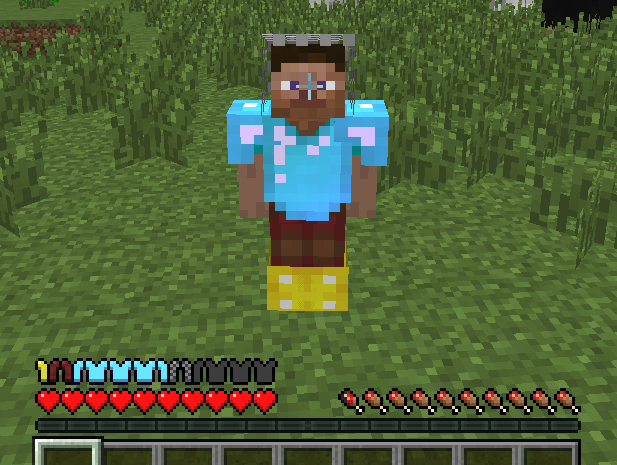
Armor Chroma is a mod which rehauls the vanilla armor bar. I will possibly be adding some other features in later versions. It adds:
- Different armor bar icons for different armor materials
- Displays glint (shine) for enchanted armor
- Displays different leather colors on the bar
This mod is based off of a suggestion by badhaloninja. It's on GitHub too.
Screenshot:
Mod support:
- Blood Magic
- Blood Arsenal
- Botania
- Flaxbeard's Steam Power
- IC2
- Thaumcraft
- Tainted Magic
- Thaumic Additions
- Thaumic Bases
- Witching Gadgets
- Thermal Foundation
- Twilight Forest
- Witchery
- Edition: Minecraft Java
- File type: .jar
- How to install: Install the matching mod loader (Forge, Fabric or NeoForge) for your Minecraft version. → Download the .jar. → Put it in the .minecraft/mods folder and launch that loader profile.
- Where to get it: Opens on CurseForge — not every file is mirrored on our own servers.
Install steps are the general flow for this file type — How to install Minecraft Java mods & modpacks walks through it step by step.
- Ships as armorchroma-1.4-beta-1.12.2.jar — drop this file into the mods folder
- Download size: 256 KB
- Download link checked 2 Nov 2026 — working
These come from our own check of the pack file, not from the source page.