
PowerSticks
Minecraft Java mod. Downloads from the MC Java Mods app on Android.
⬇ Download on CurseForge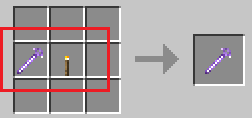
OVERVIEW
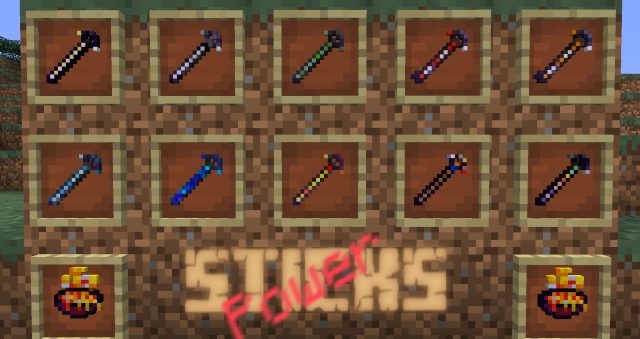
It's a mod done to help you survive. News sticks are added to Minecraft, each one with a different power. Blast and kill modb's with a hit, fly over the world, breathing underwater, survive to fire and swim in the lava, being immortal. These are the skills you will acquire while holding the stick.
PS:
- The fighting skills only affect the mob's. No block or player will be affected.
- This is the oficial project page. All news is here.
SCREENSHOT
CRAFTING
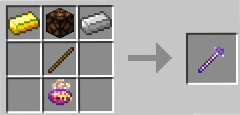
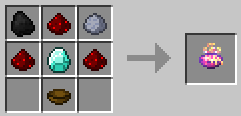
1. Magic Bowl
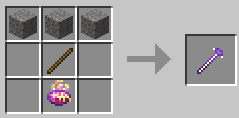
All the mod sticks are made using two essentials: one stick (obvious) and this magic bowl.
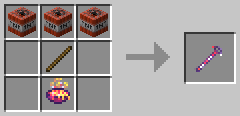
2. Blasting Mobs
(the name already says)
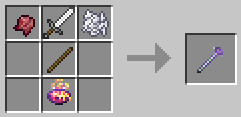
3. One Hit to Kill
No mob had been standing in front of you, but be quick!
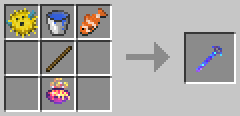
4. Breathe under water
(the name already says)
5. Resist to fire
Try swimming in lava!
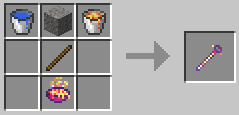
6. I Belive, I Can Fly
Yes, you'll fly, but does not drop the stick!
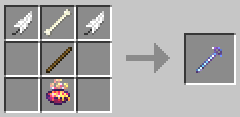
7. I am immortal
Became immortal. No mob will harm you.
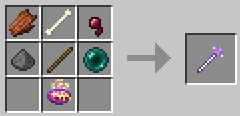
8. Colorize Sheeps (cosmetic)
(use right click) Use with right click on the sheep.
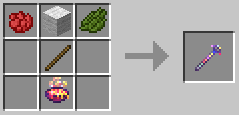
9. Shooting at Mobs (since v1.02)
(use right click) Shoot bullets of XP like at monsters
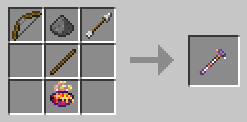
10. Finding Ores (since v1.03)
crafting util v1.03
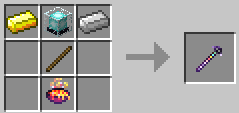
crafting since v1.04
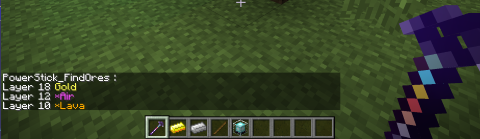
Show (at chat) all ores below a block that player clicked (right button)
11. Tied Blocks (since v1.04)
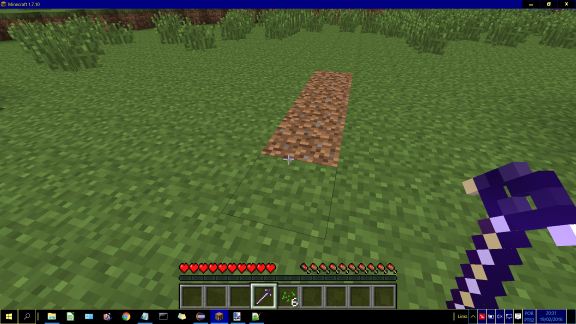
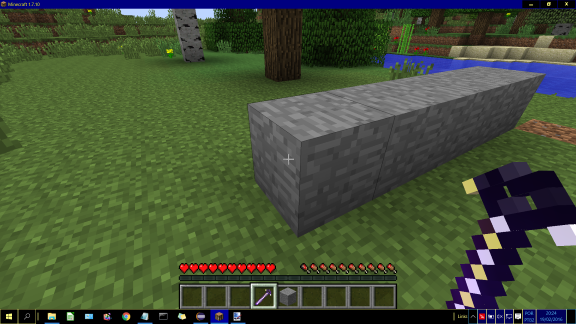
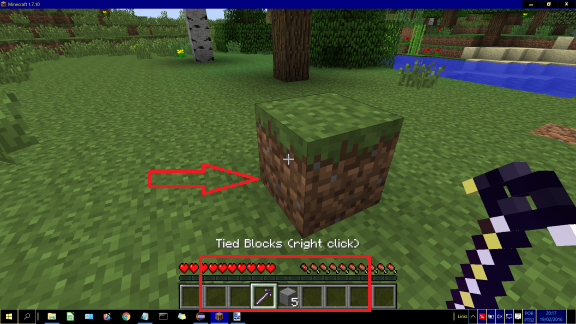
It is a stick to be used to replace or destroy blocks according to the block type that is positioned on the right side of the stick in the inventory bar.
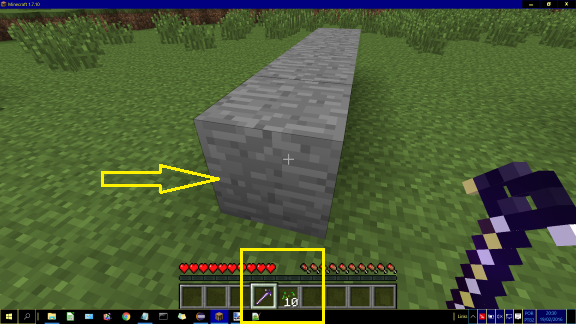
The action is triggered when the player right-click one of the face of a block(img 1). In doing so, the blocks that are stick on the right will placed at the front, above or below the block that was clicked, filling voids, or replacing the blocks after they are until a block of the same type is found or there are no more blocks available on invetário(img 2). The action will also be stopped if an ore block is found in the way.
If the clicked block is different from being placed, it will also be replaced.
If the path of the blocks there is a bed, chest, torch, furnace and craft table, these items will not be replaced.
To delete blocks, rather than put / replace, put the right stick of the following items (img 3 e 4):
- Wheat Seed
- Yellow and Red Flower
(The reason for choosing these items is plenty of them in the world.)
Heads up using TiedBlocks:
Upon completion, the change of the blocks will not be able to be undone. Check the consequences before continuing.
VIDEOS
If you make a video with PowerSticks, let me know to publish here.
Please, watch these videos below and let your 'like' !!!
1) Video by SwordtoFace (www.youtube.com/user/SwordtoFace). Thank you so much!
(in English)
Very good video!
Watch and let your 'like'!
2) Video by Slim_Guy. Thank you so much!
(in Spanish)
Muy bueno video!
Mira y deja tu 'Like'!
3) Video by TastyPie. Thank you so much!
(in Russian, i think)
Very good video!
Watch and let your 'like'!
DEPENDENCIES
1) Minecraft 1.7.10 / 1.8.8
2) Forge
- Tested with these versions:
MC 1.7.10 = Forge version 10.13.4.1558
MC 1.8.8 = Forge version 11.15.0.1654
-Download and install instructions to Forge in these links:
http://files.minecraftforge.net/
http://www.minecraftforge.net/forum/
INSTALL
This mods is universal, can be used on both the server and the client.
1) Installing in client/single player
Download and copy the .jar file into the 'mods' folder of your Minecraft.
(usually in the folder C:\Users\[your_user_name]\AppData\Roaming\.minecraft\mods)
2) Installing in Server
Download and copy the .jar file into the 'mods' folder of your server folder.
MODPACKS DISCLAIMER
Yes, you can put the PowerSticks to your modpack, since nothing is charges the end user.
BUG CORRECTION and TECHNICAL INFORMATION
See changelog in Files section by clicking in name of file.
WHAT'S NEW
IN VERSION 1.05.c (only for Minecraft 1.7.10)
(released in 2017-01-29)
[ADJUSTMENT]
- For a light emitting stick you need to craft a stick along with a torch. See image below:
- Only the sticks below can emit light:
Blasting Mobs
One Hit to Kill
Shooting at Mobs
Finding Ores
I am immortal
IN VERSION 1.05.b (only for Minecraft 1.7.10)
(released in 2017-01-26)
[NEW]
- From this version the sticks emit light to aid in the exploration. The mod will also cause the torch to emit light when being held. You can change this in config file (changing sticksEmitLight to(=) false).
IN VERSION 1.04
(released in 2016-02-19)
[NEW]
- stick TiedBlocks, for (very simple) constructions/clearing with blocks;
- creeper's explosion do not affect blocks, only players (you can change this in config file)
- new configuration file with variables for:
a) cancel the destruction of blocks by the explosion of a creeper (noBlocksAffectedByCreepersExplosions=true or false);
b) define the damage stick 'OneHitToKill' (damageFor_OneHitToKill=3000 or whatever you want).
[ADJUSTMENT]
- Crafting for FindOres: replaced 'beacon' (very difficult to spawn and kill a wither) for 'Redstone lamp'.
FINALLY...
- Report bugs in comment below. Before see Issues section
- My apologize for any error in english text above, because i am not native (I'm brazilian)
Enjoy the mod! Thanks.
- Edition: Minecraft Java
- File type: .jar
- How to install: Install the matching mod loader (Forge, Fabric or NeoForge) for your Minecraft version. → Download the .jar. → Put it in the .minecraft/mods folder and launch that loader profile.
- Where to get it: Opens on CurseForge — not every file is mirrored on our own servers.
Install steps are the general flow for this file type — How to install Minecraft Java mods & modpacks walks through it step by step.
- Ships as PowerSticks-v1.04.b_1.8.8.jar — drop this file into the mods folder
- Download size: 72 KB
- Download link checked 3 Nov 2026 — working
These come from our own check of the pack file, not from the source page.