
Favorite Items
Minecraft Java mod. Downloads from the MC Java Mods app on Android.
⬇ Download on CurseForge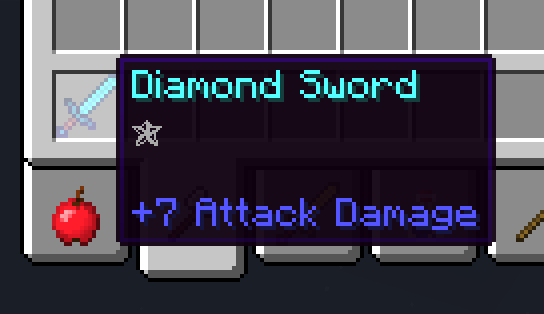

Small mod, which allows you to favorite items.
By default, press 'O' while holding an item/block to favorite it. Press 'O' again to unfavorite it.
Favored items have the glowing effect (like enchanted items) and a small star as tooltip.
While an item is favored, it cannot be dropped out of your inventory.
If enabled in the config file, the player keeps favored items on death.
You can also blacklist items in the config file or change it, that only players in creative mode can favorite items.
New in 1.2.1: Press SHIFT, while hovering over a favored item to see who favored the item/who is the owner of it. Only the owner can unfavorite the item and all features of this mod will only work for him. Can be disabled in the config file.

Small bug: You cannot enchant favored items, because they have already an enchantment. But you can just unfavorite the item, enchant it and favorite it again.
If you have any suggestions, feel free to post them!
You are allowed to use my mod(s) in your modpack!
- Edition: Minecraft Java
- File type: .jar
- How to install: Install the matching mod loader (Forge, Fabric or NeoForge) for your Minecraft version. → Download the .jar. → Put it in the .minecraft/mods folder and launch that loader profile.
- Where to get it: Opens on CurseForge — not every file is mirrored on our own servers.
Install steps are the general flow for this file type — How to install Minecraft Java mods & modpacks walks through it step by step.
- Ships as favoriteItems1.2.2-1.9.4.jar — drop this file into the mods folder
- Download size: 13 KB
- Download link checked 3 Nov 2026 — working
These come from our own check of the pack file, not from the source page.