
Plena Inanis
Minecraft Java mod. Downloads from the MC Java Mods app on Android.
A highly configurable mod that allows you to process items through its provided machines. It contains a composter for organic waste, a sieve for knocking…
⬇ Download on CurseForgePlena Inanis is my answer to not being able to configure Ex Nihilo the way I want to for use in my personal modpack.
I felt there was a lot of extra content that I would never use and what I needed did not exist.
Plena Inanis (Full on Empty) provides 3 machines, a composter, a sieve and a block squasher as well as a tool called a Block Smasher.
It comes pre loaded with vanilla recipes but has a built in recipe maker which can be opened in game using the default key 'R'.
The composter takes items in and slowly processes them based upon a setting in an external configuration file, it has the ability to output multiple item types, but like all of the other machines, only outputs 1 type of item at a time.
The sieve processes a single block at a time, by default it takes dirt and outputs pebbles. Pebbles can be used to craft cobblestone.
The block squasher takes 1 block at a time also, by default either cobblestone, stone or gravel block and requires a block smasher to use it.
Smash the block with the block smasher on the block squasher to get out gravel or (in the case of using gravel) sand.
The crucible is a multiblock structure that can be used to melt snow into water or cobblestone/stone/netherrack into lava. The crucible is not limited to this however, as it can simply be used as a liquid storage tank with a maximum capacity of 135,000mb. As with all of the other machines added by this mod, the crucible is highly configurable allowing the end user to add their own functionality to it, liquid iron anyone?
Snow can be melted at 100 ° C. The more solid blocks however require that the crucible reach a minimum temperature of 400 ° C.
Recipes
Composter 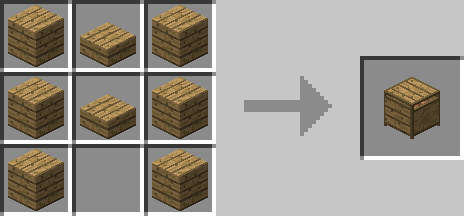
Compost Block 
Dirt Block 
Rich Soil 
Sieve 
Cobblestone 
Block Squasher 
Block Smasher 
Crucible 
- Edition: Minecraft Java
- File type: .jar
- How to install: Install the matching mod loader (Forge, Fabric or NeoForge) for your Minecraft version. → Download the .jar. → Put it in the .minecraft/mods folder and launch that loader profile.
- Where to get it: Opens on CurseForge — not every file is mirrored on our own servers.
Install steps are the general flow for this file type — How to install Minecraft Java mods & modpacks walks through it step by step.
- Ships as plenainanis-1.7.10-1.211.jar — drop this file into the mods folder
- Download size: 554 KB
- Download link checked 3 Nov 2026 — working
These come from our own check of the pack file, not from the source page.