
WorldDelete
Minecraft Java mod. Downloads from the MC Java Mods app on Android.
⬇ Download on CurseForge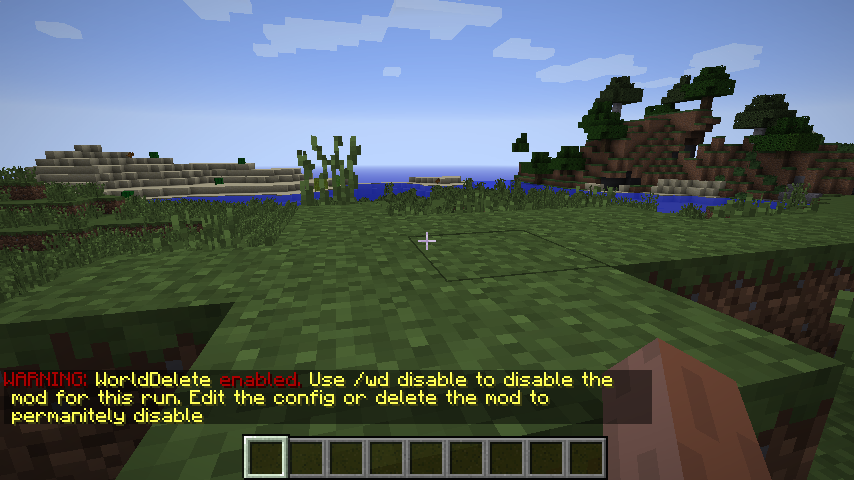
This mod simply deletes the server world when the server stops. I made it to help with testing achievements, world gen, etc.
NOTE: The mod will do nothing until it has been configured. Default configuration is set to disabled.
NOTE: There is a blacklist that will not allow the mod to delete certain folders/files.
Note: To delete single player worlds, you must exit to the main menu. Worlds will not delete if you do not do this. (Does not apply to builds 38 and higher)
If the mod is set to delete the world, it will warn all players on login and instruct them how to disable it. All players can use the command to disable or enable.
The mod adds the following commands:
- /wd disable - If WorldDelete is enabled, this command prevents the mod from deleting the world.
- /wd enable - If WorldDelete is not enabled, this enables the mod to delete the world on server stop.
The commands do not change the config values. If enabled is set to true, then the mod will be active when the server starts again.
Planned/Possible Features:
- Backup deleted worlds
Mod Pack Permission: I will not give permission for mod packs. This is mod is intended for testing purposes and not in mod packs. If you choose to use this in a mod pack, then use at your own risk.
- Edition: Minecraft Java
- File type: .jar
- How to install: Install the matching mod loader (Forge, Fabric or NeoForge) for your Minecraft version. → Download the .jar. → Put it in the .minecraft/mods folder and launch that loader profile.
- Where to get it: Opens on CurseForge — not every file is mirrored on our own servers.
Install steps are the general flow for this file type — How to install Minecraft Java mods & modpacks walks through it step by step.
- Ships as WorldDelete-1.10.2-2.03-b38.jar — drop this file into the mods folder
- Download size: 15 KB
- Download link checked 3 Nov 2026 — working
These come from our own check of the pack file, not from the source page.