MineAmp
Minecraft Java mod. Downloads from the MC Java Mods app on Android.
⬇ Download on CurseForge1.14(.1) requires Fabric! Loader and Fabric API
1.13(.2) requires Rift! https://minecraft.curseforge.com/projects/rift
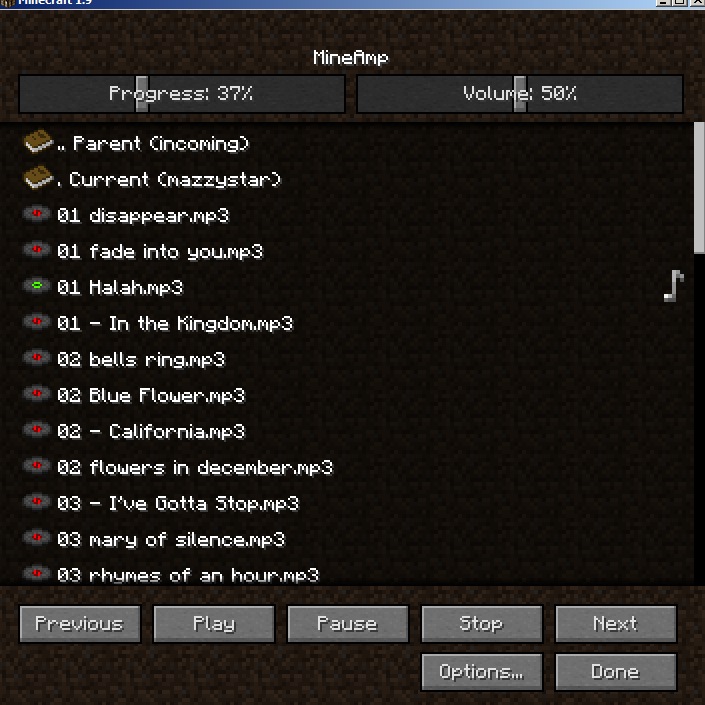
Play your tunes (mp3/ogg/wav/m4a/flac) inside Minecraft. Browse your folders (and drives) and play the songs in them. Also opens playlists (m3u/pls). Not exactly a necessary mod, but I was bored waiting for MCP to ever update
Press J while in game to bring up the interface. In-game, you can press P for play/pause, or [ and ] for previous and next track, or - and = for volume down and up. These are all bindable (and unbindable) in the minecraft controls menu. Double click file to play. Volume and position in song are adjustable. Remembers your last used folder (and volume)
Mod Review: https://www.youtube.com/watch?v=7Z7G-yMXn3Y
Mod review (auf Deutsch): https://www.youtube.com/watch?v=gppbvqOh6X0
TODO:
- DONE add OSD (On Screen Display). still TODO - improve it. Show somewhere other than in chat perhaps, or display a graphic for play/pause/stopped or something
- "Now playing" field in interface. Probably an editable "Current directory" field as well so one can change directories without clicking through the whole file tree.
- DONE maybe a convenience link in the root directory pane to the Minecraft music folder :) You can still get there, through c:\users\username\appdata\roaming\.minecraft\assets\virtual\legacy\music(orRecords). OMG. Yeah definitely a shortcut to that haha
- read id3 tags and ogg tags maybe
- allows songs to be queued to play next (outside their normal order)
- add shuffle button
- possibly edit/create playlists
Known issues:
- occasional troubles with VBR MP3s. Variable bitrate may or may not work.
- seeking in m4a encoded with lossless ALAC codec works fine, unless it is mono (not stereo). If it's mono, seek breaks past 25% or so. Just have to listen to it in order ;)
modpacks: This may be used in modpacks if
- you give credit / link to this page
- you do not make money from the pack (ie it is not hosted behind adf.ly links or things like that)
1.14 install:
- Install fabric loader
- put fabric API jar in your mods folder
- put MineAmp .jar in your mods folder
1.13 install:
- install Rift. for 1.13.2, get it here: Rift 1.13.2 snapshot
- download the MineAmp .jar file and put it in your minecraft/mods folder
- select the rift profile in the launcher
1.12.2 and below install:
- install liteloader (this is required)
- download the MineAmp .liteloader file and put it in your minecraft/mods folder
- select the liteloader profile in the launcher (the liteloader installer can chain this to Forge, so this mod works fine with Forge too)
- Edition: Minecraft Java
- File type: .jar
- How to install: Install the matching mod loader (Forge, Fabric or NeoForge) for your Minecraft version. → Download the .jar. → Put it in the .minecraft/mods folder and launch that loader profile.
- Where to get it: Opens on CurseForge — not every file is mirrored on our own servers.
Install steps are the general flow for this file type — How to install Minecraft Java mods & modpacks walks through it step by step.
- Ships as riftmod_mineAmp_1.2.1_for_1.13_2.jar — drop this file into the mods folder
- Download size: 1.3 MB
- Download link checked 13 Oct 2026 — working
These come from our own check of the pack file, not from the source page.