Chunk Highlighter
Minecraft Java mod. Downloads from the MC Java Mods app on Android.
⬇ Download on CurseForgeChunk Highlighter
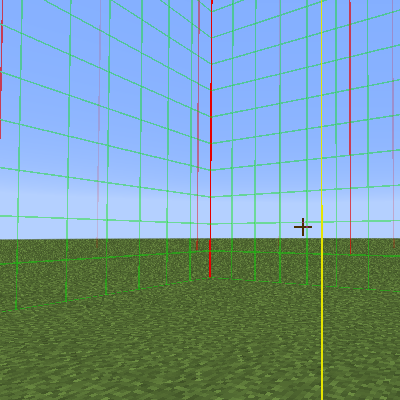
This simple client sided mod allows you to see the chunk boundaries and the middle of the chunk. This can be useful when blocks need to be in the same chunk or when using a chunkloader. Simply pressing F9 will bring up the overlay.
Red lines show the corner of a chunk.
Greens lines show the boundary of a chunk.
Yellow line shows the middle of the chunk.
The key for activating the chunk overlay is F9 by default but can be changed in the controls option.
Note that this mod is only a client mod and shouldn't be installed on a server.
Inspired by the original chunk overlay in NEI by ChickenBones
- Edition: Minecraft Java
- File type: .jar
- How to install: Install the matching mod loader (Forge, Fabric or NeoForge) for your Minecraft version. → Download the .jar. → Put it in the .minecraft/mods folder and launch that loader profile.
- Where to get it: Opens on CurseForge — not every file is mirrored on our own servers.
Install steps are the general flow for this file type — How to install Minecraft Java mods & modpacks walks through it step by step.
- Ships as ChunkHighlighter-1.0.0_1.9.4.jar — drop this file into the mods folder
- Download size: 7 KB
- Download link checked 13 Oct 2026 — working
These come from our own check of the pack file, not from the source page.