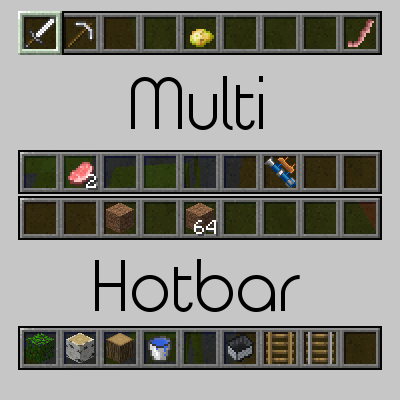
Multi-Hotbar
Minecraft Java mod. Downloads from the MC Java Mods app on Android.
⬇ Download on CurseForgeMulti-Hotbar
Multi-Hotbar is a Minecraft Forge mod that extends Minecraft's hotbar past nine slots.
The mod is open source and available on GitHub. If you have any issues, please report them there.
Status
Current: Release 3.2 | Beta 4.0
Note: Multi-Hotbar Core is required for version 4+. Vanilla server support is also dropped.
Status Definitions
Alpha: Not all features for the current release have been implemented and suggestions (preferably via GitHub issues) are welcomed.
Beta: All features for the current release have been implemented. Report bugs to the Github issue tracker. Any feature suggestions will apply to the next alpha phase.
Release: There are no planned features and no known or major bugs. Bugfixes will be applied.
Features
- Adds 2 to 3 additional hotbars
- Scroll through all hotbars
- Tap a hotbar key (e.g. 1, 2, 9) multiple times to change hotbar selection
- Hold ALT (configurable) and scroll to change hotbars
- Hold ALT and press a hotbar key (1-4) to go to that hotbar
- Toggle the hotbar with the grave (` ) key
- Compatible with InventoryTweaks' auto-refill
- Client side - can connect to vanilla servers (Versions previous than version 4)
Screenshots


- Edition: Minecraft Java
- File type: .jar
- How to install: Install the matching mod loader (Forge, Fabric or NeoForge) for your Minecraft version. → Download the .jar. → Put it in the .minecraft/mods folder and launch that loader profile.
- Where to get it: Opens on CurseForge — not every file is mirrored on our own servers.
Install steps are the general flow for this file type — How to install Minecraft Java mods & modpacks walks through it step by step.
- Ships as multihotbar-1.12.2-4.0-build-T101.jar — drop this file into the mods folder
- Download size: 22 KB
- Download link checked 13 Oct 2026 — working
These come from our own check of the pack file, not from the source page.