p455w0rd's MOTD Customizer
Minecraft Java mod. Downloads from the MC Java Mods app on Android.
⬇ Download on CurseForgep455w0rd's MOTD Customizer

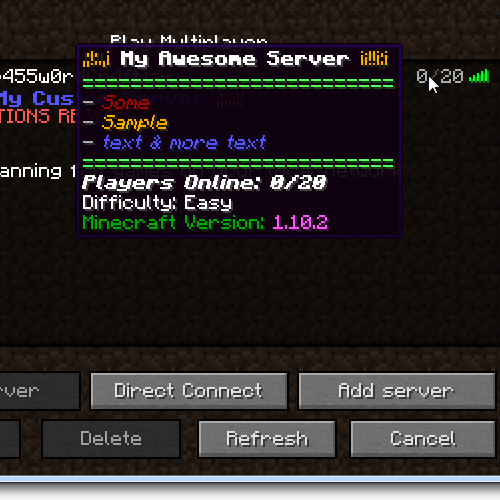
A Forge Server Side-Only mod to customize your server MOTD!
This mod requires p455w0rdsLib which can be found here for 1.9.4-1.10.2 and here for 1.7.10.
Features
- Vanilla Compatible
- 1.7.10, 1.9.4, 1.10, and 1.10.2 compatible
- Customizable Random MOTDs
- Customizable PlayerList tooltip
On first run, the mod will generate the two required files for MOTD customization in <server root dir>/CustomMOTD
There are 2 files used for configuration.
customotdlist.txt
This mod supports multiline MOTDs (2 lines as per vanilla). To set a new line, use the pipe | character in the entry in custommotdlist.txt
Each entry in custommotdlist.txt is a separate MOTD entry. This is why the pipe character is used for 2nd line
customplayerlist.txt
Contains the replacement template for the player list tooltip
Variables
{playercount} - number of players currently on the server
{maxplayers} - maximum number of players the server supports
{difficulty} - server difficulty level
{mcversion} - server Minecraft version
{radio} - obfscated radio bars
{playerlist} - list up to 10 players currently online
Color Codes and Formatting
Full support for default Minecraft color codes and formatting
to use an ampersand (&), use two ampersands in succession (&&).
bb but Plugins already do this :C
Yes they do, and I feel the less dependent modded servers are on systems like Bukkit/Sponge, the better. I have been told that Forge can't possibly do what bukkit plugins can..I beg to differ..
- Edition: Minecraft Java
- File type: .jar
- How to install: Install the matching mod loader (Forge, Fabric or NeoForge) for your Minecraft version. → Download the .jar. → Put it in the .minecraft/mods folder and launch that loader profile.
- Where to get it: Opens on CurseForge — not every file is mirrored on our own servers.
Install steps are the general flow for this file type — How to install Minecraft Java mods & modpacks walks through it step by step.
- Ships as CustomMOTD-1.12.2-1.1.6.jar — drop this file into the mods folder
- Download size: 14 KB
- Download link checked 13 Oct 2026 — working
These come from our own check of the pack file, not from the source page.