Omniscience
Minecraft Java mod. Downloads from the MC Java Mods app on Android.
⬇ Download on CurseForgeSee invisible creatures and players!
Features:
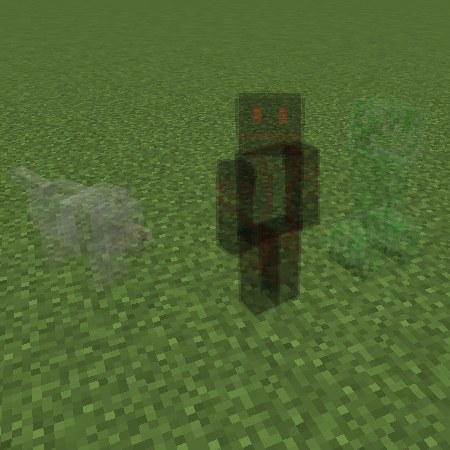
- Enable/disable viewing invisible entities as partially transparent.
- Enable/disable viewing invisible players as partially transparent.
- Allow access to Highlight Players keybind in any game mode (normally only available in spectator mode).
How to Install:
- Install LiteLoader.
- Download the .litemod file for your version of Minecraft and save it into your version's mod folder. (e.g. .minecraft/mods/1.11.2).
- Run the Minecraft client.
- Configuration options are all located in the LiteLoader panel, which can be found via the small tab along the right edge of the screen at the in-game menus.
Old Download Links:
- Omnisicence v1.1.0 for Minecraft 1.8 (requires LiteLoader) [Direct Link] [Release Page]
- Omniscience v1.0.2 for Minecraft 1.8 (requires LiteLoader) [Direct Link] [Release Page]
- Omniscience v1.0.1 for Minecraft 1.7.10 (requires LiteLoader) [Direct Link] [Release Page]
Screenshots:

An invisible player and their invisible baby wolf.
Changes:
v1.1.0
* Unplanned feature added while investigating Spectator gamemode possibilities: Player Highlight keybind.
v1.0.2
* Compatibility with MC/LL 1.8.
v1.0.1 (backport of fixes from upcoming 1.1.0 release)
* Permissions inclusion fix.
* Entity-type differentiation fix.
* Configuration saving fix.
v1.0.0
* Initial release.
Source Code:
All source code is publicly available on GitHub.
Bugs/Requests:
For the best visibility, all bug reports and feature requests can be submitted on GitHub here. You may also submit them here as comments, but GitHub is strongly preferred.
- Edition: Minecraft Java
- File type: .jar
- How to install: Install the matching mod loader (Forge, Fabric or NeoForge) for your Minecraft version. → Download the .jar. → Put it in the .minecraft/mods folder and launch that loader profile.
- Where to get it: Opens on CurseForge — not every file is mirrored on our own servers.
Install steps are the general flow for this file type — How to install Minecraft Java mods & modpacks walks through it step by step.
- Downloads as mod-omniscience-1.1.0-mc1.12.litemod
- Download size: 22 KB
- Download link checked 13 Oct 2026 — working
These come from our own check of the pack file, not from the source page.