Bounding Box Outline Reloaded
Java mod listed for Minecraft 1.16–1.21. Downloads from the MC Java Mods app on Android.
Join our discord for support, announcements & much more: Grab the CraftBukkit/Spigot/Paper server plugin on CurseForge Bukkit here This mod highlights in…
I don't know my version or loader
Join our discord for support, announcements & much more: https://discord.gg/4ZJpJvh
Grab the CraftBukkit/Spigot/Paper server plugin on CurseForge Bukkit here
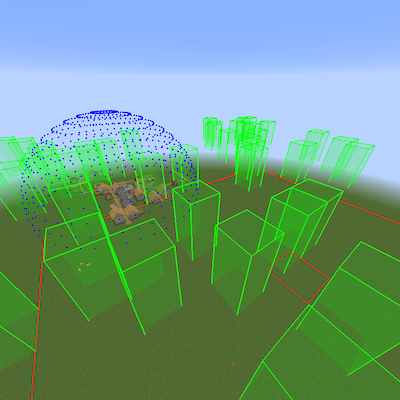
This mod highlights in a variety of colours and styles the different structures & features of the game:-
- Nether Fortresses; red boxes bound each individual area where Blaze, Wither Skeletons & normal Skeletons will spawn. Time for a beacon methinks!
- Witch Huts; blue boxes reveal everywhere only witches spawn. Witch farm anyone?
- Desert Temples; orange boxes envelop the pyramid and towers. Go grab some loot but beware TNT boobie traps!
- Jungle Temples; dark green boxes surround the temple. Indianna Jones would've love these!
- Ocean Monuments; cyan boxes indicate where guardians spawn. Sea lantern and prismarine block types FTW.
- End Cities; magenta boxes show the rooms, corridors and air ships in the End. Time to fall with style!
- Strongholds; yellow boxes show each room in the stronghold. Does anyone make anything with silverfish spawners?
- Woodland Mansions; brown boxes show each room in the woodland mansion. Here's Johnny!
- Mine Shafts; light gray boxes illustrate each of the mine shafts. Cobwebs... grrr!
- Villages (*); gray boxes designate each building in the generated village. Check out the blacksmith loot chest!
- Slime chunks; dark green boxes highlight where slimes will spawn, with a dynamic box that rises to where the players feet are to help find them from the surface. Bouncy... bouncy...
- World Spawn & spawn chunks; red boxes outline the world spawn and the spawn chunks (active & lazy).
- Igloos (*); white boxes show where igloos are. Maybe you can convert the zombie villager back?
- Shipwrecks (*); cyan boxes are like a lighthouse those wary sailors wish they'd had. Time to find some buried treasure?
- Ocean ruins (*); cyan boxes show the different ocean ruin structures. Watch out for those pesky drowns tho!
- Buried treasure (*); cyan boxes highlight where the heart of the sea can be found. Conduit anyone?
- Mob Spawners; bright green boxes show where mob spawners are, where mobs will be spawned, and red/orange/green lines help the player see if a spawner is nearby and activated.
- Pillager Outposts; dark gray boxes outline where crossbow wielding pillagers will spawn. Beware of bad omens tho!
- Village Spheres (+); multicoloured spheres encircle the village, with boxes marking if and where iron golems will spawn. You should see the iron titan... CRAZY!
(*) Prior to 1.14.4, due to how Minecraft generates these structures they will initially float above where they should be, however upon re-loading the world they should drop down to the correct height. Unfortunately (or fortunately?) buried treasure will always appear at y-90. This works as expected in 1.14.4.
(+) In 1.14 and above the concept of a village based on doors being involved in iron golem spawning has gone away, so this feature goes away too.
For more detail see the readme
- Edition: Minecraft Java
- File type: .jar
- Minecraft versions listed: 1.21, 1.20.1, 1.20
- How to install: Install the matching mod loader (Forge, Fabric or NeoForge) for your Minecraft version. → Download the .jar. → Put it in the .minecraft/mods folder and launch that loader profile.
- Where to get it: Opens on CurseForge — not every file is mirrored on our own servers.
Install steps are the general flow for this file type — How to install Minecraft Java mods & modpacks walks through it step by step.
- Ships as BBOutlineReloaded-2.4-1.15.2-forge.jar — drop this file into the mods folder
- Download size: 276 KB
- Download link checked 13 Oct 2026 — working
These come from our own check of the pack file, not from the source page.