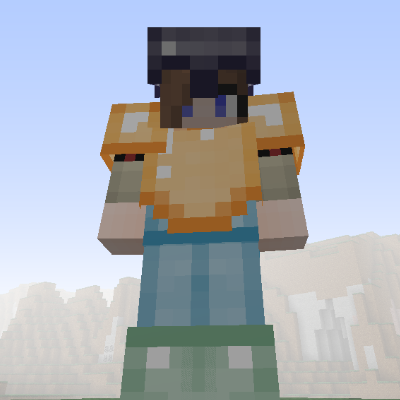
Hardcore Armor
Minecraft Java mod. Downloads from the MC Java Mods app on Android.
Armor add-on for Hardcore Ore that allows you to create armor sets based on the various metals found in Hardcore Ore
⬇ Download on CurseForge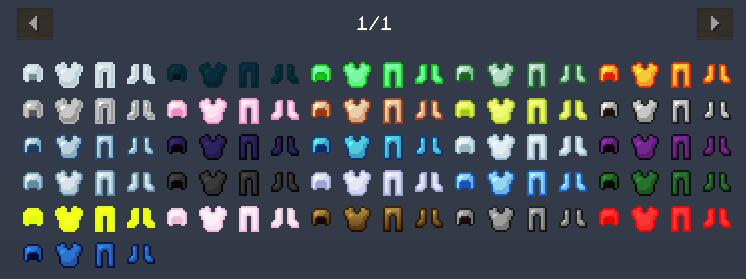
Hardcore Armor provides craftable armor sets based on metal ingots and gems found in the Hardcore Ore mod.
This mod will allow you to craft early game armor such as Wood Helmet, Wood Chestplate, Wood Leggings, and Wood Boots. Currently there are 23 materials supported that can be used to craft armor sets. The configuration allows you to disable any armor material that you do not need.
Hardcore Ore is optional but recommended as this is an add-on mod
I also finished Tinker Construct support. You can now make armor using the Tinkers Smeltery.
Hardcore Armor Features:
- Craft Helmet, ChestPlate, Leggings and Boots using metal ingots and gems found in Hardcore Ore.
- Provide early game variety and explore multiple options available to craft armor sets
- Give the player more early game options when it comes to crafting armo
Improved Player Experience:
- Help improve early game experience with a variety of Armor sets
- Give player more choices when it comes to armor progression
- Modpack developers can turn off Armor for materials that are not needed.
- Edition: Minecraft Java
- File type: .jar
- How to install: Install the matching mod loader (Forge, Fabric or NeoForge) for your Minecraft version. → Download the .jar. → Put it in the .minecraft/mods folder and launch that loader profile.
- Where to get it: Opens on CurseForge — not every file is mirrored on our own servers.
Install steps are the general flow for this file type — How to install Minecraft Java mods & modpacks walks through it step by step.
- Ships as hardcorearmor-1.12.1-0.0.2.jar — drop this file into the mods folder
- Download size: 565 KB
- Download link checked 23 Sept 2026 — working
These come from our own check of the pack file, not from the source page.