MCConfig
Minecraft Java mod. Downloads from the MC Java Mods app on Android.
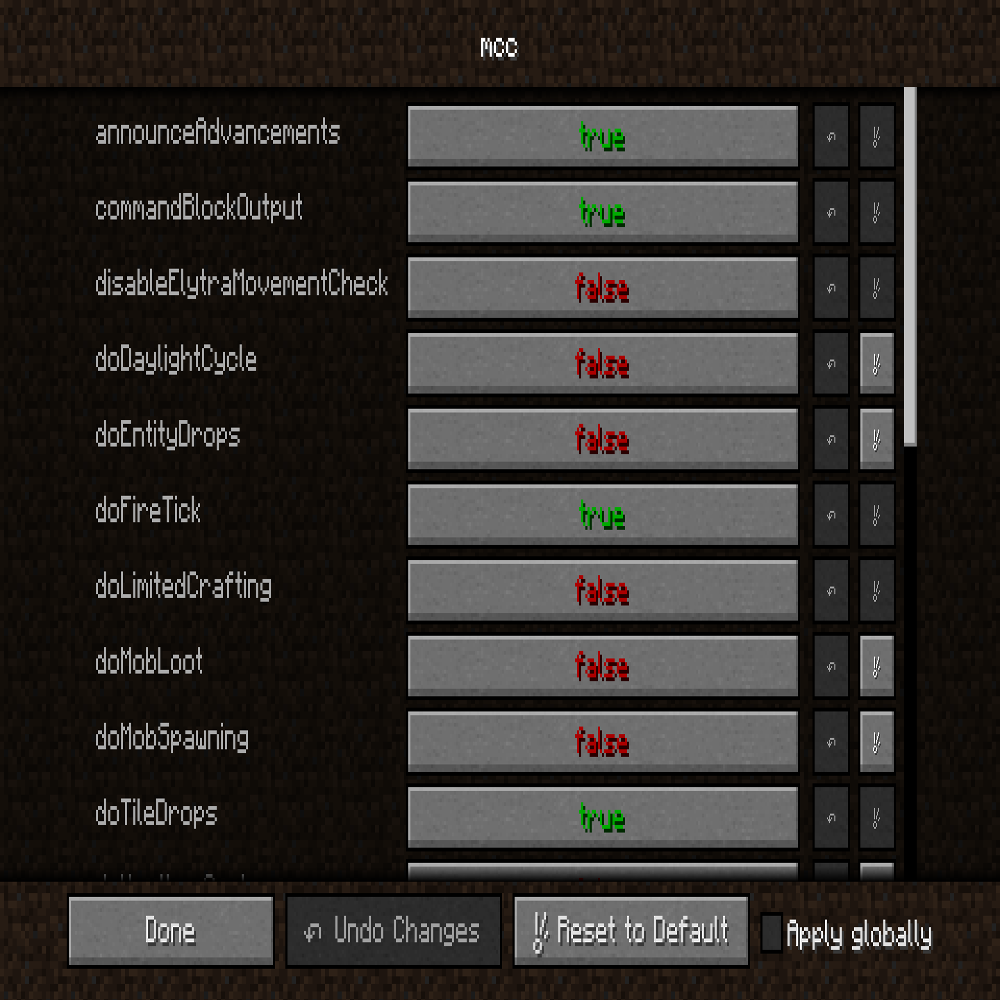
⬇ Download on CurseForgeMCConfig adds a gui config that allows you to visually see all the Minecraft Gamerules and change their values in game. The config is only avaiable in game and in non-accessible outside a world. MCC does not change gamerules of servers and changes are persistent among new worlds, so no more having to stop the daylight cycle or stop entities from spawning each time.
And the config is dynamically created, so any new game rules, or potentially custom game rules should be shown as well.
Requires LazyModder 0.74+
The gui looks like this:

- Edition: Minecraft Java
- File type: .jar
- How to install: Install the matching mod loader (Forge, Fabric or NeoForge) for your Minecraft version. → Download the .jar. → Put it in the .minecraft/mods folder and launch that loader profile.
- Where to get it: Opens on CurseForge — not every file is mirrored on our own servers.
Install steps are the general flow for this file type — How to install Minecraft Java mods & modpacks walks through it step by step.
- Ships as MCConfig-1.0.jar — drop this file into the mods folder
- Download size: 8 KB
- Download link checked 23 Sept 2026 — working
These come from our own check of the pack file, not from the source page.