Overpowered Armor Bar
Minecraft Java mod. Downloads from the MC Java Mods app on Android.
⬇ Download on CurseForgeSorry! 0.2.0 requires you delete the mod's config file, as the contents have changed to better support in game config editing.
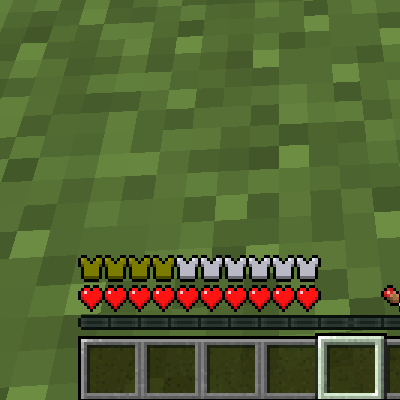
The vanilla armor bar doesn't accurately show "better than diamond" level armor, as it simply maxes out when its full. Your armor is just too overpowered!
This mod allows the armor bar to "wrap" around with different colored icons, so the amount of armor can accurately be displayed. The color of the armor icons can be configured with the in game mod config, or via the config file.
Other optional features:
- Show the armor bar when the player is not wearing any armor
- Hide empty armor icons
Known Issues
- This mod is not compatible with mods that add additional health bars.
Credits:
Vyraal1 for suggesting the idea on the bounty board
- Edition: Minecraft Java
- File type: .jar
- How to install: Install the matching mod loader (Forge, Fabric or NeoForge) for your Minecraft version. → Download the .jar. → Put it in the .minecraft/mods folder and launch that loader profile.
- Where to get it: Opens on CurseForge — not every file is mirrored on our own servers.
Install steps are the general flow for this file type — How to install Minecraft Java mods & modpacks walks through it step by step.
- Ships as overpoweredarmorbar-1.12.2-0.2.2.jar — drop this file into the mods folder
- Download size: 16 KB
- Download link checked 13 Oct 2026 — working
These come from our own check of the pack file, not from the source page.