
Stargate Network
Minecraft Java mod. Downloads from the MC Java Mods app on Android.
⬇ Download on CurseForge
Stargate Network [SGCraft] provides some technology based loosely on the television show Stargate SG-1.
Stargates allow instant travel over long distances or between dimensions. They may be used on their own, or optionally powered by IC2 or RF/FE energy and controlled by computers from Computercraft or Open Computers.
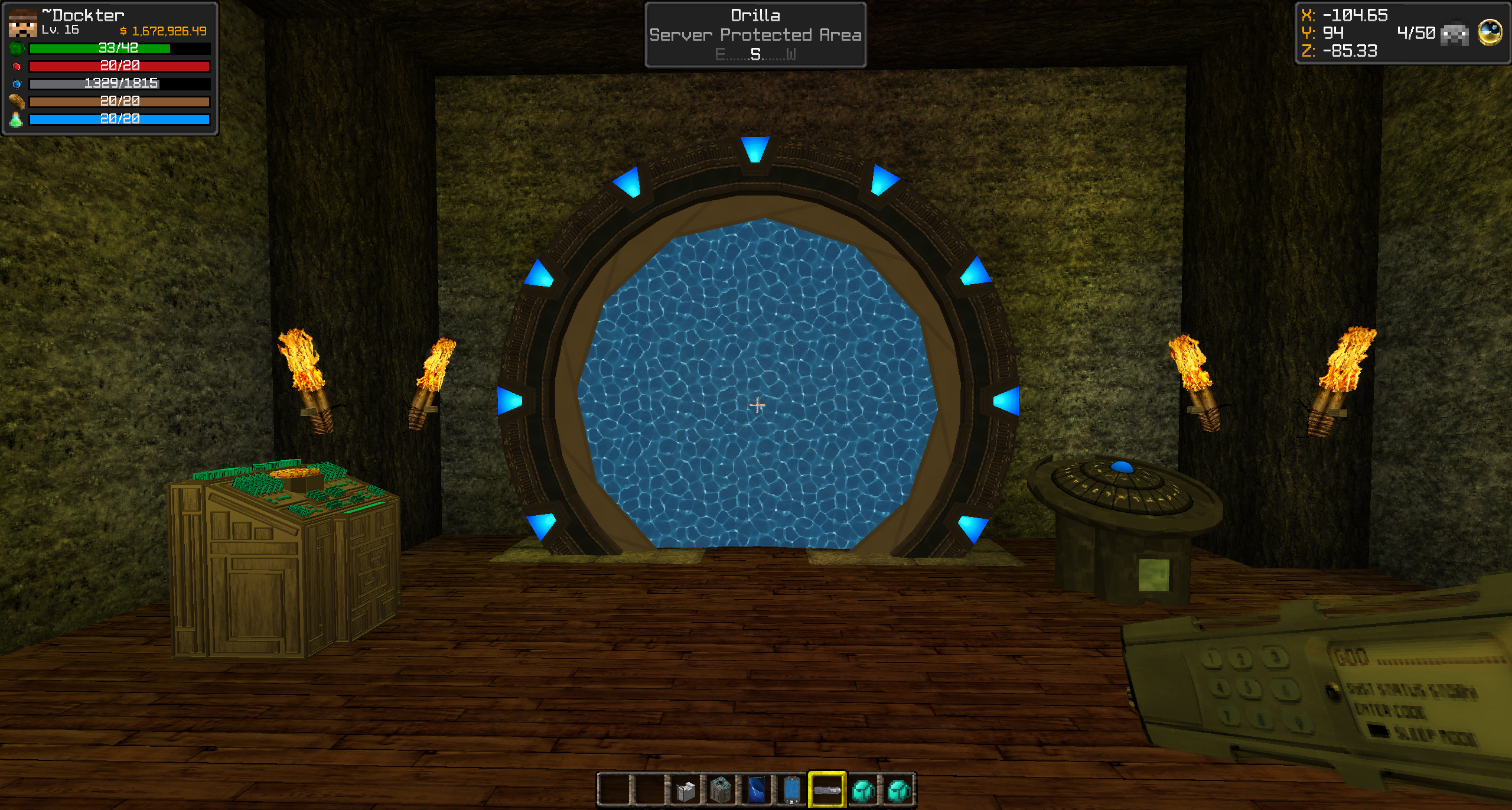
This is a continuation of the original SGCraft mod from gcewing.
Almura Development Studios has issued several fixes in collaboration with several other developers to bring this to the Minecraft community.
Github: https://github.com/AlmuraDev/SGCraft
Issues: https://github.com/AlmuraDev/SGCraft/issues
Instant Support / Discord: https://discord.gg/MV6cx8F
Liteloader Users: http://solder.almuramc.com/downloads/liteloader-1.12.2-SNAPSHOT-release-1.jar
MalisisCore users: http://solder.almuramc.com/downloads/malisiscore-1.12.2-6.5.3-SNAPSHOT.jar
2.0.4
- Added ability for Stargates to generate within Villages, Nether Fortresses and Ocean Monuments
- Added the ability to restrict naquadah generation in specific dimensions
- fixed issue with ComputerCraft/OpenComputers stopping mid-dial
- fixed issue with power transfers from ZPM Console
- fixed issue with PDD ignoring list index
- fixed issue where PDD wouldn't dial because it thought it was out of range of Stargate
- removed Mixin requirement
2.0.3
- added ZPM Hub which holds 3 zpm's. Adding more than 1 zpm will increase its IC2 power tier and create an optimization level! (IC2 Only)
- added the ability to link a DHD at any distance from the gate. Put a configurator in your right hand, sneak-right-click the gate base and then sneak-right-click the designated DHD.
- added the ability to hide the gate address from player view when they right-click the stargate base, also blocked the ability to auto-add gate addresses to pdd if gate address is hidden.
- added new HD textures for both gate versions.
- fixed transient damage issue with players and blocks when a wormhole is established.
- fixed issue with ZPM Interface Cart not updating power values on the client.
- added the ability to block players from destroying fully formed stargates.
- added the ability for the index value to auto-increment when adding new PDD entries.
2.0.2
- fixed issue feature generation options were not being respected
- fixed / added ability to enable breaking of unbreakable blocks during event horizon transient damage
- fixed isolated ore generation bug with factor of 0
- fixed bad performance issue if two zpm consoles were placed next to each other
2.0.1
- fixed issue where sounds were trying to be played at the server.
New Features
PDD, GDO and Configurator features require MalisisCore or MalisisEgo dependency
Download Here: http://solder.almuramc.com/downloads/malisiscore-1.12.2-6.5.3-SNAPSHOT.jar
- Added GDO to give users control of their local and remote stargate iris controllers
- Added PDD which allows users to store Stargate addresses into a single handheld device. This feature will also allow server admin's to pre-program common addresses into it.
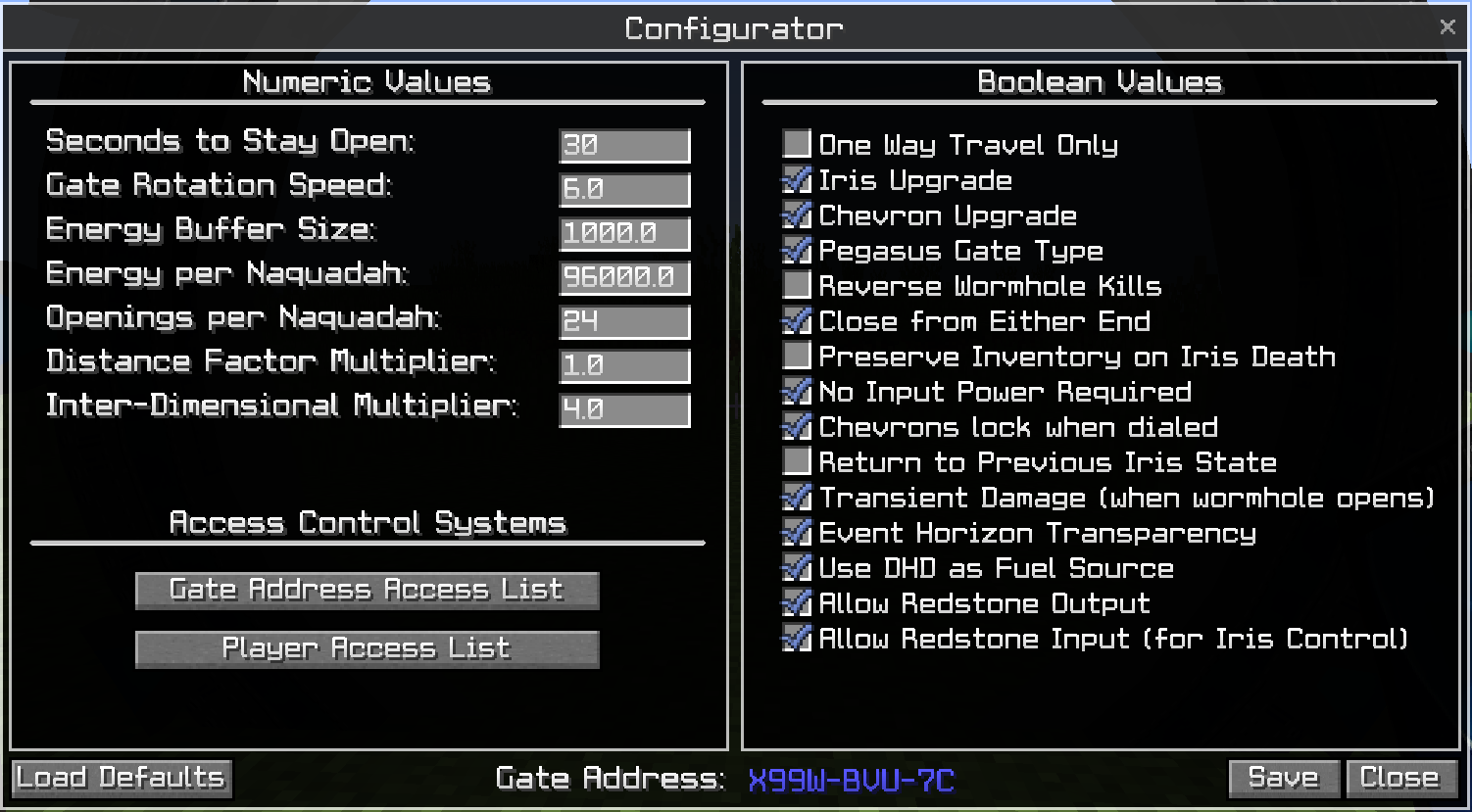
- Added Configurator device which allows server admins or players access to new unique configuration options per Stargate
- Added SG Power Block (replaced RF Power Block). Uses built-in Forge power systems.
- Added "Preserve Iris State" which will return the Iris to the state it was prior to dialing Stargate on wormhole disconnect.
- Added "No Input Power Required", requires no power to dial destinations.
- Made the feature "Transient Damage" (when wormhole opens) configurable.
- Added "Chevrons lock when dialed" where when the DHD is used will lock each chevron as its dialed vs watching the ring rotation dial sequence. This feature works slightly different when used in combination with the PDD.
- Added permissions system which relies on SpongeAPI, feature is optional, not required.
- Added dependency on MalisisCore or (EGO) for PDD, Configurator and GDO devices. Feature is optional, not required unless you want to use PDD, Configurator and GDO.
- Added "Accept Incoming Connections", which will prevent someone from dialing that specific Stargate
- Added Horizontal based Stargates
- Added Tollan Phase-shifting device which allows an admin to pass-thru any Iris. (Creative Item Only)
- Added Gate Address control system
- Added Player Access control system.
- Blocked access to DHD fuel screen unless player has Admin access to connected stargate.
- Moved ZPM to a non-exclusive feature. ZPM Interface Cart will remain for IC2.
- Added ZPM Console
- Added new Pegasus dialing sounds
- Added the ability to link a DHD outside of its normal range. Sneak-Right-Click the base of a Stargate then Sneak-Right-Click the DHD. You will see messages regarding saved location and created link.
- Added random/configurable Stargate generations within all Temple types. (Igloo, Jungle, Pyramid, Swamp Hut)
- Added blue button and GUI image for Pegasus gate DHD's
- Added configurable Stargate generation at all temple types.
- Added a ******* feature that will randomly ****** in the event its **** and the gate ******.
- Added a ***** which when a player ***** it then **** will happen....
PDD Functionality
- Users can add/remove/edit their own list of Stargate addresses as well as set a readable name for each entry and an index number for which they appear in the PDD list.
- Server owners can pre-populate the PDD device with common addresses which the users can or cannot delete/edit.
- To use PDD, put the device in your hand and right-click it while near a Stargate, the GUI will open automatically.
- The PDD addresses are stored in NBT and are unique to each item. This means you can copy and share the items using various methods.
- PDD will allow user to select the gate address from the list and click "Dial Selected Address" and the Stargate will automatically dial the address while showing a connection progress. The GUI will also show and error state if issues were encountered during dialing as well as allow the user to disconnect the gates wormhole.
- PDD entry can be added by either pressing the + button in the GUI OR by sneaking and then right-clicking the PDD handheld while you are near a Stargate, the "Add PDD Entry" window will automatically appear.
- PDD can be used near the base of the Stargate or the linked DHD.
- The configuration file /config/sgcraft/pdd.yml can be used to pre-assign locked or unlocked addresses in all new PDD's.
- Requires "sgcraft.gui.pdd" if you utilize a permissions system.
GDO Functionality
- GDO will allow a user to open/close both a local and a remote based Iris. The GDO also allows the user to disconnect a wormhole.
- GDO (may) have the ability to read from a list of players saved using the Configurator device which allows access to open the iris. Otherwise at the moment it is based on the players ability to modify the Stargates base block itself.
- GDO shows the current state of each gate so you can see visually what the state of the iris is on the other end of the wormhole.
- GDO can be used near the base of the Stargate or the linked DHD.
- Requires "sgcraft.gui.gdo" if you utilize a permissions system.
Configurator Options
- Seconds To Stay Open
- Gate Rotation Speed
- Energy Buffer Size
- Energy Per Naquadah
- Openings Per Naquadah
- Distance Factor Multiplier
- Inter-Dimensional Dimension Multiplier
- One-Way Travel Only
- Iris Upgrade
- Chevron Upgrade
- Pegasus Gate Design Type
- Preverse Wormhole Kills
- Accept Incoming Connections
- Close from Either End
- Preserve Inventory on Iris Death
- No Input Power Required
- Chevrons lock when dialed
- Return to Previous Iris State
- Enable Transient Damage
- Enabled Event Horizon Transparency
- Horizontal rendering type (up/down)
- Note: Configurator can be used to link long distance DHD's to a Stargate. Sneak-right-click the base of the Stargate with a Configurator and then sneak-right-click a DHD to create a link.
- Requires "sgcraft.gui.configurator" permissions if you utilize a permissions system. Additional permission nodes required for each option, see "configurations" list below.
Gate Address Control System
- Allows admins to set which addresses are allowed or disallowed from dialing IN or OUT
- Allows admins to set a default value to allowing incoming or outgoing wormholes
Player Access Control System
- Allows admins to set players ability to use stargate for both incoming and outgoing
- Allows admins to set players ability to control iris controller
- Allows admins to set whether or not a player can modify the base configuration of a Stargate
Fixed Issues
- Fixed issue where DHD wouldn't detect a Stargate connection properly.
- Fixed player velocity when exiting Stargate.
- Fixed issue with RedstoneFlux / ThermalExpansion Power block.
- Fixed sync/desync issue between client and server's NBT data.
- Fixed an issue where the Stargates Iris Entity was being tracked for Teleport.
- Fixed how the Base block camo/inventory window appears. If the player doesn't have admin access to the stargate then the non-inventory GUI window will appear with only the gate address
shown. - Camo slots are hidden when using horizontal based Stargates.
- Fixed DHD press button sounds not respecting global sound volume values.
- Fixed SG based blocks dropping in the event of an explosion even if canHarvest was false.
- Fixed snow accumulating on Stargate, DHD & Power Units.
- Fixed CI interface not sending "incoming"/"outgoing" during dialing procedure.
- Fixed an "unknown" state being sent to CI interfaces during connection phase.
- Fixed missing event horizon sound.
- Fixed issue with Nuclear Craft
- Fixed issue with Naquadah recipe
Removed
- Removed the RFPower Block, it was replaced with the SG Power Block.
Screenshot of "Configurator"
Screenshot of PDD

Screenshot of Gate Address Access List:

Screenshot of Player Access List:

1.20.3 -
- Fixed issue with players riding other entities and not existing Stargate correctly.
- Added option to kill an entity in the event they attempt to reverse travel through a one-way wormhole. This includes: items, animals, monsters and players.
1.20.2 -
- Fixed crashing caused by assumptions made with the entity.changeDimension method.
1.20.1 - [Download removed due to critical bug.]
- Removed required IndustrialCraft 2 dependency. It is now optional.
1.20.0 - [Download removed due to critical bug.]
Added Features:
- ZPM's and a ZPM Interface Cart (requires IndustrialCraft2)
- Pegasus Gate model and images for Stargate
- Handheld GDO (Implementation not quite finished as of 1.20.0)
- Added Fast-Dial, GDO in your offhand, chevron's lock immediately when dialing, no rotation sequence.
- Longer delay for Stargate dialing when using ZPM.
- Ability to toggle on/off any recipe.
- Ability to prevent users from harvesting existing Stargate and DHD blocks
- Tokra Villagers to Village Generator
- Ability to toggle on/off the saving of gate addresses to users clipboard when inspecting the base
- New optional HD Event Horizon Texture
- New optional power diagnostic values to DHD Power Screen
- Ability to modify the power values for IC2 and RF
- Russian and Chinese Language Translation
- Many new sounds
- Configurable ZPM requirements per world
- Configurable Tokra villagers per world
Fixed issues:
- Pyramid generated Stargates would appear to float
- Event Horizon glowing effect
- Item Dupe using Horse or Entity that contains inventory object
- Missing background and item tool tips
- Structure Augmentation
- GUI Conflict with NEI/JEI
- Recipe Registrations happening too early.
- Netty attempting to send packets on wrong thread
- IC2 Power module client crash
- model/item loading registration errors
- Updated for latest 1.12.2 MCP mappings
- DimensionMap crash on Windows PC's
- Fixed possible issue with recipe registration for invalid items
- Made one-way travel default
- Timings of phases to allow for usage of newer connect sound.
- Server/Client config sync issue with IC2PowerTE and RFPowerTE
- Bug between TinkersConstruct w/ GLContext/Thread error
- Fixed ComputerCraft interface error
FAQ: (updated 1/2/2020)
What is a PDD?
A PPD is a Personal Dialing Device. This is a hand-held tool that is used to store gate addresses. How the device works is that within the GUI you can manually add, edit and remove gate addresses. These entries are unique to the item itself except for the values that can be pre-programmed into the PDD device via the pdd.yml configuration file. You can easily add new addresses to a PPD by sneak-right-clicking a stargate with a PDD. This handheld device also allows you to set familiar names to gate addresses.
What is a GDO?
A GDO is a hand-held device that allows you to control the iris of a stargate both the ones you're currently standing near and the remote gate.
What is a Configurator?
A configurator is a hand-held device that opens up a GUI that allows you to change many gate configuration values that are unique per gate.
How do I set a Stargate to use the Pegasus gate model?
You can change the type by using either the Configurator or the Pegasus Gate Crystal (right-click gate)
How can I link a DHD to a Stargate at a distance further than the default?
Put a Configurator in your right hand, sneak-right-click the base of the stargate, you'll get a message about the gate location being saved. Now go to the DHD you want to link the gate to and then sneak-right-click the DHD.
What is a ZPM?
A ZPM is an extremely powerful ancient device which placed in a ZPM Interface Cart and provide vast amounts of Power to IC2 equipment as well as be used as a power source for the Stargates themselves.
How do I configure the Dimension to Dimension ZPM requirement?
In your config folder you’ll see a folder called /SGCraft/, inside of that folder there is a zpm.yml file. Edit the YML file with your origin and destination values. Any value greater than 0 means transport between the point of origin and the destination requires the usage of a ZPM. The value also is used as a multiplier to configure how much additional power is required to make the initial connection. World to World ZPM requirements are turned off by default.
Common Issues:
- Mixin config mixins.sgcraft.json requires mixin subsystem version 0.7.10 but 0.7.4 was found. The mixin config will not be applied.
- This is a mixin version conflict typically with MalisisCore though I have also seen it with MovingWorld. Mod authors should all be on the 0.7.10 or 0.7.11 version of Mixin. If they aren't tell them to stop being lazy and update their dependencies.... You can typically figure out which mod is causing the issue by looking for this line in your "latest.log" file: "SpongePowered MIXIN Subsystem Version=0.7.4 Source=file:" Following this line will point to the exact file/mod that loaded the Mixin system.
Resources:
Configuration: http://www.almuramc.com/sgcraft/configuration.html
Permissions: http://www.almuramc.com/sgcraft/permissions.html
Power Units: http://www.almuramc.com/sgcraft/IC2Integration.html
Build Instructions: http://www.almuramc.com/sgcraft/Stargates.html
Recipes: http://www.almuramc.com/sgcraft/Recipes.html
Computer Interfaces: http://www.almuramc.com/sgcraft/ComputerCraft.html
Tok'ra Villagers: http://www.almuramc.com/sgcraft/TokraVillager.html
- Edition: Minecraft Java
- File type: .jar
- How to install: Install the matching mod loader (Forge, Fabric or NeoForge) for your Minecraft version. → Download the .jar. → Put it in the .minecraft/mods folder and launch that loader profile.
- Where to get it: Opens on CurseForge — not every file is mirrored on our own servers.
Install steps are the general flow for this file type — How to install Minecraft Java mods & modpacks walks through it step by step.
- Ships as SGCraft-2.0.0-beta-6.jar — drop this file into the mods folder
- Download size: 6.2 MB
- Download link checked 2 Nov 2026 — working
These come from our own check of the pack file, not from the source page.