WorldGen Indicators
Minecraft Java mod. Downloads from the MC Java Mods app on Android.
⬇ Download on CurseForge
WorldGen indicators allows you to generate extra blocks depending of existing worldgen. One of the common uses is adding prospecting flowers for ores that generate in the chunk. It uses craftweaker to make it possible.

- Checking for any block in the chunk and generating a block in the surface

- Generate at a define Y relative to the checked block
- Generate at a define Y relative to the surface
- Generate structures based on Minecraft NBT structure
- Checkers based on the biome

First you need to create a BlockChecker by BlockChecker.create(1) where the number is the chance of getting triggered. Then you can add block to check to it with addValid(IBlock block) and Indicators with addIndicator(IIndicator indicator). The indicator can have multiple blocks added by the method add(IBlock block). (The indicators in the block checkers and the blocks inside of the indicators will be choosen at random)

Surface Indicator
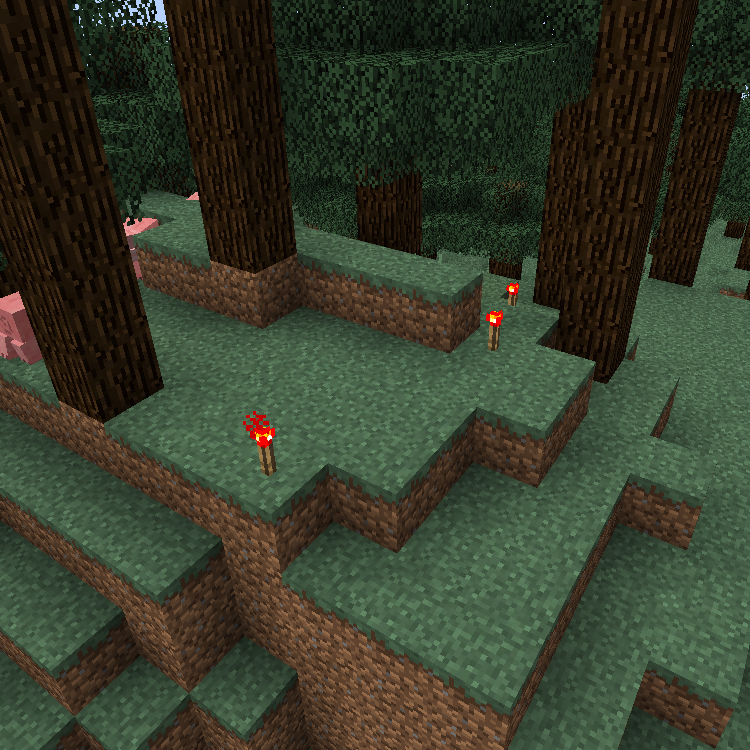
The following script adds a 10% chance of adding a redstone torch in the surface when it finds a redstone ore:
import mods.worldgenindicators.BlockChecker;
import mods.worldgenindicators.WorldGenManager;
import mods.worldgenindicators.SurfaceIndicator;
import crafttweaker.block.IBlock;

var redstoneOre = <minecraft:redstone_ore>.asBlock();
var redstoneTorch = <minecraft:redstone_torch>.asBlock();
var surfaceIndicator = SurfaceIndicator.create().add(redstoneTorch);
var blockChecker = BlockChecker.create(0.1).addValid(redstoneOre).addIndicator(surfaceIndicator);
WorldGenManager.addChecker(blockChecker);
Relative Surface Indicator
The relative surface indicator needs a parameter in the create that is how many blocks above the surface will generate the blocks.
import mods.worldgenindicators.BlockChecker;
import mods.worldgenindicators.WorldGenManager;
import mods.worldgenindicators.RelativeSurfaceIndicator;
import crafttweaker.block.IBlock;

var grass = <minecraft:grass>.asBlock();
var glass = <minecraft:glass>.asBlock();
var surfaceIndicator = RelativeSurfaceIndicator.create(20).add(glass);
var blockChecker = BlockChecker.create(1).addValid(grass).addIndicator(surfaceIndicator);
WorldGenManager.addChecker(blockChecker);
Whitelist and Blacklist
import mods.worldgenindicators.BlockChecker;
import mods.worldgenindicators.WorldGenManager;
import mods.worldgenindicators.SurfaceIndicator;
import mods.worldgenindicators.RelativeSurfaceIndicator;
import crafttweaker.block.IBlock;
import crafttweaker.item.IItemStack;

WorldGenManager.addChecker(
    BlockChecker.create(0.5d)
        .addWhitelistEntry(<minecraft:sand>.asBlock())
        .addValid(<minecraft:gold_ore>.asBlock())
        .addIndicator(SurfaceIndicator.create().add( <minecraft:gold_block>.asBlock()) )
);

WorldGenManager.addChecker(
    BlockChecker.create(0.5d)
        .addBlacklistEntry(<minecraft:grass>.asBlock())
        .addBlacklistEntry(<blockstate:minecraft:air>.block)
        .addValid(<minecraft:iron_ore>.asBlock())
        .addIndicator(RelativeSurfaceIndicator.create(2).add(<minecraft:diamond_block>.asBlock()))
);




- Edition: Minecraft Java
- File type: .jar
- How to install: Install the matching mod loader (Forge, Fabric or NeoForge) for your Minecraft version. → Download the .jar. → Put it in the .minecraft/mods folder and launch that loader profile.
- Where to get it: Opens on CurseForge — not every file is mirrored on our own servers.
Install steps are the general flow for this file type — How to install Minecraft Java mods & modpacks walks through it step by step.
- Ships as WorldGenIndicators-1.12.2-1.1.0-6.jar — drop this file into the mods folder
- Download size: 15 KB
- Download link checked 23 Sept 2026 — working
These come from our own check of the pack file, not from the source page.