Simple Mob Radar
Minecraft Java mod. Downloads from the MC Java Mods app on Android.
⬇ Download on CurseForge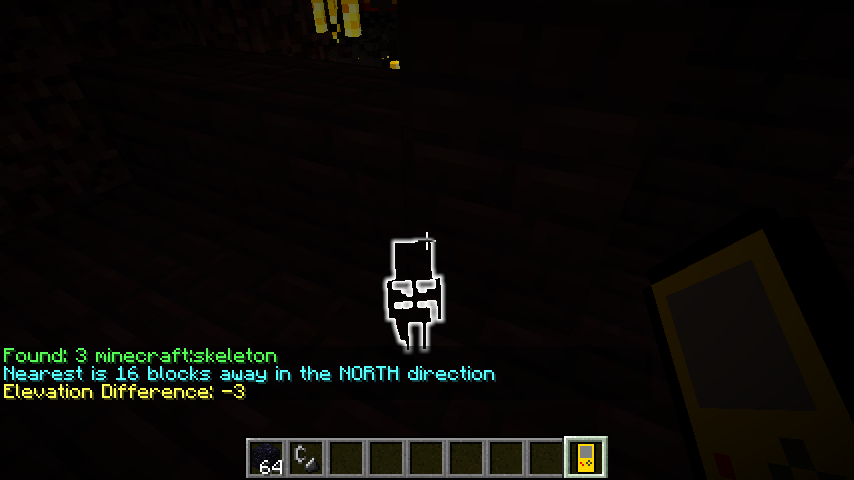

Directions:
Shift-scroll to change selected mob, right click scan for target mob, that's all there is to it. All mobs within range will be highlighted and the distance to the nearest one will be displayed.
Same goes for the passive finder except it has a bigger default range.(150)
Range is configurable for both (default:64), but use caution when inputting values above 120 on the mob finder as issues may occur due to rapid spawning/despawning.
Recipes
Default recipes, feel free to change them with Crafttweaker
Simple mob radar
Simple passive radar
Open to suggestions, join the Discord
- Edition: Minecraft Java
- File type: .jar
- How to install: Install the matching mod loader (Forge, Fabric or NeoForge) for your Minecraft version. → Download the .jar. → Put it in the .minecraft/mods folder and launch that loader profile.
- Where to get it: Opens on CurseForge — not every file is mirrored on our own servers.
Install steps are the general flow for this file type — How to install Minecraft Java mods & modpacks walks through it step by step.
- Ships as simplemobradar-2.3.jar — drop this file into the mods folder
- Download size: 28 KB
- Download link checked 13 Oct 2026 — working
These come from our own check of the pack file, not from the source page.