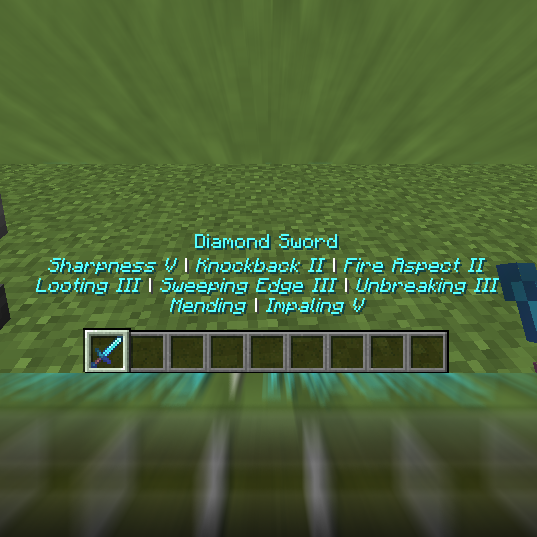
Enchant Popoff (Fabric)
Minecraft Java mod. Downloads from the MC Java Mods app on Android.
⬇ Download on CurseForgeEnchant Popoff
Displays enchantment tooltips underneath the item name popup
Configuration
Default Configuration
{
  "defaultColor": "AQUA",
  "colorOverrides": {},
  "maxLevelFormat": "ITALIC",
  "mergeLines": true
}
Changing Things
defaultColor
The default color to use for all enchantments. See below for all valid values.
colorOverrides
This is a String -> String map that allows you to set a specific color for a given enchantment.
Example:
{
  "colorOverrides": {
    "minecraft:sharpness": "RED"
  }
}
This will make the sharpness text be red. See below for all valid values.
maxLevelFormat
This is a text format that will be applied to enchantment text when it is max level. See below for all valid values.
mergeLines
When true, this will merge lines until they are as wide as scaledScreenWidth / 2. When false, every enchantment will be on it's own line.
Text formats
Colors
Valid color values are as follows: BLACK, DARK_BLUE, DARK_GREEN, DARK_AQUA, DARK_RED, DARK_PURPLE, GOLD, GRAY, DARK_GRAY, BLUE, GREEN, AQUA, RED, LIGHT_PURPLE, YELLOW, WHITE
Decorators
Valid decorator values are as follows: OBFUSCATED, BOLD, STRIKETHROUGH, UNDERLINE, ITALIC, RESET
RESET will be treated as NONE and use whatever the colorOverrides map provides as usual.
- Edition: Minecraft Java
- File type: .jar
- How to install: Install the matching mod loader (Forge, Fabric or NeoForge) for your Minecraft version. → Download the .jar. → Put it in the .minecraft/mods folder and launch that loader profile.
- Where to get it: Opens on CurseForge — not every file is mirrored on our own servers.
Install steps are the general flow for this file type — How to install Minecraft Java mods & modpacks walks through it step by step.
- Ships as EnchantPopoff-fabric-1.14.4-1.0.0-2.jar — drop this file into the mods folder
- Download size: 13 KB
- Download link checked 13 Oct 2026 — working
These come from our own check of the pack file, not from the source page.