
Bluestone
Minecraft Java mod. Downloads from the MC Java Mods app on Android.
⬇ Download on CurseForge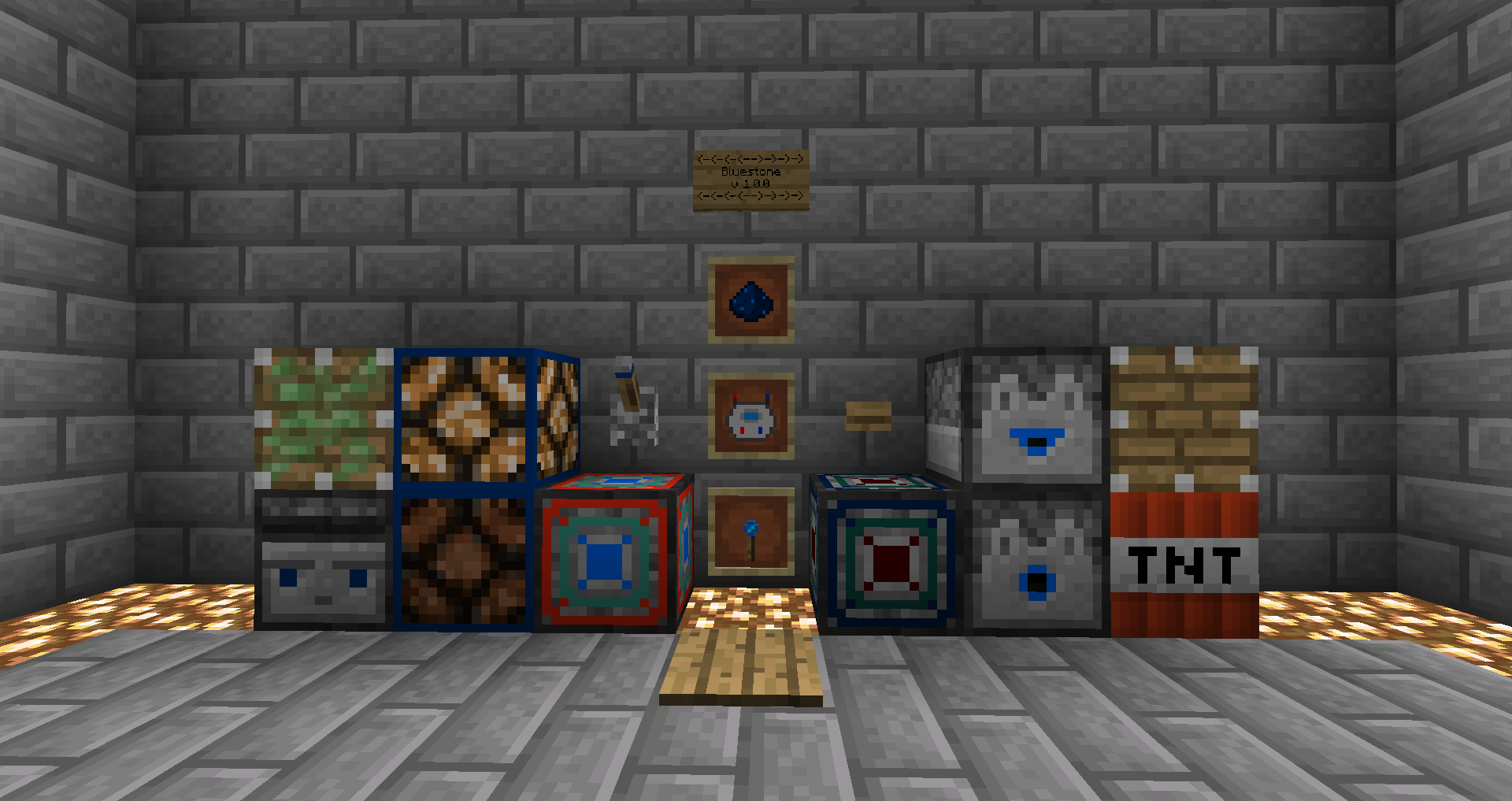

1.15 Rework In Progress.
Bluestone is a wireless redstone mod designed to allow you to take your redstone contraptions to the next level.
How does it work?
Bluestone blocks are either designated as transmitters or receivers. Transmitters act as sources for bluestone signals, while receivers perform a certain task when receiving a signal. The network tool can be used to easily link and unlink transmitters and receivers, even across great distances.
Getting Started
Just Enough Items is HIGHLY recommended.
To get started, simply combine one redstone and one lapis in order to obtain 2 bluestone dust. From there, craft a networking tool. Determine what type of device you wish to build, and construct the appropriate transmitter and receiver. Shift-right click on the placed transmitter, then do the same on the placed receiver. These two blocks are now linked.
Networking Tool Controls
Set transmitter -> Shift right click on any transmitter block.
Link receiver -> Shift right click on any receiver block to link it to the saved transmitter.
Unlink mode -> Shift right click while facing any non-transmitter/receiver block to toggle the tool into unlink mode. Repeat the same steps used to link blocks.
Clear saved transmitter -> Shift right click while facing upwards towards empty space (no block within reach).
Implemented Features:
Transmitters:
Bluestone Emitter -> Emits a constant bluestone signal, toggleable via redstone signal. Defaults to on.
Bluestone Lever
Bluestone Button (Wood & Stone)
Bluestone Observer
Bluestone Lever
Bluestone Pressure Plate (Wood & Stone)
Bluestone Detector Rail
Bluestone Activator Rail
Logic Gates
Receivers:
Bluestone Receiver -> Emits a redstone signal based on the incoming bluestone signal.
Bluestone Lamp
Bluestone TNT
Bluestone Dropper
Bluestone Dispenser
Bluestone Piston
Bluestone Sticky Piston
Bluestone Powered Rail
Bluestone Doors
Bluestone Trapdoors
Logic Gates
Planned Features:
Bluestone Fence Gates
Bluestone Network Visualization
Interdimensional Bluestone
Non-Binary Bluestone
ComputerCraft & OpenComputers Integration
F.A.Q. and Other Information:
Q: Can I use bluestone in my modpack?
A: Please do!
Q: Can I implement bluestone support in my mod/create an addon for bluestone?
A: Certainly! If you run into any questions or problems with the source code, please feel free to reach out to me. There is currently no dedicated Bluestone API. That being said, if this mod takes off, I will add an API to allow for easy integration with other mods.
Q: I found a bug! What do I do!
A: Please report it on the GitHub issues page, found here.
Q: I would like to suggest/request a feature.
A: Great! Feel free to comment here, create an issue on GitHub, or reach out to me directly, information below.
Q: I would like to contribute code/models/textures/translations to the mod.
A: Reach out to me directly, information below.
Q: You didn't answer my question/I need something else!
A: Reach out to me directly, information below.
Discord: TechDweebGaming#9649
GitHub Project Page: https://github.com/TechDweebGaming/Bluestone
- Edition: Minecraft Java
- File type: .jar
- How to install: Install the matching mod loader (Forge, Fabric or NeoForge) for your Minecraft version. → Download the .jar. → Put it in the .minecraft/mods folder and launch that loader profile.
- Where to get it: Opens on CurseForge — not every file is mirrored on our own servers.
Install steps are the general flow for this file type — How to install Minecraft Java mods & modpacks walks through it step by step.
- Ships as bluestone-1.1.2-BETA.jar — drop this file into the mods folder
- Download size: 178 KB
- Download link checked 14 Oct 2026 — working
These come from our own check of the pack file, not from the source page.