ModsJava
Enemage Blinds
Minecraft Java mod. Downloads from the MC Java Mods app on Android.
⬇ Download on CurseForge
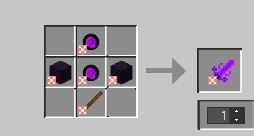
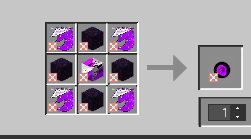
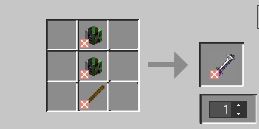
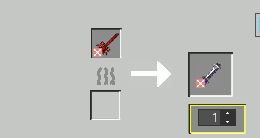
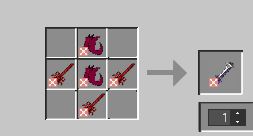
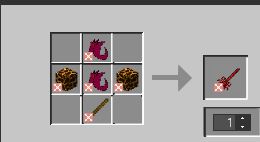
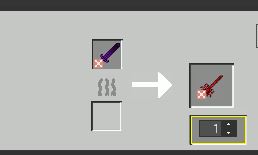
Enemage Blinds, is a mod in working. and this mod is an Alpha. we re working hard on this mod. , the mod adds Some Swords, and elements.
All this, is designed for when you arrive after the diamond and are looking for something more, and here enter this mod. the next to the Diamond.

COMMANDS

RED MATTER:
/redmatter_sword (gives you a Red Matter Sword)

/redmatter_scythe (gives you a Red Matter Scythe)

/redmatter_core (gives you Red Matter Core)

/redmatter_block (gives you Red Matter Block)

FARFARUM:
/farfarum_block (gives you a Farfarum Block)

/farfarum_scythe (gives you a Farfarum Scythe)

/farfarum_core (gives you Farfarum Core)

/farfarum_sword (gives you a Farfarum Sword)

NIGHTMARE:
/nightmare_sword (gives you a Nightmare Sword)

INFINITE:
/infinite_block (gives you a Infinite Block)

/infinite_sword (gives you a Infinite Sword)

/infinite_scythe (gives you a Infinite Scythe)

COMMON:
/get_scythe (gives you a Scythe)

FIRE DUTSHELL:
/fire_scythe (gives you a Scythe on Fire)

ULTRA VIOLET:
/ultraviolet_core (gives you a Ultraviolet Core)

SKULL:
/skull_sword (gives you a Skull Sword)

ALL comands is for Version 1.0, and 1.1. we re adding more commands in the 1.2 Version.
Quick facts
- Edition: Minecraft Java
- File type: .jar
- How to install: Install the matching mod loader (Forge, Fabric or NeoForge) for your Minecraft version. → Download the .jar. → Put it in the .minecraft/mods folder and launch that loader profile.
- Where to get it: Opens on CurseForge — not every file is mirrored on our own servers.
Install steps are the general flow for this file type — How to install Minecraft Java mods & modpacks walks through it step by step.
File checked by MCModsHub
- Ships as Enemage 1.7.jar — drop this file into the mods folder
- Download size: 5.7 MB
- Download link checked 4 Nov 2026 — working
These come from our own check of the pack file, not from the source page.