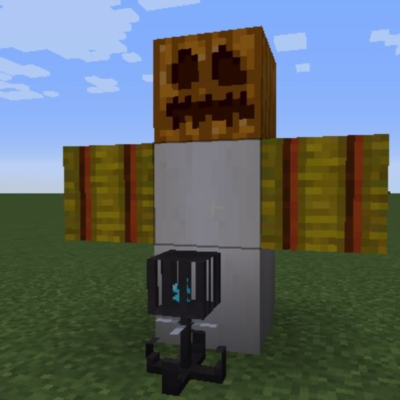
Malek's Multiblock Mobs
Minecraft Java mod. Downloads from the MC Java Mods app on Android.
Adds the ability to change a new multiblockmobs.mbm file to create structures that spawn mobs and execute commands. Using modded blocks and entities.
⬇ Download on CurseForge
You spawn mobs and execute commands. You must edit the multiblockmobs.mbm file. Two examples are listed here for how to set up the file. You must place the soul chassis somewhere on the multiblock structure, but you do not have to include it in the multiblock structure file, which means it will not get deleted. If your game crashes on startup you messed up the file. Everything needs to be exactly like it is below, spaces between equal signs must be the same, you have to have the quotation marks, etc. Do not add or remove spacing between characters!
The mod does not have a crafting recipe for the soul chassis, you must add that yourself either through another mod, or something like crafttweaker.
Example file of two mobs and blocks, one modded, one without modded stuff.
#Dimension
#Hashtags are comments
#X goes across, Y goes down
#Spacing is important
#Mob 1
!startMultiblockMob
!startDim
Dimensions:[x = 3, y = 3, z = 2]
!endDim
!startInit
minecraft:hay_block = "w"
minecraft:bone_block = "p"
multiblockmobs:soul_chassis = "s"
minecraft:air = "~"
minecraft:gold_block = "g"
!endInit
!startLoc
#z=0
["~s~"]
["wpw"]
["~p~"]
#z=1
["ggg"]
["ggg"]
["ggg"]
!endLoc
!startCustom
particals = "true"
particaltype = "modid:partical"
music = "true"
musicFile = "music"
soundEffect = "true"
soundEffectFile = "sound_effect"
customChat = "true"
customChat = "You made a mistake"
customCommand = "say Hi"
!stopCustom
!entityStart
entity = "harvestersnight:harvester"
!entityStop
!endMultiblockMob
!startMultiblockMob
!startDim
Dimensions:[x = 3, y = 2, z = 1]
!endDim
!startInit
minecraft:wool = "w"
minecraft:stone = "c"
multiblockmobs:soul_chassis = "s"
minecraft:air = "~"
!endInit
!startLoc
#z=0
["www"]
["c~c"]
!endLoc
!startCustom
particals = "true"
particaltype = "modid:partical"
musicBoolean = "true"
musicFile = "music"
soundEffectBoolean = "true"
soundEffectFile = "sound_effect"
customChat = "true"
customChat = "You made a mistake"
!stopCustom
!entityStart
entity = "minecraft:sheep"
!entityStop
!endMultiblockMob
- Edition: Minecraft Java
- File type: .jar
- How to install: Install the matching mod loader (Forge, Fabric or NeoForge) for your Minecraft version. → Download the .jar. → Put it in the .minecraft/mods folder and launch that loader profile.
- Where to get it: Opens on CurseForge — not every file is mirrored on our own servers.
Install steps are the general flow for this file type — How to install Minecraft Java mods & modpacks walks through it step by step.
- Ships as malek's multiblock mobs 2.0.jar — drop this file into the mods folder
- Download size: 53 KB
- Download link checked 14 Oct 2026 — working
These come from our own check of the pack file, not from the source page.