ModsJava
NoExpensive
Java mod listed for Minecraft 1.16–1.21. Downloads from the MC Java Mods app on Android.
I don't know my version or loader
Open the Minecraft launcher and look at the profile you play on — it names both, like fabric-loader-1.21.4. The version also shows in the bottom-right corner of the game's main menu.
No loader in the profile name? Then it's plain Minecraft, and these mods won't run — you need Fabric or NeoForge installed first.
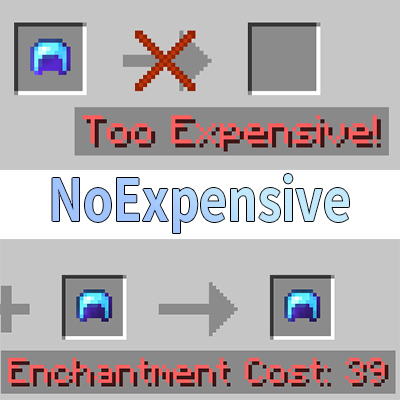
The anvil has no expensive restrictions and compatible to any enchantment.
Configuration
This mod uses the MineConf for configuration.
Configs
| Config | Description |
|---|---|
| max_level | The maximum repair cost level (default: 39). Set to 0 for auto calculation. |
| combine_higher | Enable or disable combining higher-level enchantments (default: false). |
| compatibility | Allow two enchantments to be compatible. |
{
  "maxLevel": 39,
  "combineHigher": false,
  "compatibility": {
    "minecraft:mending": [
      "minecraft:infinity"
    ],
    "minecraft:multishot": [
      "minecraft:piercing"
    ],
    "minecraft:sharpness": [
      "minecraft:smite",
      "minecraft:bane_of_arthropods"
    ],
    "minecraft:smite": [
      "minecraft:bane_of_arthropods",
      "minecraft:sharpness"
    ],
    "minecraft:bane_of_arthropods": [
      "minecraft:sharpness",
      "minecraft:smite"
    ],
    "minecraft:density": [
      "minecraft:breach",
      "minecraft:sharpness",
      "minecraft:smite",
      "minecraft:bane_of_arthropods"
    ],
    "minecraft:breach": [
      "minecraft:density",
      "minecraft:sharpness",
      "minecraft:smite",
      "minecraft:bane_of_arthropods"
    ],
    "minecraft:protection": [
      "minecraft:projectile_protection",
      "minecraft:blast_protection",
      "minecraft:fire_protection"
    ],
    "minecraft:projectile_protection": [
      "minecraft:blast_protection",
      "minecraft:fire_protection",
      "minecraft:protection"
    ],
    "minecraft:blast_protection": [
      "minecraft:fire_protection",
      "minecraft:protection",
      "minecraft:projectile_protection"
    ],
    "minecraft:fire_protection": [
      "minecraft:protection",
      "minecraft:projectile_protection",
      "minecraft:blast_protection"
    ]
  }
}
Legacy version
- The Compatibility config is number(enchantment id), not string(enchantment name), because the enchantment uses number to register in 1.7.x and below.
Quick facts
- Edition: Minecraft Java
- File type: .jar
- Minecraft versions listed: 1.21.11, 1.20.6, 1.19.4
- How to install: Install the matching mod loader (Forge, Fabric or NeoForge) for your Minecraft version. → Download the .jar. → Put it in the .minecraft/mods folder and launch that loader profile.
- Where to get it: Opens on CurseForge — not every file is mirrored on our own servers.
Install steps are the general flow for this file type — How to install Minecraft Java mods & modpacks walks through it step by step.
File checked by MCModsHub
- Ships as NE-1.14.4-Fabric-1.3.0.jar — drop this file into the mods folder
- Download size: 23 KB
- Download link checked 14 Oct 2026 — working
These come from our own check of the pack file, not from the source page.