
Ugly Scoreboard Fix
Java mod listed for Minecraft 1.16–1.20. Downloads from the MC Java Mods app on Android.
I don't know my version or loader
Ugly Scoreboard Fix offers multiple scoreboard modifications to optimize the look of the sidebar in your game. Currently it includes the following features:
- Change number of sidebar entries
- Hide the scores (red numbers on the right side):
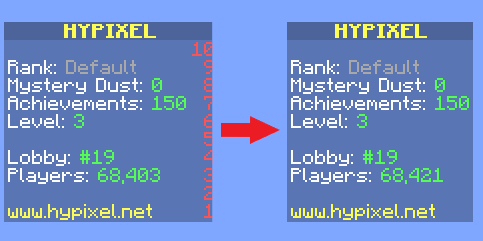
- Hide the sidebar completely
- Configure when to hide the scores/sidebar (always, never, or only if the scores are in consecutive order)
- Manually hide the sidebar using a configurable key-binding
- Set the sidebar position (horizontal and vertical) and scale
- Change the text colors and background colors
Requires CompleteConfig to be downloaded seperately.
To configurate the mod, either use the config file at config/uglyscoreboardfix.conf or open the ingame config via Mod Menu (requires Cloth Config).
Warning: This mod is incompatible with OptiFabric, I highly recommend to not use both mods at the same time. See here for Optifine alternatives.
- Edition: Minecraft Java
- File type: .jar
- Minecraft versions listed: 1.20.2, 1.20.1, 1.19.4
- How to install: Install the matching mod loader (Forge, Fabric or NeoForge) for your Minecraft version. → Download the .jar. → Put it in the .minecraft/mods folder and launch that loader profile.
- Where to get it: Opens on CurseForge — not every file is mirrored on our own servers.
Install steps are the general flow for this file type — How to install Minecraft Java mods & modpacks walks through it step by step.
- Ships as uglyscoreboardfix-2.10.1.jar — drop this file into the mods folder
- Download size: 26 KB
- Download link checked 14 Oct 2026 — working
These come from our own check of the pack file, not from the source page.