GUI Followers
Java mod listed for Minecraft 1.16–1.21. Downloads from the MC Java Mods app on Android.
I don't know my version or loader


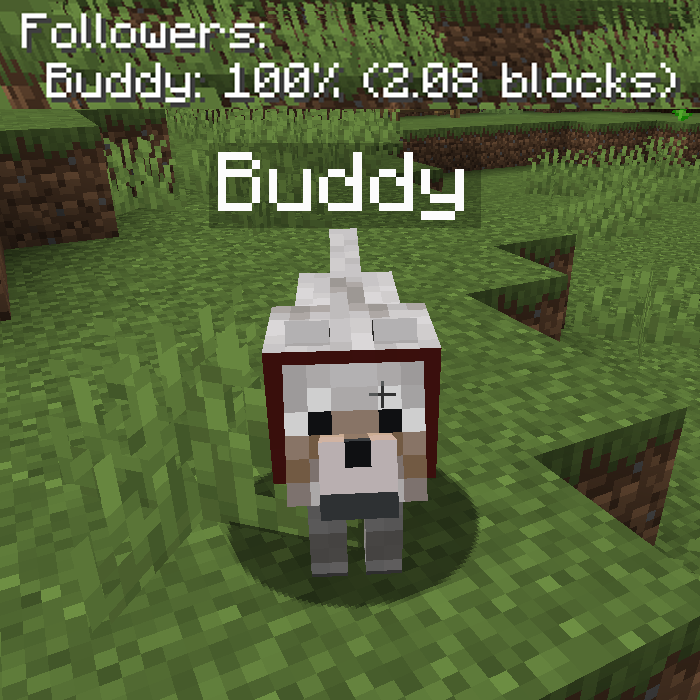
GUI Followers is a client-side mod which shows a list of all tamed non-sitting following mobs around the player. By default it also shows the health of the follower as a percentage, and how many blocks it is away from the player. Fully configurable! You'll never accidentally leave your wolf buddy behind.


All available config options:
followerListHeaderFormat default "Followers:"
The header text above the follower list.
showFollowerHealth default true
If enabled, shows the follower's health in the GUI list.
followerHealthFormat default "
<health>%"): The format of the health string in the GUI. <health> will be replaced by the percentage of total health.
showFollowerDistance default true
If enabled, shows the follower's distance in blocks to the player in the GUI list.
followerDistanceFormat default " (<distance> blocks
The format of the distance string in the GUI. <distance> will be replaced by distance in blocks.
distanceToCheckForFollowersAround default 50, min -1, max 300
The distance in blocks around the player where the mod checks for tamed, non-sitting followers to add to the list. A value of -1 disables this feature.
timeBetweenChecksInSeconds default 2, min 0, max 3600
The time in seconds in between checking for tamed, non-sitting followers around the player.
followerListPositionIsLeft default true
Places the follower list on the left.
followerListPositionIsCenter default false
Places the follower list in the middle.
followerListPositionIsRight default false
Places the follower list on the right.
followerListHeightOffset default 20, min 0, max 3000
The vertical offset (y coord) for the follower list. This determines how far down the list should be on the screen. Can be changed to prevent GUIs from overlapping.
drawTextShadow default true
If the text displayed should have a shadow drawn below it.
RGB_R default 255, min 0, max 255
The red RGB value for the text.
RGB_G default 255, min 0, max 255
The green RGB value for the text.
RGB_B default 255, min 0, max 255
The blue RGB value for the text.

The wolf named buddy shown in the GUI:
The wolf buddy is currently at 85% health. I did feel a little bad about testing this.
Sitting entities will not be added to the follower list.
Long distances are supported.
And last but not least, a GIF showing the feature:


You may freely use this mod in any modpack, as long as the download remains hosted within the CurseForge or Modrinth ecosystem.
Serilum.com contains an overview and more information on all mods available.
Comments are disabled as I'm unable to keep track of them across so many separate mod pages.
For issues, ideas, suggestions or anything else there is the Github repo. Thanks!
- Edition: Minecraft Java
- File type: .jar
- Minecraft versions listed: 1.21.11, 1.21.10, 1.21.9
- How to install: Install the matching mod loader (Forge, Fabric or NeoForge) for your Minecraft version. → Download the .jar. → Put it in the .minecraft/mods folder and launch that loader profile.
- Where to get it: Opens on CurseForge — not every file is mirrored on our own servers.
Install steps are the general flow for this file type — How to install Minecraft Java mods & modpacks walks through it step by step.
- Ships as guifollowers_1.19.3-2.1.jar — drop this file into the mods folder
- Download size: 14 KB
- Download link checked 14 Oct 2026 — working
These come from our own check of the pack file, not from the source page.