
Better Controls
Java mod listed for Minecraft 1.16–1.21. Downloads from the MC Java Mods app on Android.
New ways to control sprinting, sneaking, and flying. Reimagining of Better Sprinting built for Fabric and Forge.
I don't know my version or loader
Better Controls is a reimagining of Better Sprinting with even more customizability. It features several new keybindings and many configurable options for how sprinting, sneaking, and flying should behave.
Better Controls only focuses on complementing vanilla mechanics, rather than adding new mechanics (such as Better Sprinting's option to allow sprinting in all directions) that only work on client side and server owners must explicitly opt in to enable them. By not having such features in Better Controls, it significantly reduces complexity by not having a server side version of the mod, and not needing a way to completely disable the mod while the game is running.
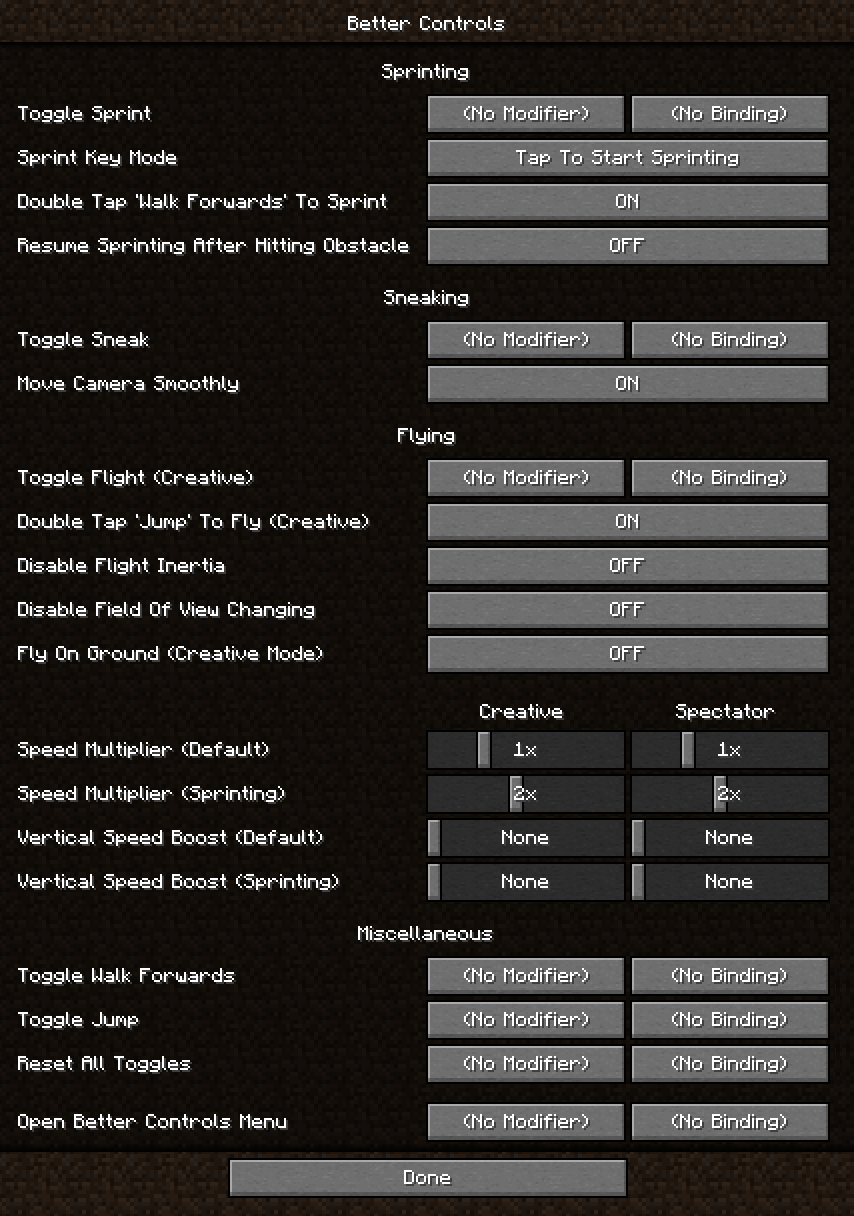
Another major difference is the amount and granularity of options. Better Controls could be considered an advanced controls mod - by default, none of the keybinds are bound, and all options are set to match vanilla behavior. To take full advantage, go into Options - Controls - Better Controls, check out all of the available options, and figure out the best configuration for you.
Features
The mod adds Toggle Keybinds for sprinting, sneaking, flying (creative mode), walking, and jumping. You can use modifier keys (Control / Shift / Alt) for each, including for example setting Control to Sneak, and Control + Y to Toggle Sneak. If you press the original key, the toggle will be canceled (in the previous example, you can Toggle Sneak by pressing Control + Y, and stop sneaking by simply tapping Control). Note that the vanilla options for toggling sprinting/sneaking are disabled to avoid conflicts with the custom keybinds.
You can also bind a key that resets all Toggle Keybinds at once. That makes it easy to for ex. turn on walking, jumping, and sprinting, and then turn all of them off again by pressing one key instead of three.
Sprinting
- Sprint Key Mode changes how the Sprint key behaves. You can choose between Tap To Start Sprinting, Tap To Start / Stop Sprinting, and Hold To Sprint.
- Double Tap 'Walk Forwards' To Sprint can be turned off.
- Resume Sprinting After Hitting Obstacle re-activates sprinting once you are no longer touching any blocks.
Sneaking
- Move Camera Smoothly can be turned off to disable the smooth movement when sneaking or unsneaking.
Gliding
- Start a Glide with a dedicated key.
- Double Tap 'Jump' To Glide can be turned off.
Flying
- Double Tap 'Jump' To Fly can be turned off.
- Flight Inertia Multiplier changes how quickly you stop moving in the air when you stop holding movement keys.
- Disable Field Of View Changing prevents sprinting, potions, and other factors from changing the FOV while flying in creative and spectator mode.
- Fly On Ground lets you fly while touching the ground in creative mode. Stop flying by tapping Sneak while touching the ground.
- Flight Speed Multiplier (0.25x - 8x) changes flight speed in creative and spectator mode.
- Vertical Speed Boost (up to +300%) adds additional vertical flight speed boost in creative and spectator mode.
Both speed boosts can be configured separately for sprinting, which will be active when the Sprint key is held. Unlike in vanilla, the sprinting flight boost works in all directions.
Installation
The following mod loaders are supported:
After you install the mod loader of your choice, download the mod and place the .jar file into .minecraft/mods.
Minecraft Updates
The mod will attempt to load on new versions of Minecraft (including snapshots) as they come out. I made it that way so that if the mod works on a newly released version of Minecraft without any changes, I can simply mark it as compatible and you don't have to wait for an update.
While this is convenient, there is potential for bugs which can affect server play. If you plan to use the mod on a server, please always use the latest version of the mod, and wait until I either mark the version as compatible with new Minecraft updates, or release a new version of the mod that is marked as compatible.
Compatibility
- Better Controls is a client-side mod, it will do nothing when installed on a server.
- If you run into a conflict with another mod that modifies the Controls screen, hold Alt while opening Controls to prevent Better Controls from adding its button. If another mod prevents the button from appearing, a button to open the mod's configuration is available in the Mods menu (for Fabric, install Mod Menu).
Screenshot
- Edition: Minecraft Java
- File type: .jar
- Minecraft versions listed: 1.21.11, 1.21.9, 1.21.10
- How to install: Install the matching mod loader (Forge, Fabric or NeoForge) for your Minecraft version. → Download the .jar. → Put it in the .minecraft/mods folder and launch that loader profile.
- Where to get it: Opens on CurseForge — not every file is mirrored on our own servers.
Install steps are the general flow for this file type — How to install Minecraft Java mods & modpacks walks through it step by step.
- Ships as BetterControls-Forge-1.20+v1.3.0.jar — drop this file into the mods folder
- Download size: 91 KB
- Download link checked 23 Sept 2026 — working
These come from our own check of the pack file, not from the source page.