
Eric's Retail
Java mod listed for Minecraft 1.16–1.19. Downloads from the MC Java Mods app on Android.
I don't know my version or loader
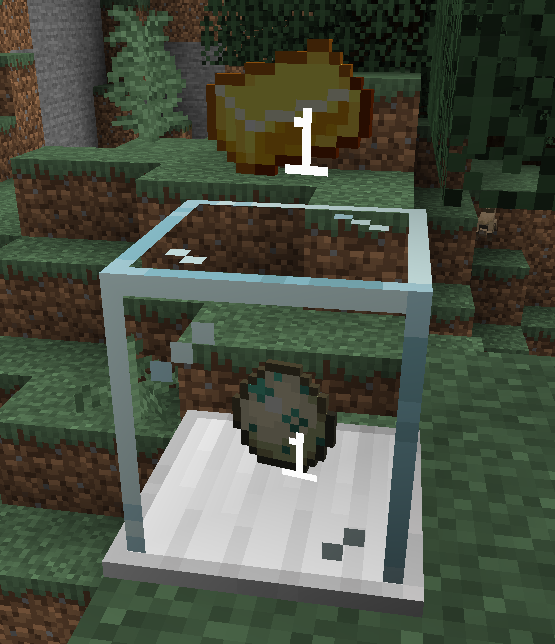
The Vending Block allows players to easily accept item trades.
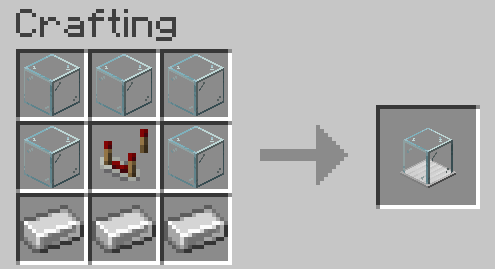
Crafting
How to Use
To set up a Vending Block, place it on the ground and right-click to open a menu. The player that placed it is the only player that can open the configuration/inventory.
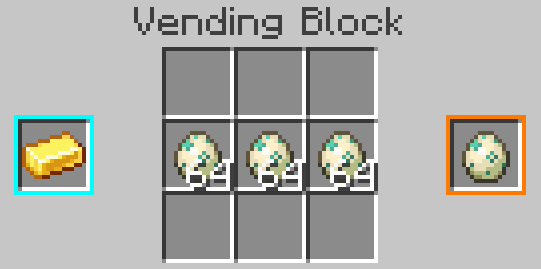
The blue slot on the left is the stack accepted for trade, and the orange slot on the right is the stack that will be returned to the customer. These slots don't consume items, but can be clicked with a stack to set them.
In the center is the inventory of the block, which should contain the stock of items to distribute. Items paid by users will also appear here, so make sure to leave space for them.
Once configured, players can exchange items by right-clicking on the block with the required item in hand.
Creative Vending Block
A variant of the Vending Block, this item is not craftable and meant to be used by server admins. It has no inventory, and will infinitely allow the configured trade.
Exposed Vending Block
A variant of the Vending Block that can interact with item transport (e.g. hoppers). Note that this weakens the security of the block, as other players could extract items.
Contact
- Edition: Minecraft Java
- File type: .jar
- Minecraft versions listed: 1.19, 1.17.1, 1.18.1
- How to install: Install the matching mod loader (Forge, Fabric or NeoForge) for your Minecraft version. → Download the .jar. → Put it in the .minecraft/mods folder and launch that loader profile.
- Where to get it: Opens on CurseForge — not every file is mirrored on our own servers.
Install steps are the general flow for this file type — How to install Minecraft Java mods & modpacks walks through it step by step.
- Ships as Retail-mc1.16-fabric-0.1.1.jar — drop this file into the mods folder
- Download size: 29 KB
- Download link checked 14 Oct 2026 — working
These come from our own check of the pack file, not from the source page.