
ItemZoom Rekindled
Java mod listed for Minecraft 1.16. Downloads from the MC Java Mods app on Android.
⬇ Download on CurseForgeThe author built this one for Minecraft 1.16–1.16.5 on Forge. On other versions it may install and then do nothing.
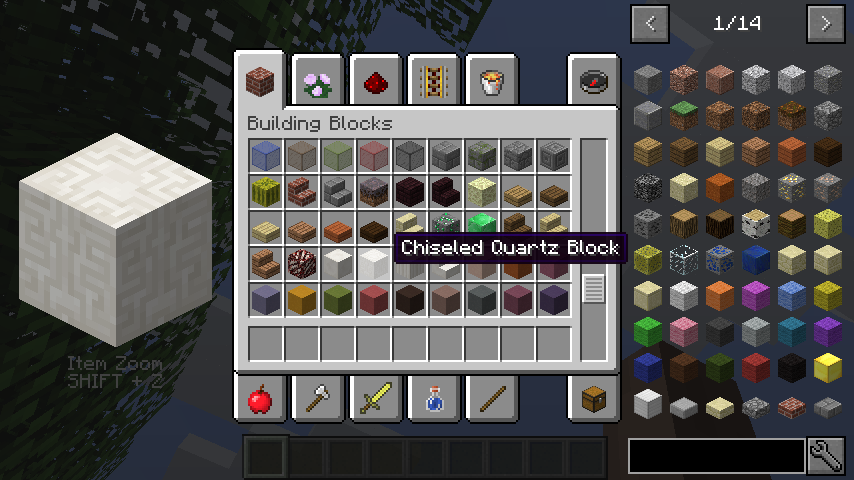
This client-side mod shows a big version of whatever item you hover over.
Great for builders looking for the right materials!
By default you can toggle it on and off with Shift + Z, which can be changed in the Minecraft controls.
There is also an unmapped keybinding you can use if you want to hold a button down to make it display.
You can change the zoom amount in the config or by setting the hotkeys for Zoom In and Zoom Out.

This mod is originally by mezz and available here, but it broke in recent versions so I fixed it according to his MIT license.
21st January 2021: It does appear that mezz updated his original mod again, but only to 1.16.4. This mod fork here will stay up to prevent mod(pack) rot and for the additional 1.16.5 version that is still not implemented in the original, but I'd say keep an eye on mezz' version and use it over this, once it's updated!
- Edition: Minecraft Java
- File type: .jar
- Minecraft versions listed: 1.16.3, 1.16.1, 1.16
- How to install: Install the matching mod loader (Forge, Fabric or NeoForge) for your Minecraft version. → Download the .jar. → Put it in the .minecraft/mods folder and launch that loader profile.
- Where to get it: Opens on CurseForge — not every file is mirrored on our own servers.
Install steps are the general flow for this file type — How to install Minecraft Java mods & modpacks walks through it step by step.
- Ships as itemzoom-1.16.x-2.2.1.jar — drop this file into the mods folder
- Download size: 23 KB
- Download link checked 14 Oct 2026 — working
These come from our own check of the pack file, not from the source page.