
ModsJava
World Defender
Minecraft Java mod. Downloads from the MC Java Mods app on Android.
⬇ Download on CurseForge



World Defender is world protecting mod. It is a modded equivalent of WorldGuard plugin. To work it need to be on Server and Client side.
If you want world protecting mod for newer version of Minecraft, use Yet Another World Protector mod by Zordak.
This mod is designed to protect designated areas from selected actions. The available list of flags is below and it will still grow.
If you have an idea for a new flag, leave a comment.
Command:
/worlddefender or /worldfend or /wdf
Needed permission:
- Server OP (lvl 4)
How to create a region and add flags into it:
Creating regions:
1) Take the "Region Wand" from Tools tab in creative mode,
2) Mark 2 points diagonally (like in WorldGuard),
3) (Optional) Type "/wdf expand-vert" to expand region vertically,
4) With "Region Wand" in hand type the "/wdf rg define <regionName>" command.
Adding flags:
1) Type "/wdf flag list" command to get all flags list,
2) Type "/wdf flag add <regionName> <flagToAdd>" command to add flag into region
Main help:
Regions help:
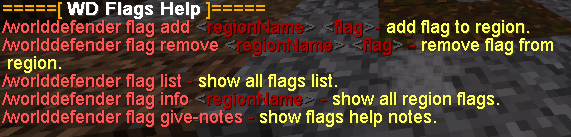
Flags help:
Flags list (v1.0.0):
In version 1.1.0:
- added "farmland-trample" flag
Flags notes:
Try out my other mods:
- Simple Flashlight Port
- GroundOres
- VPN Blocker
- DGWeapons
Or join to my Discord server: https://discord.gg/JAgyak99mt
This mod can be used without problems on a public Minecraft server.
Quick facts
- Edition: Minecraft Java
- File type: .jar
- How to install: Install the matching mod loader (Forge, Fabric or NeoForge) for your Minecraft version. → Download the .jar. → Put it in the .minecraft/mods folder and launch that loader profile.
- Where to get it: Opens on CurseForge — not every file is mirrored on our own servers.
Install steps are the general flow for this file type — How to install Minecraft Java mods & modpacks walks through it step by step.
File checked by MCModsHub
- Ships as worlddefender-1.1.0.jar — drop this file into the mods folder
- Download size: 45 KB
- Download link checked 4 Nov 2026 — working
These come from our own check of the pack file, not from the source page.