Forging Beyond
Java mod listed for Minecraft 1.16–1.18. Downloads from the MC Java Mods app on Android.
⬇ Download on CurseForgeThe author built this one for Minecraft 1.16–1.18.1 on Fabric. On other versions it may install and then do nothing.
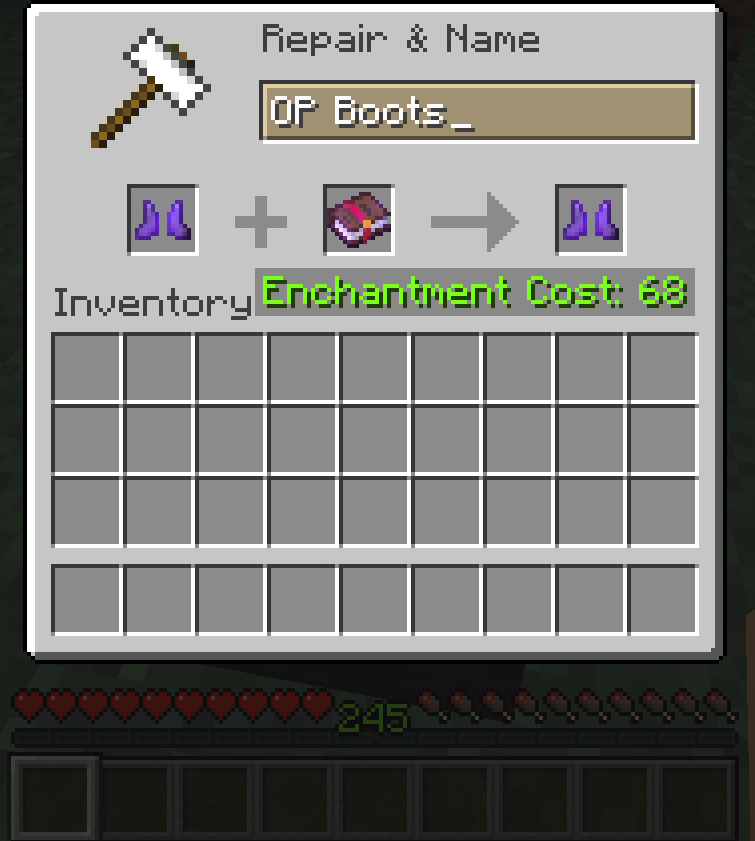
Tired of seeing "Too Expensive!" while forging the best items in the game? Then this mod is for you!
Forging Beyond mod allows you to change how expensive can forging items get before the anvil blocks you.
The mod features a config file in your minecraft directory, where you can set the number that's going to be the upper limit of the anvil.
This mod needs to be installed on both client and server to work properly in multiplayer!
Since version 0.0.2, Fabric API must also be installed!
After installing the mod, you must launch the game with it at least once for a config file to generate in your minecraft/config directory.
By default the mod will keep the level limit on 40, so you will have to edit the said config file if you wish to have it higher (or lower, that's possible too).
The mod was made using Fabric! The forge version is not planned, as I am unfamiliar with writting mods for Forge and the mod itself depends heavily on Fabric API as of 0.0.2.
GitHub page: https://github.com/Xtreme533/Forging-Beyond
- Edition: Minecraft Java
- File type: .jar
- Minecraft versions listed: 1.17.1, 1.16.3, 1.16.1
- How to install: Install the matching mod loader (Forge, Fabric or NeoForge) for your Minecraft version. → Download the .jar. → Put it in the .minecraft/mods folder and launch that loader profile.
- Where to get it: Opens on CurseForge — not every file is mirrored on our own servers.
Install steps are the general flow for this file type — How to install Minecraft Java mods & modpacks walks through it step by step.
- Ships as forging-beyond-0.0.2+1.16-1.17.jar — drop this file into the mods folder
- Download size: 27 KB
- Download link checked 14 Oct 2026 — working
These come from our own check of the pack file, not from the source page.