ModsJava
RPG Backpacks
Java mod listed for Minecraft 1.16–1.21. Downloads from the MC Java Mods app on Android.
I don't know my version or loader
Open the Minecraft launcher and look at the profile you play on — it names both, like fabric-loader-1.21.4. The version also shows in the bottom-right corner of the game's main menu.
No loader in the profile name? Then it's plain Minecraft, and these mods won't run — you need Fabric or NeoForge installed first.
RPG Backpacks




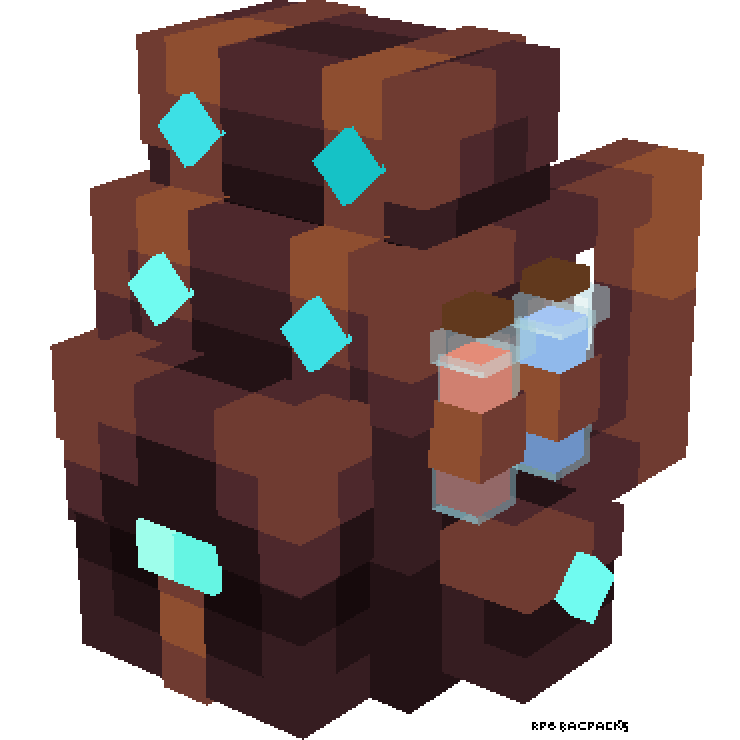
RPG Backpacks adds wearable backpacks with different storage capacities to your Minecraft adventures. Carry more items, organize your inventory, and look stylish while exploring the world!
✨ Features
- Tiered Backpacks:
- Leather Backpack: 18 Slots (2 Rows)
- Iron Backpack: 27 Slots (3 Rows)
- Golden Backpack: 36 Slots (4 Rows)
- Diamond Backpack: 45 Slots (5 Rows)
- Netherite Backpack: 54 Slots (6 Rows) & Fire Resistant!
- Wearable: Equip backpacks in your Chestplate slot or Curios Back slot (if installed).
- 3D Models: Custom, detailed 3D models when worn on your back.
- Easy Access: Open your backpack with a keybind (Default:
B). - Convenient Tooltips: Hover over a backpack to see a preview of its contents without opening it.
📥 Installation
- Download Minecraft.
- Install modloader.
- Download the latest version of RPG Backpacks from Modrinth or CurseForge.
- (Optional but Recommended) Install Curios API to wear backpacks without replacing your armor.
- Place the
.jarfile in yourmodsfolder. - Launch the game and enjoy!
🎮 Usage
🛠️ Crafting Recipes
| Item | Ingredients | Recipe Type |
|---|---|---|
| Leather Backpack | 8x Leather + 1x Chest | Crafting Table (Surround) |
| Iron Backpack | 8x Iron Ingots + 1x Leather Backpack | Crafting Table (Surround) |
| Golden Backpack | 8x Gold Ingots + 1x Iron Backpack | Crafting Table (Surround) |
| Diamond Backpack | 8x Diamonds + 1x Golden Backpack | Crafting Table (Surround) |
| Netherite Backpack | 1x Netherite Ingot + 1x Diamond Backpack + 1x Netherite Upgrade Smithing Template | Smithing Table |
[!TIP] Inventory Preservation: When upgrading a backpack, all contents are automatically transferred to the new tier!
🎒 How to Use
- Equipping: Place the backpack in your Chestplate slot or the Curios back slot.
- Opening:
- Right-click while holding the backpack in your hand.
- Press
B(configurable in controls) while the backpack is equipped. Reference priority: Worn > Main Hand > Off Hand.
- Preview: Hover over any backpack in your inventory to see a list of its contents.
🐛 Issues & Support
Found a bug? Have a suggestion?
- Report issues on GitHub.
- Join our Discord Community for support.
- Check the Wiki for detailed guides.
🔗 Links
- Author: Yigit Guven
- GitHub: yigit-guven/RPG-Backpacks
- Modrinth: rpg-backpacks
- CurseForge: RPG Backpacks
📜 License
This project is licensed under the GNU General Public License v3.0. See the LICENSE file for details.
Quick facts
- Edition: Minecraft Java
- File type: .jar
- Minecraft versions listed: 1.21.1, 1.20.1, 1.20.2
- How to install: Install the matching mod loader (Forge, Fabric or NeoForge) for your Minecraft version. → Download the .jar. → Put it in the .minecraft/mods folder and launch that loader profile.
- Where to get it: Opens on CurseForge — not every file is mirrored on our own servers.
Install steps are the general flow for this file type — How to install Minecraft Java mods & modpacks walks through it step by step.
File checked by MCModsHub
- Ships as rpgbackpacks-25kspecialversion-1.16.5.jar — drop this file into the mods folder
- Download size: 755 KB
- Download link checked 14 Oct 2026 — working
These come from our own check of the pack file, not from the source page.