ModsJava
Easy Hammers
Java mod listed for Minecraft 1.16–1.21. Downloads from the MC Java Mods app on Android.
I don't know my version or loader
Open the Minecraft launcher and look at the profile you play on — it names both, like fabric-loader-1.21.4. The version also shows in the bottom-right corner of the game's main menu.
No loader in the profile name? Then it's plain Minecraft, and these mods won't run — you need Fabric or NeoForge installed first.
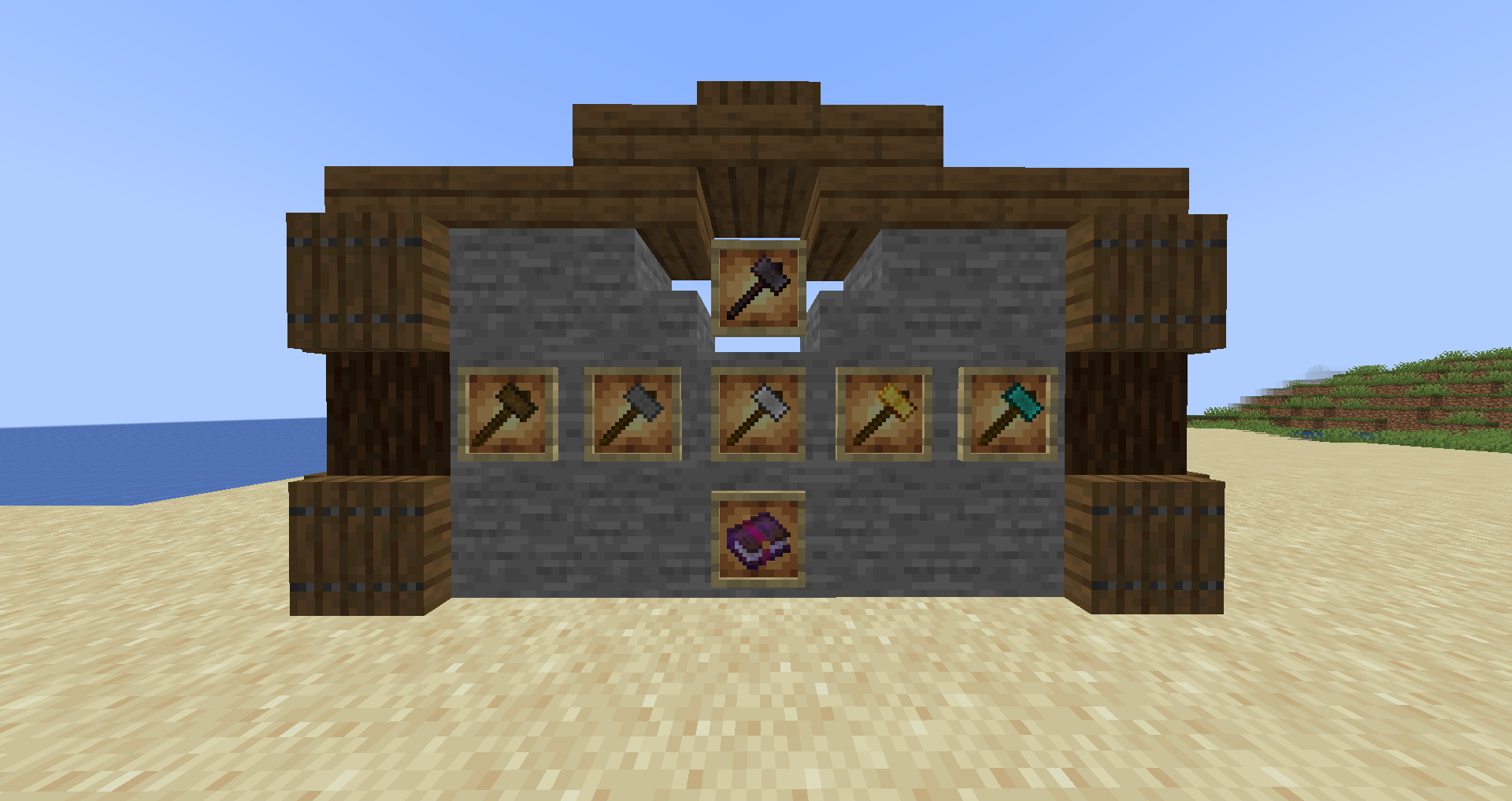





Easy Hammers enhances your Minecraft mining experience by adding a collection of powerful hammers that mine a 3x3 area at once. Say goodbye to tedious strip mining and hello to efficient excavation!
🔗 Links
| Platform | Link |
|---|---|
| 📥 CurseForge | Download Here |
| 📥 Modrinth | Download Here |
| 💬 Discord | Join Community |
| 🐛 Issues | Report Bugs |
| 📚 Wiki | Documentation |
| 💻 Source | GitHub Repo |
| 👤 Author | Yiğit Güven | Website |
✨ Features
- 3x3 Mining: Break 9 blocks with a single swing! Perfect for strip mining and large-scale excavation.
- Vanilla-Friendly Tiers: Progression mirrors vanilla tools, from Wooden to Netherite.
- Wooden Hammer: Early game clearing.
- Stone Hammer: Solid starter option.
- Iron Hammer: Reliable workhorse.
- Golden Hammer: Fast but fragile.
- Diamond Hammer: High durability and speed.
- Netherite Hammer: The ultimate mining tool.
- Balanced Gameplay: Hammers are "Heavy" tools. They swing slower than pickaxes but pack a punch with higher damage and ~4x durability to compensate for the area effect.
- Enchantments:
- Soil Breaker: Allows the hammer to also mine dirt, sand, gravel, and grass in the 3x3 area (normally only mines stone-like blocks).
- Smash: Chance to stun enemies for a short duration on critical hits, slowing them and reducing their damage.
- Configurable:
gamerule easyhammersSneakingMode: When true (default), sneak-mining mines only 1 block (precision mode).gamerule damageHammerByBlockCount: When true (default), durability is used for every block broken in the 3x3 area.
🛠️ Crafting
Craft a hammer using the standard pattern (similar to a pickaxe but "heavier"):
Recipe:
M M M
M S M
  S
(M = Material, S = Stick)
📦 Installation
- Download and install Modloader for Minecraft.
- Download the Easy Hammers mod jar from CurseForge or Modrinth.
- Place the jar file in your
.minecraft/modsfolder. - Launch Minecraft and enjoy!
👨💻 Building from Source
If you want to contribute or build the jar yourself:
- Clone the repository.
bash git clone https://github.com/yigit-guven/Easy-Hammers.git - Copy
gradle.properties.exampletogradle.properties. - (Optional) If your system Java is not Java 21, set
org.gradle.java.homeingradle.properties. - Run
./gradlew build. - The jar will be in
build/libs.
📜 License
This project is licensed under the GPL-3.0 License. See the LICENSE file for details.
❤️ Credits
- Author: Yiğit Güven
- Special Thanks: The Minecraft community for inspiration and support.
Quick facts
- Edition: Minecraft Java
- File type: .jar
- Minecraft versions listed: 1.20.1, 1.21.1, 1.19.2
- How to install: Install the matching mod loader (Forge, Fabric or NeoForge) for your Minecraft version. → Download the .jar. → Put it in the .minecraft/mods folder and launch that loader profile.
- Where to get it: Opens on CurseForge — not every file is mirrored on our own servers.
Install steps are the general flow for this file type — How to install Minecraft Java mods & modpacks walks through it step by step.
File checked by MCModsHub
- Ships as easy_hammers-7.0.2-fabric-1.20.1.jar — drop this file into the mods folder
- Download size: 219 KB
- Download link checked 14 Oct 2026 — working
These come from our own check of the pack file, not from the source page.