
Potion Tweaker
Minecraft Java mod. Downloads from the MC Java Mods app on Android.
⬇ Download on CurseForge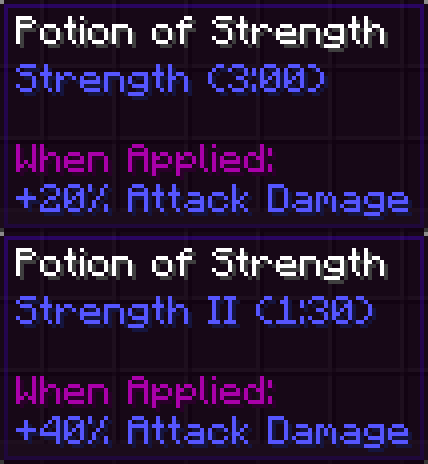
This mod allows you to tweak Minecrafts vanilla potion effects.
How to configure the mod:
- Navigate to your config folder and open the file "potiontweaker.cfg" on any text editor.
- The following example is on the strength potion effect (but applies to most of the potions within the game):
strength {
# How strong do you want it? [range: 0.0 ~ 10000.0, default: 3.0]
S:"Strength Modifier"=3.0
# By which operation should the modifier be applied? [range: 0 ~ 2, default: 0]
I:"Strength Operation"=0
}
The "Modifier" is the amount by which the respective attribute will be changed. The way it will be applied however depends on the "Operation".
The "Operation" tells the game how to apply the modifier to the base stat. Valid operations range from 0 to 2.
- Operation 0 will add the given Modifier to the base stat. It will increment by the value of the Modifier per potion level.
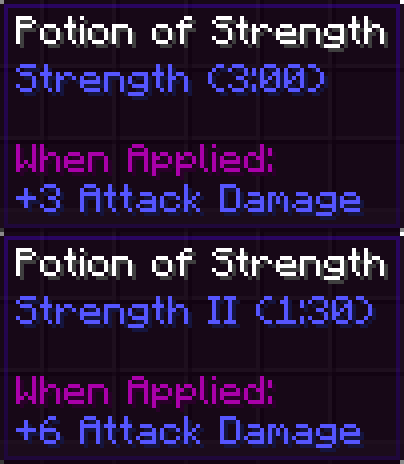
(Formula: Modified_Value = Base_Value + Modifier * Potion_Level) E.g. operation 0 with a modifier of 3.0 will increase your base attack damage by +3 per potion level.
- Operation 1 and 2 are multiplication (and although different in their nature they are in our case the same). It will increment by the value of the Modifier per potion level.
(Formula: Modified_Value = Base_Value + Base_Value * Modifier * Potion_Level) E.g. operation 1 with a modifier of 0.2 will increase your base attack damage by +20% per potion level. Note that your base damage is modified by the weapon you're wielding, thus will this example potion increase your weapons damage by +20% per potion level.
For some potions the game does not allow to alter their operations, such as regeneration or hunger. That is also why you won't find an inquiry for the operation for those potions within the config file.
For further reading see the minecraft wiki's attribute page.
- Edition: Minecraft Java
- File type: .jar
- How to install: Install the matching mod loader (Forge, Fabric or NeoForge) for your Minecraft version. → Download the .jar. → Put it in the .minecraft/mods folder and launch that loader profile.
- Where to get it: Opens on CurseForge — not every file is mirrored on our own servers.
Install steps are the general flow for this file type — How to install Minecraft Java mods & modpacks walks through it step by step.
- Ships as potiontweaker-1.2.jar — drop this file into the mods folder
- Download size: 11 KB
- Download link checked 14 Oct 2026 — working
These come from our own check of the pack file, not from the source page.