
ModsJava
MultiCoreLib
Java mod listed for Minecraft 1.16–1.19. Downloads from the MC Java Mods app on Android.
I don't know my version or loader
Open the Minecraft launcher and look at the profile you play on — it names both, like fabric-loader-1.21.4. The version also shows in the bottom-right corner of the game's main menu.
No loader in the profile name? Then it's plain Minecraft, and these mods won't run — you need Fabric or NeoForge installed first.
MULTITEAM PRESENTS

This Core/Library mod features coding utilities for forge modders.
Currently, we have:
- TeleportTool: A utility class for teleporting the player between dimensions (or in the same dimension) to a specific coordinate.
- MathF: Currently contains calculation utilities, such as scaling values which are useful for example in rendering (float value between 0 and 1 which represents a space inside a block. now you can use one of the functions in this class to transform your integer value between 0 and 16 to this float value.)
- ItemGroupTool: A class to make simple creative tabs easily.
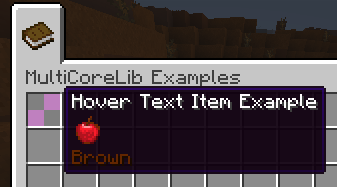
- ItemTooltipComponent: Makes it possible to draw items in a tooltip. let images speak instead of me:
0.0.1.7 and above:
- RegistrationTool: utility class filled with registration related functions that makes life easier.
- ItemManagementTool: currently there is only one function in there, to count a type of item inside an inventory (can count more than a stack)
0.2.2.1: With Minecraft 1.18, the bundle made us realize there's a better system to do the Item within item tooltip thing, so please read the documentation! [CLICK]
If you need further help, you can contact us on our Discord server! https://discord.gg/rudHdrJ
Quick facts
- Edition: Minecraft Java
- File type: .jar
- Minecraft versions listed: 1.19.2, 1.18.1, 1.18
- How to install: Install the matching mod loader (Forge, Fabric or NeoForge) for your Minecraft version. → Download the .jar. → Put it in the .minecraft/mods folder and launch that loader profile.
- Where to get it: Opens on CurseForge — not every file is mirrored on our own servers.
Install steps are the general flow for this file type — How to install Minecraft Java mods & modpacks walks through it step by step.
File checked by MCModsHub
- Ships as multicore_lib-1.19.2-0.4.0.jar — drop this file into the mods folder
- Download size: 152 KB
- Download link checked 14 Oct 2026 — working
These come from our own check of the pack file, not from the source page.