
Iconify
Java mod listed for Minecraft 1.16–1.17. Downloads from the MC Java Mods app on Android.
I don't know my version or loader
Introduction
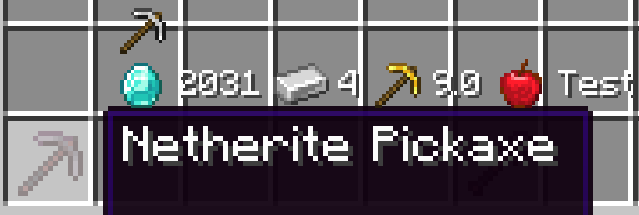
Iconify has one goal: make comparing items easier. It does so by adding additional information to the items' tooltips, but labels them with icons instead of text. For example, an items durability (max uses) is marked with a diamond, and the value is displayed after that.
Iconify replaces Equipment Tooltips. The name was changed because the mod is much more versatile now.
Screenshot of an early version (0.1.0)
API and Data Packs
New icons can be added with data packs. Likewise, mods can also add new icons and even new text functions, which allow custom information to be displayed next to the icon.
At the time of writing (before initial release), the API is very unstable. Expect major code changes in the future. Because of this, I will omit most information about it for now. The wiki on GitHub will contain more information once the API is more stable.
Icons
Icons check for items that match certain conditions and display themselves when their conditions match. Icons also have a texture and text function associated with them.
Text Functions
Text functions create text based on the item. For example, the food text function will show the hunger and saturation restored by food items. Icons will display the text produced next to their image.
- Edition: Minecraft Java
- File type: .jar
- Minecraft versions listed: 1.17.1, 1.16.3, 1.16.5
- How to install: Install the matching mod loader (Forge, Fabric or NeoForge) for your Minecraft version. → Download the .jar. → Put it in the .minecraft/mods folder and launch that loader profile.
- Where to get it: Opens on CurseForge — not every file is mirrored on our own servers.
Install steps are the general flow for this file type — How to install Minecraft Java mods & modpacks walks through it step by step.
- Ships as iconify-1.16.5-0.1.0.jar — drop this file into the mods folder
- Download size: 62 KB
- Download link checked 4 Nov 2026 — working
These come from our own check of the pack file, not from the source page.