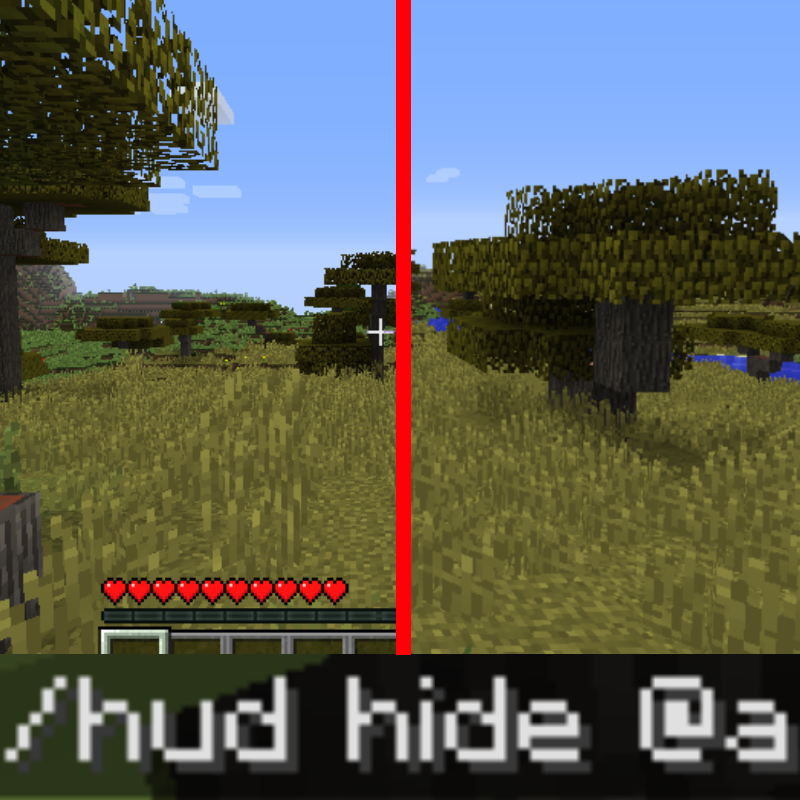
ENG:
This mod adds commands which allow to hide player's HUD
Sometimes while creating Minecraft maps there are cases where you want to hide HUD for the end player (just like when they press the F1 button), but there's no way to achieve that besides changing player's gamemode to spectator.
Thus I present you a mod which is able to hide player's HUD (arm, health bar, experience bar, slots and so on) via commands, this way you can use it with command blocks and other mods like CustomNPCS and Mappet. You can show and reveal HUD for multiple or one specific player. In addition, you can hide and show individual interface elements! The mod supports multiplayer.
AVAILABLE COMMANDS:
- /hud list -> shows a list of all interface elements
- /hud show -> displays the standard interface for all player
- /hud hide -> hides the entire interface for all players
- /hud show Player123 -> displays the standard interface for Player123
- /hud hide Player123 -> hides the entire interface for Player123
- /hud show only health,food -> hides the health bar and food bar for all players
- /hud show but health,food -> hides everything except the health bar and food bar for all players
- /hud show Player123 only health,food -> shows the health bar and food bar for the player Player123
- /hud show Player123 but health,food -> shows everything except the health bar and the food bar for Player123
RU:
Этот мод добавляет команды, с помощью которых можно спрятать интерфейс игрока.
Иногда при создании карт Minecraft бывают случаи, когда вы хотите скрыть интрефейс для конченого игрока, как при нажатии F1, вот только без переноса игрока в режим наблюдателя такое не провернуть. Поэтому представляю вам мод, способный прятать интерфейс посредством команд. Таким образом его можно использовать в командных блоках и других модах, по типу CustomNPCS или Mappet. Прятать интерфейс можно как для одного, так и для всех игроков. Кроме этого вы можете скрывать и показывать отдельные элементы интерфейса! Мод поддерживает мультиплеер.
ДОСТУПНЫЕ КОМАНДЫ:
- /hud list -> показывает список всех элементов интерфейса
- /hud show -> отображает стандартный интерфейс для всех игроков
- /hud hide -> скрывает весь интерфейс для всех игроков
- /hud show Player123 -> отображает стандартный интерфейс для игрока Player123
- /hud hide Player123 -> скрывает весь интерфейс для игрока Player123
- /hud show only health,food -> скрывает шкалу здоровья и шкалу еды всем игрокам
- /hud show but health,food -> скрывает всё, кроме шкалы здоровья и шкалы еды всем игрокам
- /hud show Player123 only health,food -> показывает шкалу здоровья и шкалу еды для игрока Player123
- /hud show Player123 but health,food -> показывает всё, кроме шкалы здоровья и шкалы еде для игрока Player123
Examples:


Complete list of hud elements
hand
bar
health
helmet
crosshair
oxygen
food
armor
bossbar
exp
tab
potion
sabtitle
title
lines
all
chat
inventory
- Edition: Minecraft Java
- File type: .jar
- How to install: Install the matching mod loader (Forge, Fabric or NeoForge) for your Minecraft version. → Download the .jar. → Put it in the .minecraft/mods folder and launch that loader profile.
- Where to get it: Opens on CurseForge — not every file is mirrored on our own servers.
Install steps are the general flow for this file type — How to install Minecraft Java mods & modpacks walks through it step by step.
Hide HUD Util is a free Minecraft Java mod. Downloaded 2,784 times (via CurseForge). Download it and open it directly in the game.