
Coffee+
Java mod listed for Minecraft 1.16–1.18. Downloads from the MC Java Mods app on Android.
I don't know my version or loader

Coffee+ adds coffee to Minecraft, the way coffee should be done.
Plants
Coffee Tree
Right-clicking the ground while holding raw coffee beans will plant a coffee tree. Over time it will grow, and right-clicking a fully-grown tree will give you between 1-3 raw coffee beans.
Coffee trees can spawn in any mountain or mutated extreme hill biome - but remember that you can only gather coffee by right-clicking a grown plant, destroying it won't drop anything.
Blocks
Coffee Machine
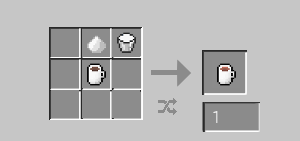
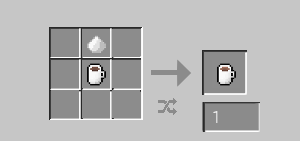
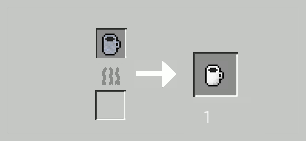
Coffee can be brewed by placing ground coffee within the top slot of a Coffee Machine, an empty mug within the bottom one, and pressing the "Brew" button. This will create a 'Full coffee mug', which can be crafted to create different coffee varieties, as listed below.
Coffee Grinder
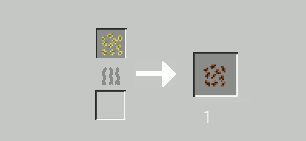
One of the ways that coffee beans can be ground is with a coffee grinder. The coffee grinder must be placed down and does not use up durability over time. To use the coffee grinder, place roasted coffee beans into the grinder and click 'Grind'.
Items
Coffee varieties:
After drinking any variety of coffee, an empty mug will be returned to you. Drinking coffee also applies some potion effects for a short amount of time. The potions and amounts of time vary depending on which coffee variant is drunk. These effects slowly wear off over time, e.g., giving you speed two before slowing it to speed one as the caffeine wears off. The insomnia effect is also applied, which will prevent sleeping after drinking coffee.
Full coffee mug
The Full coffee mug is obtained after using the coffee machine, details of how to do so are listed above.
Sugary Coffee
Milky coffee
Sugary milky coffee
Coffee beans:
Raw coffee beans
These are the raw coffee beans that you harvest from a coffee tree. Details of how to collect them are listed above, under the 'Coffee Tree' plant.
Roasted coffee beans
Raw coffee beans can be roasted in a furnace or a smoker, to obtain Roasted coffee beans. These can then be ground down using any variety of coffee grinders, for use in a Coffee machine.
Ground coffee
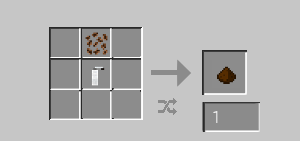
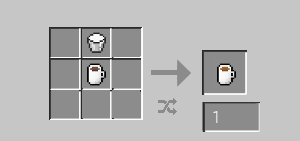
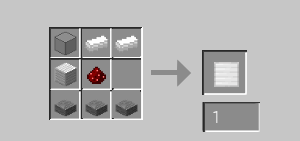
This can be crafted within a crafting grid using the hand grinder (as shown below), or by utilising the coffee grinder block (as shown above)
Mugs:
Clay mug
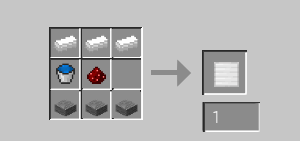
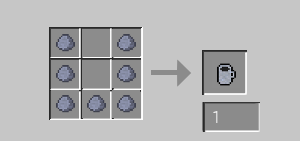
The coffee mug is obtained by gathering 7 clay and crafting a clay mug.
Empty coffee mug
The clay mug must be smelted in a furnace to 'harden' the clay, creating a coffee mug - the item used to hold coffee.
Other:
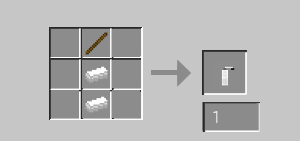
Hand grinder
Coffee beans can also be ground with a hand grinder. The hand grinder can be kept in your inventory and loses durability as you use it. To use the hand grinder, place the hand grinder and roasted coffee beans into any shape in a crafting grid. This will use up 1 durability, with a total of 16 uses.
- Edition: Minecraft Java
- File type: .jar
- Minecraft versions listed: 1.18.2, 1.16.5
- How to install: Install the matching mod loader (Forge, Fabric or NeoForge) for your Minecraft version. → Download the .jar. → Put it in the .minecraft/mods folder and launch that loader profile.
- Where to get it: Opens on CurseForge — not every file is mirrored on our own servers.
Install steps are the general flow for this file type — How to install Minecraft Java mods & modpacks walks through it step by step.
- Ships as coffeeplus_beta_8_ver1.18.2.jar — drop this file into the mods folder
- Download size: 348 KB
- Download link checked 14 Oct 2026 — working
These come from our own check of the pack file, not from the source page.