JinGames Notes and Tomes
Minecraft Java mod. Downloads from the MC Java Mods app on Android.
⬇ Download on CurseForge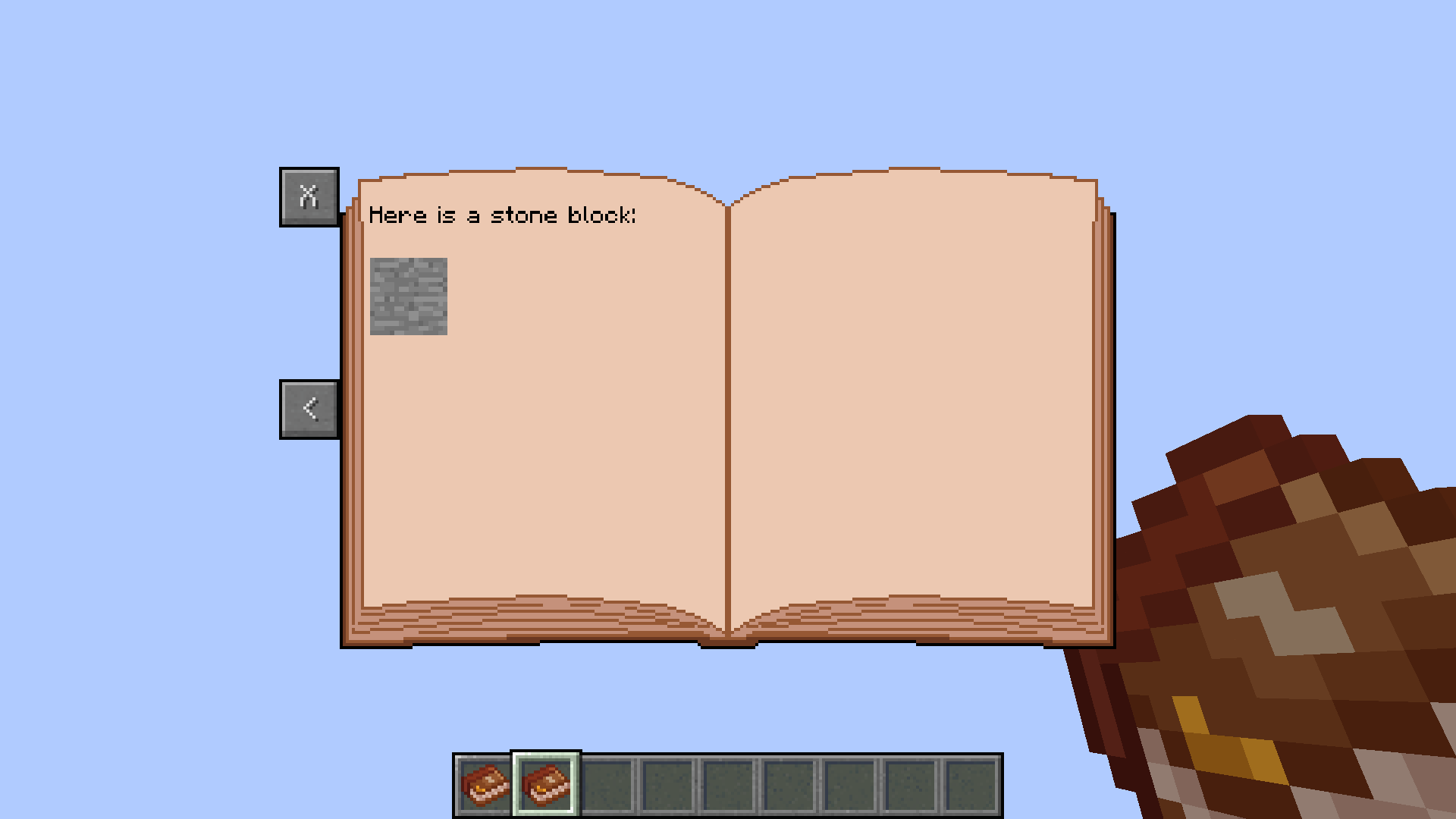
Notes and Tomes - Forge 1.7.10 Mod
A standalone mod that lets you create customizable books, mainly for servers.
Customization features:
- Add images from mods, or from the mod's folder (minecraft/jgnotesandtomes).
- Customize texture position, and size inside the image file.
- Format text.
- Resize everything.
Usage:
Creating a Book:
- (SERVERS ONLY) Create a Text file inside the "minecraft/jgnotesandtomes" folder. The name of the file will be the bookID and the page number. (For example a book with the ID "welcome" has to be titled "welcome_page1.txt" "welcome_page2.txt" etc...)
- Give yourself the book in-game using the command "/notesandtomes create @p welcome Welcome Message"
- (SERVERS ONLY) Edit the "welcome_page1.txt" file to your liking.
- Update the book's content using the command "/notesandtomes update welcome"
Command:
You have 3 command options: Create, Create missing, and Update.
Create: Gives a player a Book.
Create missing: Gives a player a Book IF he doesn't already have a book with the same bookID in his inventory.
Update: Updates all books with the set bookID. All admins are notified of the update.
Commands:
"notesandtomes create @p bookID BookTitle"
"/notesandtomes createmissing @p bookID BookTitle"
"/notesandtomes update bookID"
Example commands:
"/notesandtomes create @p welcome Tutorial to our Server!"
"/notesandtomes createmissing @p welcome Tutorial to our Server!"
"/notesandtomes update welcome"
Customization detailed:
Adding Images:
- Always use 1:1 Aspect ratio images, and try to mainly use a 256x256 image size.
- Images can have their XY position, and width,height be set like in the example below. The Width and Height isn't the Size of the image, but rather the width and height inside the image file.Code examples:
- Image from a minecraft: "(image=textures/blocks/stone;x=10;y=30;w=256;h=256)"
- Image from mod: "(image=jgnotesandtomes:book2)"
- Image from the "minecraft/jgnotesandtomes" folder: "(image=jgnotesandtomes/book2)"
Formatting Text:
- Minecraft MOTD codes work with the mod. (CHECK https://minecraft.fandom.com/wiki/Formatting_codes "Use in server.properties and pack.mcmeta" part for codes)Code examples:
- Color with black text: "\u00A70"
- Bold text: "\u00A71"
- Reset formatting: "\u00A7r"
Resizing:
- The default size is 100.Code examples:
- 100% text and image size: "(size=100)"
- 50% text and image size: "(size=50)"
Example Book:
Server side:
Page 1:
Filename should be "welcome_page1.txt"
Text File Content:
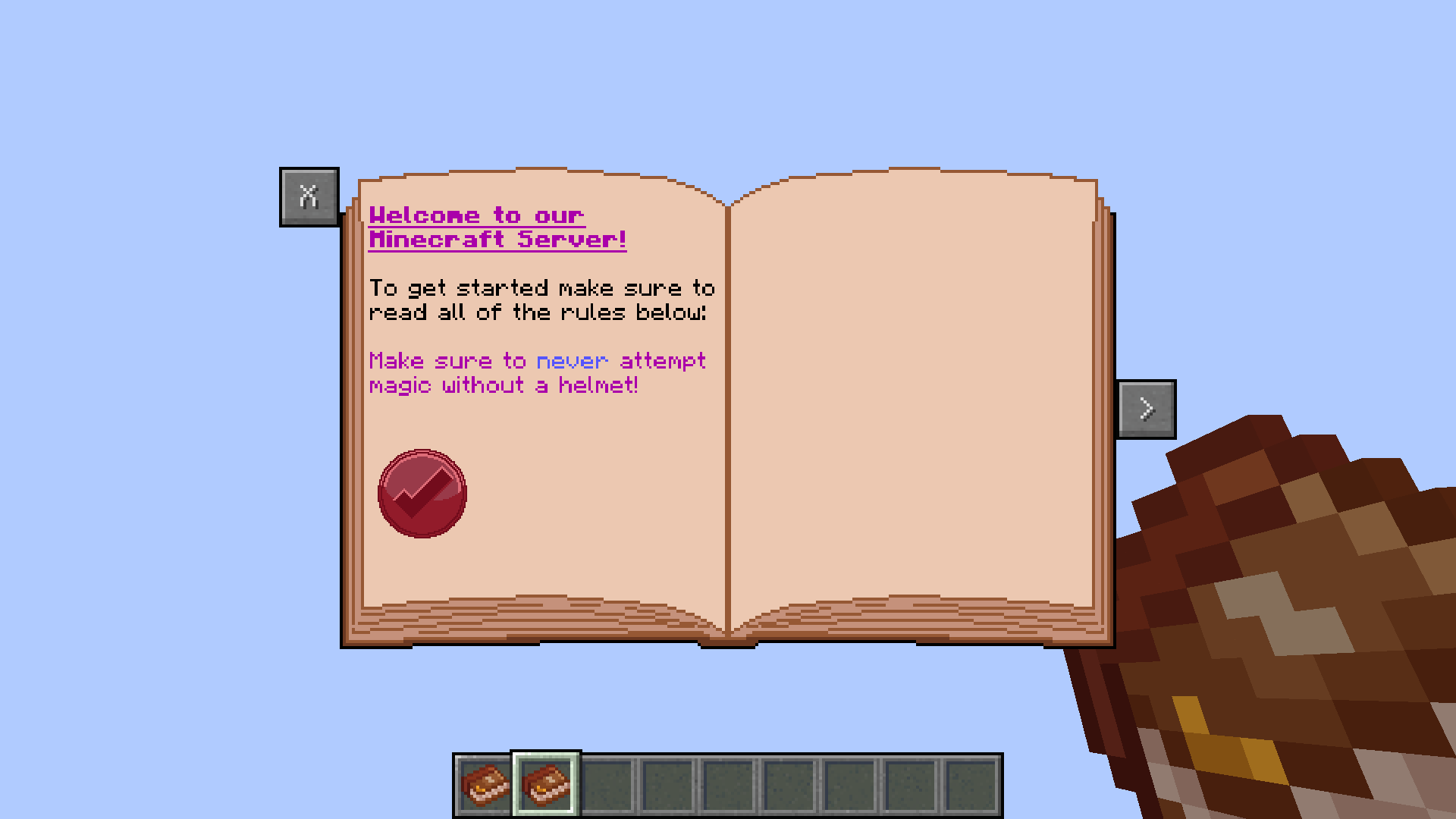
(size=100)
(image=jgnotesandtomes:book2)
(size=80)
\u00A75\u00A7n\u00A7lWelcome to our
Minecraft Server!
\u00A7rTo get started make sure to
read all of the rules below:
\u00A75Make sure to \u00A79never \u00A75attempt
magic without a helmet!
(size=50)
(image=jgnotesandtomes/stamp;x=10;y=90;w=80;h=70)
Page 2:
Filename should be "welcome_page2.txt"
Text File Content:
(size=100)
(image=jgnotesandtomes:book2)
(size=80)
\u00A7rHere is a stone block:
(size=10)
(image=textures/blocks/stone;x=10;y=30;w=256;h=256)
Client side:
Download this texture, and rename it to "stamp.png":

Common Question(s):
Q: Will the mod be updated to a newer Forge version?
A: I mostly quit Modding already so I doubt that.
Credits:
- Creator: Benjámin "JinGames_Ben" Nagy
Donate:
OUR PATREON: patreon.com/JinRyuu
SERVER DONATION: JinGames DBC Zero S Minecraft Server

JinGames is Sponsored by BisectHosting!
Need a Minecraft Server? BisectHosting is a super easy to use Server Hosting provider!
Use our Link and promo code JinGames to get 25% OFF your first month.
|
|

|
|
|


- Edition: Minecraft Java
- File type: .jar
- How to install: Install the matching mod loader (Forge, Fabric or NeoForge) for your Minecraft version. → Download the .jar. → Put it in the .minecraft/mods folder and launch that loader profile.
- Where to get it: Opens on CurseForge — not every file is mirrored on our own servers.
Install steps are the general flow for this file type — How to install Minecraft Java mods & modpacks walks through it step by step.
- Ships as JinGamesNotesAndTomes-v1.0.0.jar — drop this file into the mods folder
- Download size: 44 KB
- Download link checked 14 Oct 2026 — working
These come from our own check of the pack file, not from the source page.