
Not Enough Experience
Java mod listed for Minecraft 1.16–1.20. Downloads from the MC Java Mods app on Android.
I don't know my version or loader
Not Enough Experience
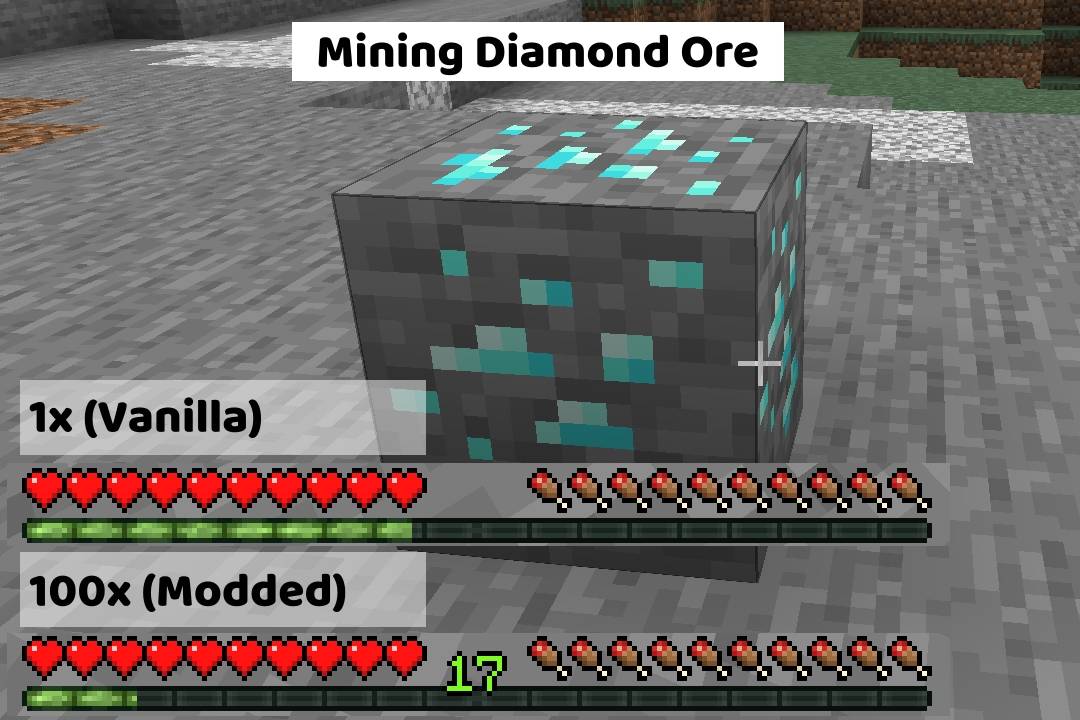
Adds configurable multipliers to various xp sources.
See the Github ReadMe for a better reading experience.
Configuration
The multipliers can be edited in the server config file. Scroll down to see the "Locating the Config File" section if your having trouble finding it.
Once opened, it should look something like this:
🟡Use Global Modifier?
This setting is to let the game/mod know which option you want to use.
- If you want to use the global modifier, set it to true and it will use the global modifier and ignore all individual modifiers
- If you want to use the individual modifiers, set it to false and it will use the individual modifiers and ignore the global modifier
This value can only be true or false. Default: true
🟢Global Multiplier
This multiplier is just for convenience. If you plan on using the same number for every category, you can just use this multiplier instead.
This value can be any number between 0 and 1000000 (one million). Default: 1.0
🔵Individual Multipliers
These multipliers are used for more fine tuning over the xp drops. It is broken down into 9 categories:
- Mining Ores
- Killing Mobs
- Smelting
- Trading
- Breeding
- Fishing
- Throwing Enchanting Bottles
- Getting Advancements
- Using The Grindstone
These values can be any number between 0 and 1000000 (one million). Default: 1.0
Locating the Config File
The config file will get generated when the world gets created, so make sure to do that first before trying the next steps. The name of the file your looking for is notenoughexperience-server.toml
While in game you can enter the command
/config showfile notenoughexperience SERVER- This will send a clickable link to the file in the in-game chat (if the file exists). Example
If the file doesnt exist (for example, if you're on a server), you will need to manually navigate to the file location.
- Look for a folder named
saves, then just clicksaves>YourWorldName>serverconfigand you should see the file listed there
- Look for a folder named
Recommended Mods
These mods arent required, but I think they pair really well with this mod.
Clumps
- If you plan on using this mod to increase the xp dropped to insane amounts, I highly recommend installing this mod. It will not only help with the lag, but also reduce the time you are waiting to "soak up" the xp (without this mod, it can be several minutes if you have really high multipliers)
Configured
- Configured (and similar mods) will make editing the config a breeze and allow you to edit the file in-game
- Edition: Minecraft Java
- File type: .jar
- Minecraft versions listed: 1.20.1, 1.16.5, 1.19.3
- How to install: Install the matching mod loader (Forge, Fabric or NeoForge) for your Minecraft version. → Download the .jar. → Put it in the .minecraft/mods folder and launch that loader profile.
- Where to get it: Opens on CurseForge — not every file is mirrored on our own servers.
Install steps are the general flow for this file type — How to install Minecraft Java mods & modpacks walks through it step by step.
- Ships as notenoughxp-1.19.3-1.0.0-fabric.jar — drop this file into the mods folder
- Download size: 36 KB
- Download link checked 14 Oct 2026 — working
These come from our own check of the pack file, not from the source page.