Locator Heads (Neoforge)
Java mod listed for Minecraft 1.21. Downloads from the MC Java Mods app on Android.
⬇ Download on Modrinth





Locator Heads NeoForge
is a client-side Minecraft mod that displays nearby players as heads on your XP bar, making it easy to track their location and direction at a glance. Customize colors, borders, filtering options, and add a compass overlay to enhance your multiplayer experience.
Note: This is the official NeoForge port of the original Fabric mod, maintained by Roostyk.

▬▬▬▬▬▬▬▬▬▬▬▬▬▬▬▬▬▬▬▬▬▬▬▬▬▬▬▬▬▬▬▬▬▬▬▬▬▬▬▬▬▬▬▬

▬▬▬▬▬▬▬▬▬▬▬▬▬▬▬▬▬▬▬▬▬▬▬▬▬▬▬▬▬▬▬▬▬▬▬▬▬▬▬▬▬▬▬▬

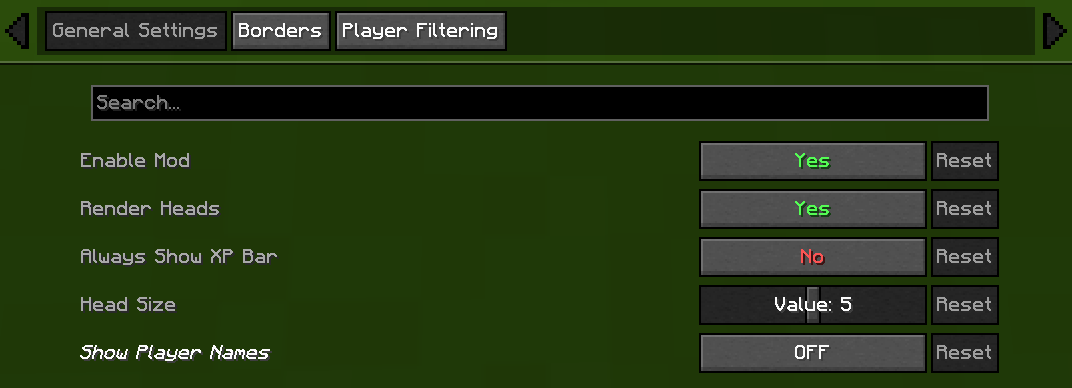
🎭 General Settings
- Enable/Disable Mod Chose weather or not mod is on or off.
- Render Heads Choose if you want heads to be rendered (can be used to only show names)
- Always show XP bar
- Head Size Change the size of the heads
- Show Player Names
| Player Name Option | Description |
|---|---|
| Never | No names on the locator bar. (default) |
| Always | Names permanently visible above all player heads. |
| Looking At | Names appear only when you look within a 30° |
| Player List | Names show when the in-game player list is open. |
▬▬▬▬▬▬▬▬▬▬▬▬▬▬▬▬▬▬▬▬▬▬▬▬▬▬▬▬▬▬▬▬▬▬▬▬▬▬▬▬▬▬▬▬

▬▬▬▬▬▬▬▬▬▬▬▬▬▬▬▬▬▬▬▬▬▬▬▬▬▬▬▬▬▬▬▬▬▬▬▬▬▬▬▬▬▬▬▬
▬▬▬▬▬▬▬▬▬▬▬▬▬▬▬▬▬▬▬▬▬▬▬▬▬▬▬▬▬▬▬▬▬▬▬▬▬▬▬▬▬▬▬▬
🧭 Compass
- Show Compass Toggle the compass overlay on or off
- Compass Colour Customize the color of the compass direction letters using hex color picker
- Compass Shadow Toggle black outline around compass letters for better visibility
▬▬▬▬▬▬▬▬▬▬▬▬▬▬▬▬▬▬▬▬▬▬▬▬▬▬▬▬▬▬▬▬▬▬▬▬▬▬▬▬▬▬▬▬

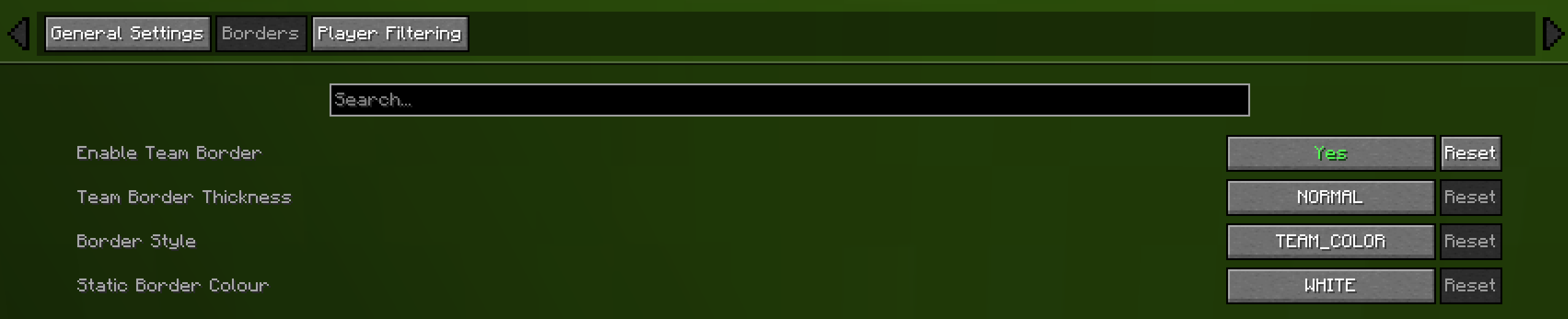
🎨 Borders
- Enable Border If enabled the border is on
- Border Thickness How many pixels thick the border should be
- Border Style Can be eithere "TEAM_COLOUR" or "STATIC_COLOUR"
- Static Border Colour Choose what colour the static border will have

▬▬▬▬▬▬▬▬▬▬▬▬▬▬▬▬▬▬▬▬▬▬▬▬▬▬▬▬▬▬▬▬▬▬▬▬▬▬▬▬▬▬▬▬
🎯 Advanced Player Filtering
choose who appear on your locator bar:
- All Players (default)
Shows everyone. - Include Only
Display only the players listed in your filter. - Exclude Only
Hide only the players listed, showing all others.
Filter Syntax
- Separate names by commas (
,), semicolons (;), colons (:), or periods (.).
Example:
Jeb_, Dinnerbone; LadyAgnes

🔗 Dependencies
Required
Optional (Recommended)
👥 Credits
- NeoForge Port: [Roostyk]
- Original Head Rendering Concept & Code: MCRcortex and their mod facebar
- Original Mod Creator: Haage
- Update Help:
- Always show XP bar: TechPro424
- Static border: Starrider37
- Compass: Zedaph
- Edition: Minecraft Java
- File type: .jar
- Minecraft versions listed: 1.21.7, 1.21.8, 1.21.9
- How to install: Install the matching mod loader (Forge, Fabric or NeoForge) for your Minecraft version. → Download the .jar. → Put it in the .minecraft/mods folder and launch that loader profile.
- Where to get it: Opens on Modrinth — not every file is mirrored on our own servers.
Install steps are the general flow for this file type — How to install Minecraft Java mods & modpacks walks through it step by step.
- Ships as locator-heads-1.6.3.jar — drop this file into the mods folder
- Download size: 30 KB
- Download link checked 15 Oct 2026 — working
These come from our own check of the pack file, not from the source page.