
ViveInterFace
Java mod listed for Minecraft 1.21. Downloads from the MC Java Mods app on Android.
have you ever been annoyed that you cant change the position of the minecraft hud in VR Whereever you wanted to for example a map to your'e hand or jade…
⬇ Download on Modrinth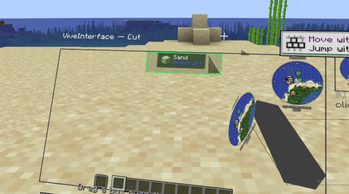
ViveInterface
Bring parts of the Vivecraft HUD into your VR world.
What does this mod do?
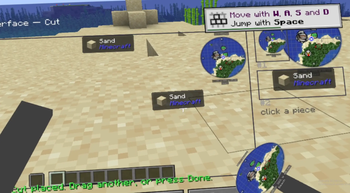
ViveInterface lets you cut individual sections out of the Vivecraft HUD and place them anywhere in VR — on your hands, on your head, or floating in the world. Instead of keeping every UI element locked to one flat panel in front of you, you can put important information where it feels natural.
Cut pieces keep mirroring the live HUD, so a minimap on your wrist stays up to date, and the region you cut is hidden from the flat panel so nothing is drawn twice.
How to use it
- Open the cut screen. Press N on the keyboard, or — for VR — add ViveInterface's Open cut screen key to Vivecraft's radial menu, which is how you reach it in a headset.
- Drag a box over the HUD with the pointer and press Cut. That region lifts out as a floating panel in front of you. Cut as many as you like, then press Done.
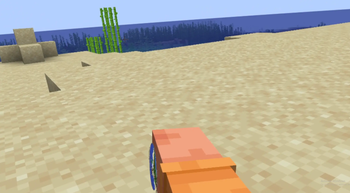
- Move pieces with your hands. Reach a hand into a piece — it turns green — and squeeze to grab it. Let go and it stays put. Let go touching your other hand or your head and it sticks there and follows you. Reach across with the other hand to take it back off.
Pieces also lie flat against walls and floors instead of sinking into them, and stick to each other, so you can build a multi-panel dashboard that moves as one.
Currently supported attachment points
- 🖐️ Left hand
- 🖐️ Right hand
- 👤 Head
- 🧱 Any block surface
- 🔗 Other cut pieces
Support for additional body locations is planned. Waist, elbows, knees and feet.
Notice
- AI was used in the development of this mod.
- VR is needed for this mod function even though it wokrs with flat screen as of now but its not intended to be on flat screen use its mostly for debugging
- This is a beta. It works end to end, but expect rough edges.
- Detached panels mirror the Vivecraft HUD in real time. The cost is one framebuffer copy per frame while VR is active — this is roughly the same whether you have one panel or ten, since each panel itself is only a single textured quad. On lower-end machines that per-frame copy may still cost you some frames.
- Hardware used in testing:
- AMD Ryzen 5 3600 (6-core)
- 32 GB DDR4 RAM
- NVIDIA GeForce RTX 4060 Ti VR is needed for this mod function
Features
- Cut any region out of the Vivecraft HUD — minimaps, Jade, hotbar, health, anything that draws there
- Attach pieces to your hands or head, or leave them floating in the world
- Pieces snap flat to block surfaces and can stick to each other
- Grab and reposition pieces with your VR hands
- Placed pieces persist through restarts
- Configurable background colour, sizes and glue distances via Mod Menu
Requirements
- Minecraft 1.21.4 (client-side only — nothing to install on the server)
- Fabric Loader 0.16.0+ and Fabric API
- Vivecraft for 1.21.4
- Java 21
- Optional: Mod Menu + Cloth Config for the settings screen
Planned features
- Additional body attachment points
- More customization options
- Improved positioning and scaling controls
- Cut regions would hide from the flat HUD panel so nothing would renders twice
If you encounter any issues or have suggestions, please open an issue on the project's GitHub page.
- Edition: Minecraft Java
- File type: .jar
- Minecraft version listed: 1.21.4
- How to install: Install the matching mod loader (Forge, Fabric or NeoForge) for your Minecraft version. → Download the .jar. → Put it in the .minecraft/mods folder and launch that loader profile.
- Where to get it: Opens on Modrinth — not every file is mirrored on our own servers.
Install steps are the general flow for this file type — How to install Minecraft Java mods & modpacks walks through it step by step.
- Ships as viveinterface-1.0.0-beta.jar — drop this file into the mods folder
- Download size: 68 KB
- Download link checked 24 Sept 2026 — working
These come from our own check of the pack file, not from the source page.