
Offers+
Java mod listed for Minecraft 26.x. Downloads from the MC Java Mods app on Android.
See villager and wandering trader offers on your HUD just by looking at them — no right-click, no trade screen.
⬇ Download on Modrinth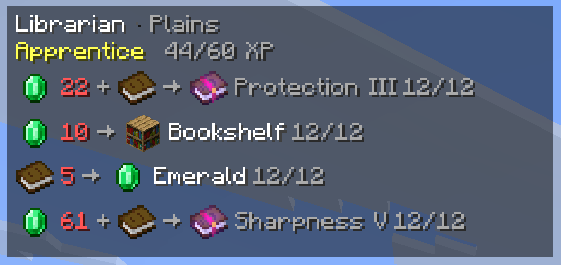
Offers+
See a villager's or wandering trader's current trade offers the moment you look at them — no right-click, no trade screen, no guesswork. offers+ is a lightweight, fully client-side HUD that never touches trades, prices, stock, or game balance; it only displays information the server would show you anyway.
Features
- Instant offer HUD — focus a villager or wandering trader and its trades appear in a configurable on-screen panel.
- Three layouts — Detailed, Compact, or Icons-only, so the panel is as information-dense or as minimal as you want.
- Rich trade info — current and base prices, discounts/inflation, remaining stock, item and enchantment details, merchant profession and native biome, and level/XP progress.
- Search & watchlist — a small query language (
emerald<=20 mending,sharpness 5, AND semantics) highlights and filters the trades you actually care about, with an optional match sound. - Session roll history — see which trades are new since you last checked a merchant.
- 5 sort modes — Default, Price ascending/descending, estimated Unlock level, or Availability.
- Toggle, hold-to-show and pin keybinds — all unbound by default so nothing collides with your existing setup.
- Deep appearance control — anchor + drag-to-position editor, scale, background style/opacity, border, text shadow, fade-in, and per-row detail toggles.
- A settings screen that explains itself — every option has a tooltip, and rarely-used network/debug settings are tucked behind a "Show advanced settings" switch. Optional Mod Menu integration.
- English, Russian and Japanese localizations out of the box.
How it fetches offers
Minecraft normally only sends a merchant's trade list once you open its trade screen. To show offers before you've opened that screen, offers+ can send a real interaction packet, suppress the resulting screen client-side, cache the returned offers, and close the container again — all without visibly opening a GUI.
These are genuine extra network packets, and offers+ is upfront about it: Silent request mode can be set to Auto (default, backs off if a server seems unhappy), Always, or Never, which disables the extra packets entirely and only shows offers you've opened normally. Cooldown, global rate-limit, and cache-lifetime settings further limit how often it asks. If you open a trade screen yourself, offers+ simply reuses what the server already sent you.
Search and watchlist syntax
| Query | Meaning |
|---|---|
mending |
Substring match anywhere in the offer's text |
book mending |
Both terms must match (space = AND) |
sharpness 5 |
Sharpness at exactly level 5 |
emerald<=20 |
Either payment stack is emeralds and costs at most 20 |
emerald>=32, emerald<10, emerald>5, emerald=16 |
Other price comparisons |
Matching offers are outlined, and the watchlist can optionally play a sound the moment a newly rolled trade matches. Everything lives in config/offersplus.json and can be hand-edited:
{
  "filterQuery": "emerald<=20 mending",
  "watchlist": ["mending", "sharpness 5"],
  "highlightColor": -10496,
  "playSoundOnMatch": true,
  "matchSound": "block.note_block.bell"
}
by Shinoame
- Edition: Minecraft Java
- File type: .jar
- Minecraft version listed: 26.2
- How to install: Install the matching mod loader (Forge, Fabric or NeoForge) for your Minecraft version. → Download the .jar. → Put it in the .minecraft/mods folder and launch that loader profile.
- Where to get it: Opens on Modrinth — not every file is mirrored on our own servers.
Install steps are the general flow for this file type — How to install Minecraft Java mods & modpacks walks through it step by step.
- Ships as offersplus-1.0.0.jar — drop this file into the mods folder
- Download size: 116 KB
- Download link checked 15 Oct 2026 — working
These come from our own check of the pack file, not from the source page.