
SketchPaper
Java shader pack listed for Minecraft 26.x. Downloads from the MC Java Mods app on Android.
⬇ Download on Modrinth
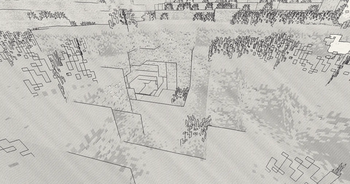
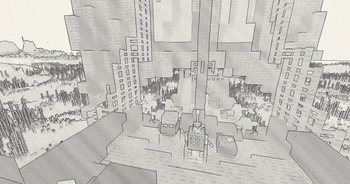
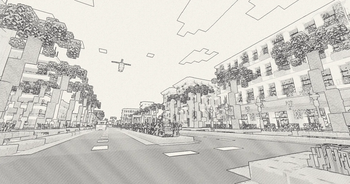
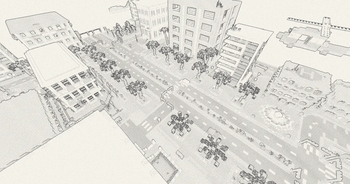
SketchPaper
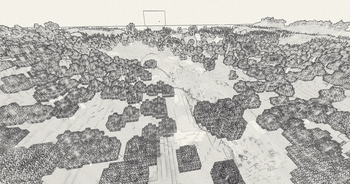
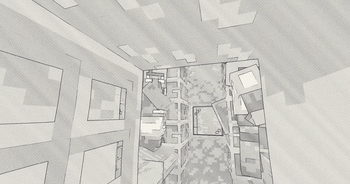
Minecraft redrawn as a pencil sketch on paper.
Everything you see is post-processing. There are no shadow maps and no lightmap — the whole look is built from outlines, quantized tone and hatching drawn over a paper-white background, so it costs almost nothing to run.
마인크래프트를 종이에 그린 연필 스케치로 바꾸는 쉐이더팩입니다. 그림자맵도 라이트맵도 쓰지 않고 전부 후처리로 처리하기 때문에 GPU 부담이 거의 없습니다.
What it does
Outlines from depth, not from colour alone. Edges are found by looking at where the change in depth bends, not just where depth changes. Flat ground seen at a grazing angle changes depth rapidly across the screen but has no real step in it, so this avoids the black band along the horizon that simpler edge detection produces.
Hatching at a single angle. Darkness comes from stroke thickness and from adding a second set of strokes between the first, never from crossing angles. Crossed hatching turns into a mesh pattern; parallel strokes read as drawn shading.
A stepped redraw rate. The drawing redraws a few times a second, so lines and hatching jump rather than slide. The camera itself stays smooth at your normal framerate — only the distortion is stepped, so nothing feels laggy to play.
Distance separation in block-sized steps. Every pixel of a block shares one grey level, and the levels step rather than blend. Overlapping trees land on different levels and read as separate layers instead of merging into one dark mass.
Detail that knows when to stop. Block textures are 16×16 texels. Past a certain distance a texel falls below one pixel on screen and its edges stop being information — so those lines are dropped rather than merely faded. Silhouettes are kept.
Paper grain, a flat paper sky, outlined clouds, and see-through water are included.
Presets
The button at the top of the settings screen switches between six presets. They aren't quality levels — each pushes a different axis.
| Preset | |
|---|---|
DEFAULT |
Shipped settings. Use this to get back if you lose track of what you changed. |
EYECARE |
The least visually noisy setting available. Fine detail turned down, distance separation at maximum. Loses the finest leaf texture in exchange. |
CALM |
Keeps the detail but stops it moving — slowest redraw, smallest wobble, no hatch jitter. |
CRISP |
Sharp, clean linework for screenshots. Crisp means the marks are crisp, not that the image shakes faster. |
COLOR |
Original block colours partly restored. |
CHAOS |
Every restraint removed. The setting the other five exist to avoid. |
Around thirty individual options are available underneath if you want to build your own look.
프리셋 여섯 개는 품질 단계가 아니라 각각 다른 축을 극단으로 민 것입니다.
EYECARE는 시각적 노이즈 최소, CALM은 움직임 최소, CRISP는 선명함,
CHAOS는 모든 제한 해제입니다.
Requirements
- Iris, Sodium recommended
- Tested on Minecraft 26.2 with Iris 1.11.1. Other versions are untested — it may well work, but no promises.
Put the .zip in your shaderpacks folder without unzipping it.
Things to know before you install
Everything is fullbright. Tone comes from block texture brightness, not from lighting. Caves look the same as the surface, and night looks much like day. This is intentional rather than an oversight — drawings on paper don't have physically correct shadows — but if you want a shader that lights your world, this isn't it.
Dense foliage is the hard case. Leaf blocks generate in clumps, and at
middle distance the result is busy no matter what. EYECARE and the
LINE_DETAIL_MIN option exist to manage it, and it is much improved over
early builds, but it is a trade against leaf texture rather than a clean win.
No shadows, reflections, PBR, or bloom. None of that is here.
풀브라이트이며 밤낮 차이가 거의 없습니다. 종이 그림에는 물리적으로 정확한 그림자가 없으니 의도된 동작입니다.
Licence
All Rights Reserved, with the following made explicit.
You may use it freely for personal play, modify it for your own use, and use it in videos, streams and screenshots including monetized content. Credit is appreciated but not required.
You may not redistribute it or any part of it, publish a modified version without asking first, claim it as your own work, or put the download behind ad-gates or link shorteners.
If you want to do something not covered here, just ask.
Full terms are in LICENSE.txt inside the pack.
- Edition: Minecraft Java
- File type: .zip (resource pack)
- Minecraft version listed: 26.2
- How to install: Download the .zip resource pack — do not unzip it. → Put it in .minecraft/resourcepacks. → Enable it in Options → Resource Packs.
- Where to get it: Opens on Modrinth — not every file is mirrored on our own servers.
Install steps are the general flow for this file type — see the MC Java Mods guides for the full walkthrough.
- Downloads as SketchPaper-2.4.zip
- Download size: 23 KB
- Download link checked 15 Oct 2026 — working
These come from our own check of the pack file, not from the source page.