ModsJava
Keyboards
Java mod listed for Minecraft 1.17–1.18. Downloads from the MC Java Mods app on Android.
I don't know my version or loader
Open the Minecraft launcher and look at the profile you play on — it names both, like fabric-loader-1.21.4. The version also shows in the bottom-right corner of the game's main menu.
No loader in the profile name? Then it's plain Minecraft, and these mods won't run — you need Fabric or NeoForge installed first.
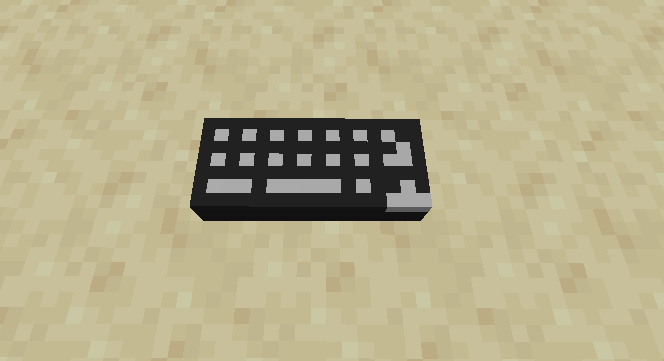
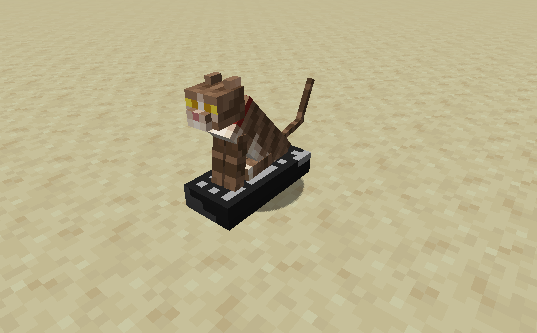
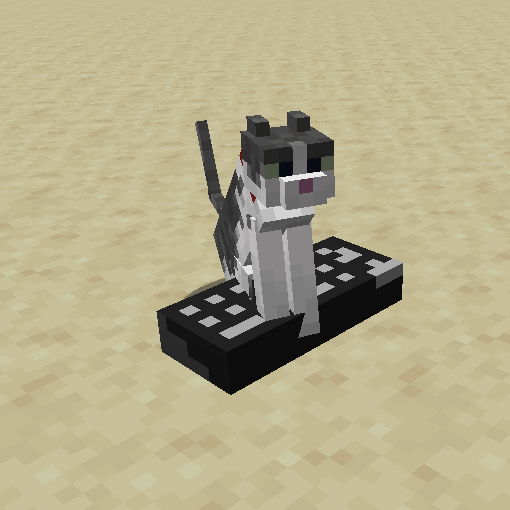
What's that, you're looking for a convenient way to keep your cat away from your chests and beds?
Look no further than the innovative Keyboard™!
It's a certified Level 6 cat attractant, your little fluff ball will love sitting on it!
However, be careful what you let him or her press, because the keyboard is connected to your chat box!
If he/she manages to press enter, they might send a message!
Created for jriwanek.
Quick facts
- Edition: Minecraft Java
- File type: .jar
- Minecraft versions listed: 1.18.2, 1.17.1
- How to install: Install the matching mod loader (Forge, Fabric or NeoForge) for your Minecraft version. → Download the .jar. → Put it in the .minecraft/mods folder and launch that loader profile.
- Where to get it: Opens on CurseForge — not every file is mirrored on our own servers.
Install steps are the general flow for this file type — How to install Minecraft Java mods & modpacks walks through it step by step.
File checked by MCModsHub
- Ships as keyboards-2.1.jar — drop this file into the mods folder
- Download size: 12 KB
- Download link checked 5 Nov 2026 — working
These come from our own check of the pack file, not from the source page.