
LoM Emerald Items
Java mod listed for Minecraft 1.16. Downloads from the MC Java Mods app on Android.
⬇ Download on CurseForge


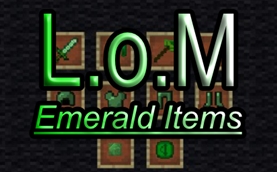
Adding more to your emeralds. Supported Minecraft versions: 1.12.2, 1.14.4, 1.15.2 & 1.16.5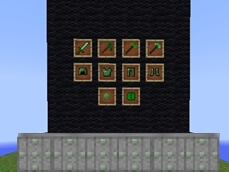
Emerald items that include: sword, pick, axe, spade, hoe, armor & battle-axe.
I also included a custom emerald coin & recipes.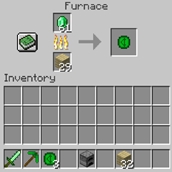
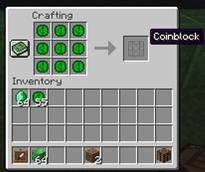
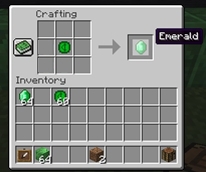
With the coin also comes a Coin block.
The block is random gen in world chunks & is rare. You can mine them for emerald coins. The ore has something fun about them tho & you might not want them as building blocks! If you jump on them or step on them, you'll break them and also manage to get the coins if you don't fall into lava first. You can shift walk slow over them in survival mode. While in creative mode, the blocks will ignore touches.
Help?:
Starting a world?:
Remember, configs are only generated after the first world creation, so be sure to create a quick world to gen the configs, change the settings you wish with notepad, than, start your actual world & delete the old one.
A good town seed I have found is below! I recommend this seed for Hardcore & Survival!
MC 1.12.2 = 3496861161616722430
MC 1.16.5 = 666444222000666
Installing additional mods?:
This can be done by extracting mods to the mods folder located within documents/curse/minecraft/instances/lom/mods folder.
Out of memory?:
Using multiple mods or large resource packs?
If you have 8GB system RAM, be sure to check the profile options and allow more memory. I recommend 4GB
If you have 4GB system RAM, Be sure you dedicate only 2GB & be sure your not using resource packs, texture packs, shaders.
LoM Server Website:
http://lominecraft.freeforums.net/
- Edition: Minecraft Java
- File type: .jar
- Minecraft version listed: 1.16.5
- How to install: Install the matching mod loader (Forge, Fabric or NeoForge) for your Minecraft version. → Download the .jar. → Put it in the .minecraft/mods folder and launch that loader profile.
- Where to get it: Opens on CurseForge — not every file is mirrored on our own servers.
Install steps are the general flow for this file type — How to install Minecraft Java mods & modpacks walks through it step by step.
- Ships as lomemeralditemsv1.0forminecraft1.16.5.jar — drop this file into the mods folder
- Download size: 83 KB
- Download link checked 5 Nov 2026 — working
These come from our own check of the pack file, not from the source page.