
EyeMine
Java mod listed for Minecraft 1.16–1.21. Downloads from the MC Java Mods app on Android.
I don't know my version or loader
EyeMine - play Minecraft with your eyes!
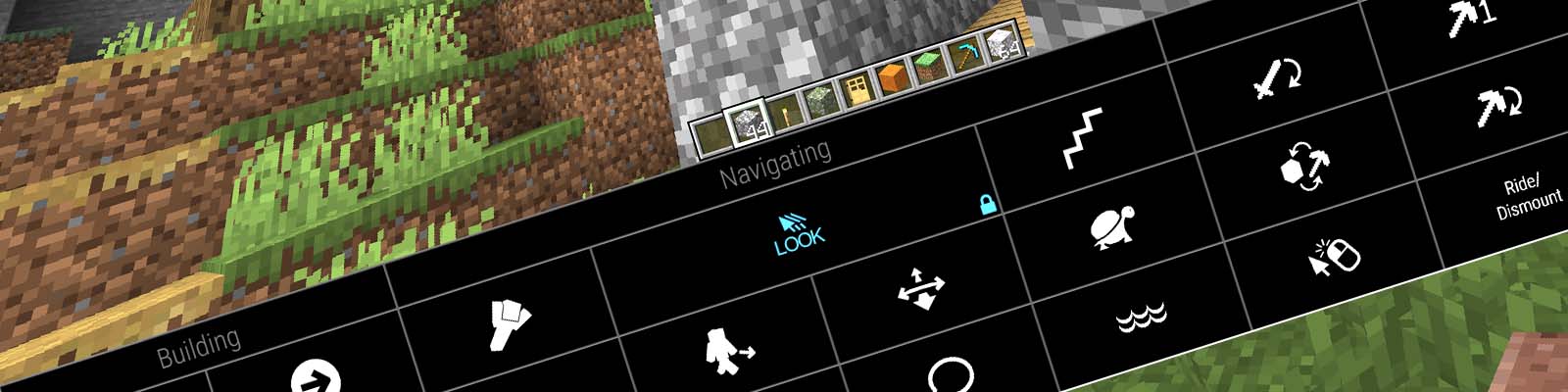
This mod adds various functionality to support eye control for users unable to operate conventional controls.
To play with eye control, please install the EyeMineV2 interface from the EyeMine wiki which provides the necessary on-screen keyboard to access the controls. You will also require an eye tracker, head mouse or another method of controlling the cursor.
Requires Architectury (Forge) or Architectury (Fabric). For an easier install, use the mod pack: [EyeMine Mod Pack](https://www.curseforge.com/minecraft/modpacks/eyemine-pack/)
⚠️ Important config ⚠️
Before playing, go to Options -> Controls -> Mouse and turn sensitivity right down to "yawn" and set Raw Input: OFF. You can adjust your mouse sensitivity later using the keys in the EyeMine keyboard or with the left/right arrow keys on a physical keyboard.
If you are using an unsupported eye tracker via mouse emulation, you need to manually turn on "mouse emulation mode" in the mod options: Mods -> EyeMine -> Config -> Modify "eyemine-config.toml" -> Basic -> "Using mouse emulation"
For older versions see EyeMine Classic
Authors: EyeMine was originally developed by kmcnaught for SpecialEffect and upgraded by mrbysco for more versions of Minecraft
Code + issue tracker: https://github.com/SpecialEffect/EyeMineMods/issues
Documentation: https://github.com/SpecialEffect/EyeMine/wiki
- Edition: Minecraft Java
- File type: .jar
- Minecraft versions listed: 1.21.1, 1.20.1, 1.20.4
- How to install: Install the matching mod loader (Forge, Fabric or NeoForge) for your Minecraft version. → Download the .jar. → Put it in the .minecraft/mods folder and launch that loader profile.
- Where to get it: Opens on CurseForge — not every file is mirrored on our own servers.
Install steps are the general flow for this file type — How to install Minecraft Java mods & modpacks walks through it step by step.
- Ships as eyemine-1.19-forge-4.0.0.jar — drop this file into the mods folder
- Download size: 322 KB
- Download link checked 15 Oct 2026 — working
These come from our own check of the pack file, not from the source page.