
Infernal Tops
Java mod listed for Minecraft 1.18–1.20. Downloads from the MC Java Mods app on Android.
I don't know my version or loader
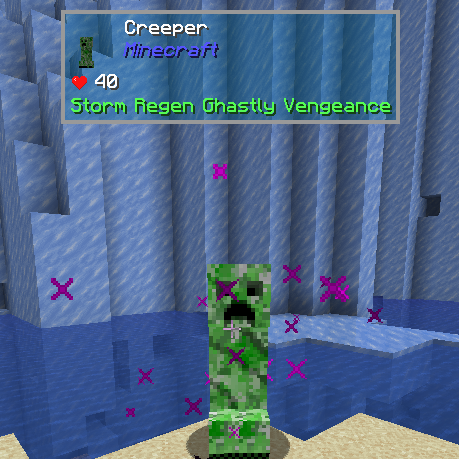
Adds The One Probe (TOP) support for Infernal Mobs.
This mod tries to fix the GUI clutter that you get when using multiple mods that show healthbar and other status information about mobs by integrating it into TOP for a more seamless experience.
Features:
- Display Modifiers for Infernal mobs (Storm when they cause lightning, Regen if they regenerate, etc - as added by Infernal Mobs)
- Rarity Class, Tooltip color indicates rarity - Green = Elite, Yellow = Ultra, Red = Infernal.
- Ability to hide specific modifiers for added difficulty (disabled by default)
Configuration:
Set:
"disableHealthBar": true
in infernalmobs.cfg for intended effect.
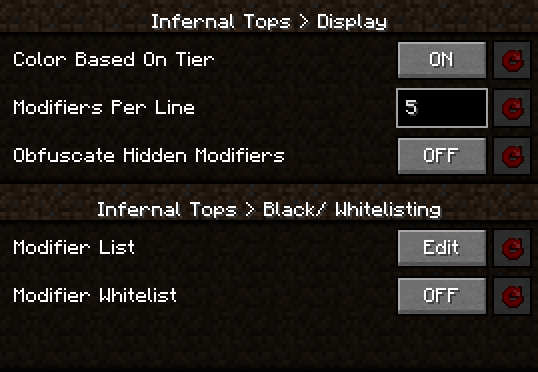
The configuration file allows for fine tuning the settings to your liking, either by changing "infernaltops-common.toml" or ingame using Configured:
This is a integration mod for these 2 mods:
https://www.curseforge.com/minecraft/mc-mods/the-one-probe
https://www.curseforge.com/minecraft/mc-mods/atomicstrykers-infernal-mobs
Modpacks:
Feel free to use this in your modpack, no need to ask for permission.
- Edition: Minecraft Java
- File type: .jar
- Minecraft versions listed: 1.20.1, 1.18.1, 1.18.2
- How to install: Install the matching mod loader (Forge, Fabric or NeoForge) for your Minecraft version. → Download the .jar. → Put it in the .minecraft/mods folder and launch that loader profile.
- Where to get it: Opens on CurseForge — not every file is mirrored on our own servers.
Install steps are the general flow for this file type — How to install Minecraft Java mods & modpacks walks through it step by step.
- Ships as InfernalTops-1.20.1-1.1.0.jar — drop this file into the mods folder
- Download size: 41 KB
- Download link checked 15 Oct 2026 — working
These come from our own check of the pack file, not from the source page.