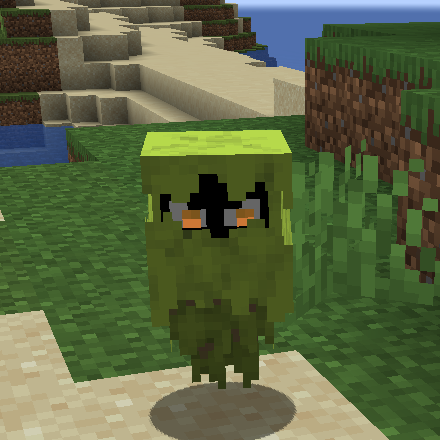
YDM's Glare
Java mod listed for Minecraft 1.17–1.20. Downloads from the MC Java Mods app on Android.
I don't know my version or loader
YDM's Glare for FORGE/FABRIC
Get the Glare to your game!
It will show you areas that are dark enough for monsters to spawn.
It does so by flying to dangerously dark areas and then throwing a hissy fit.
With the glare by your side, you’ll know that each tantrum might lead to monsters too!
-can be tamed and breed with glow berries.
-it glares at you
-if you want a mob to spawn in another mods biome:
You have to change the biome_name line to:
biome_name = "modid:name_of_the_biome"
For example with Biomes O' Plenty:
biome_name = "biomesoplenty:cherry_blossom_grove"
To let it spawn in more biomes you have to put a comma (,) between the biome names like this:
biome_name = "modid:name_of_the_biome,minecraft:desert,minecraft:forest"
In the fabric version you dont have to write the modid.
(You have to restart the game to let the config changes happen)
In 1.19 the config for spawn settings was replaced with biome tag and biome modifier json files.
These can be found under the data folder in the jar.
If you find any errors please let me know.
Thanks for downloading my mod!


- Edition: Minecraft Java
- File type: .jar
- Minecraft versions listed: 1.20.1, 1.19.3, 1.19.2
- How to install: Install the matching mod loader (Forge, Fabric or NeoForge) for your Minecraft version. → Download the .jar. → Put it in the .minecraft/mods folder and launch that loader profile.
- Where to get it: Opens on CurseForge — not every file is mirrored on our own servers.
Install steps are the general flow for this file type — How to install Minecraft Java mods & modpacks walks through it step by step.
- Ships as glare-fabric-1.19.3-1.0.1.jar — drop this file into the mods folder
- Download size: 62 KB
- Download link checked 24 Sept 2026 — working
These come from our own check of the pack file, not from the source page.