
Put Ingot Down!
Java mod listed for Minecraft 1.16. Downloads from the MC Java Mods app on Android.
⬇ Download on CurseForgeThe author built this one for Minecraft 1.16.5 on Forge. On other versions it may install and then do nothing.
How romantic it is to stack the ingots neatly!
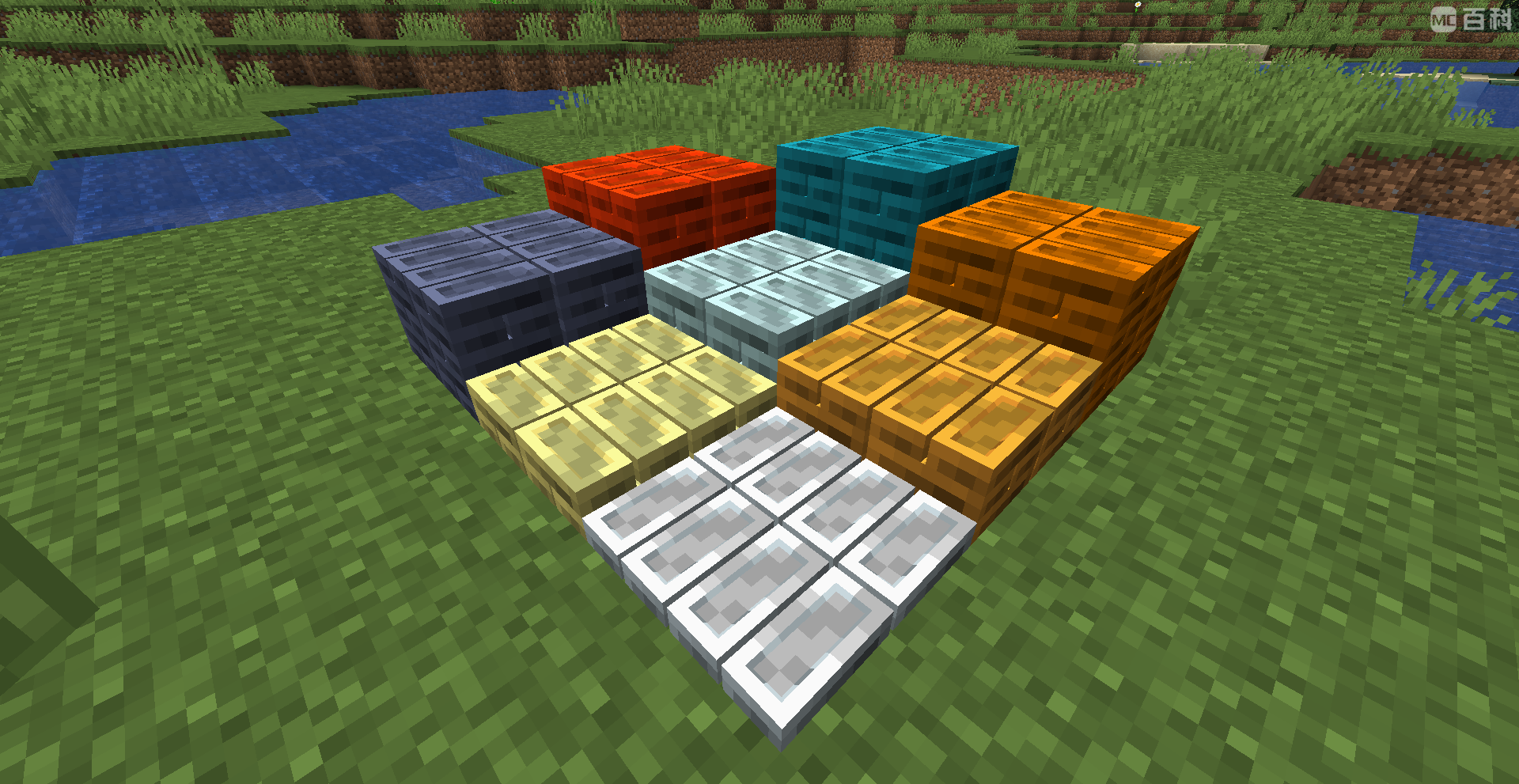
Now, you can hold various ingots by pressing the "Place" shortcut key (default: K) to place the ingots on the ground and right click to retrieve the ingots.
After version 1.1.0, normal items can now be placed on the ground.
The Mod allows you to customize which items can be placed and what color they are placed in. Note, however, that all items are placed in the same ingot model.
The default status has added color definitions for common ingots.
- //In the Putingotdown -common file, you can adjust the color of the ingots and which items can be placed according to the model of the ingots.
- //In Itme, an item must correspond to a color value in base 10 (convert the hexadecimal color value to base 10).
- Item = ["minecraft:iron_ingot", "16777215", "minecraft:gold_ingot", "16375075", "minecraft:netherite_ingot", "4473153"]
- //To add to a Tag, a Tag must correspond to a color value.
- Tag = ["forge:ingots/tin", "10470592"]
- //Set how many items can be stored in a heap. Default is 64.
- MaxCount = 64
- //When the same Item is valid in both Item and Tag, the color defined by Item is preferred.
- //Set to false to disallow placement of normal items, default to true.
- //CanAllPut = true //In the Putingotdown -client file, you can adjust the render distance, shortening the distance to reduce the render pressure.
- //The default value is 160. The value can be an integer ranging from 1 to 160.
- Distance = 64
- Edition: Minecraft Java
- File type: .jar
- Minecraft version listed: 1.16.5
- How to install: Install the matching mod loader (Forge, Fabric or NeoForge) for your Minecraft version. → Download the .jar. → Put it in the .minecraft/mods folder and launch that loader profile.
- Where to get it: Opens on CurseForge — not every file is mirrored on our own servers.
Install steps are the general flow for this file type — How to install Minecraft Java mods & modpacks walks through it step by step.
- Ships as putingotdown-1.16.5-1.1.1.jar — drop this file into the mods folder
- Download size: 118 KB
- Download link checked 15 Oct 2026 — working
These come from our own check of the pack file, not from the source page.