Smithing Tweaks
Java mod listed for Minecraft 1.16–1.21. Downloads from the MC Java Mods app on Android.
I don't know my version or loader
Smithing Tweaks is back and better than ever!
This mod will allow you to progressively upgrade any Vanilla Tools and Armor using the smithing Table.
Note: Older Versions of the Mod (Before MC 1.20.1 work different and have less stuff to upgrade)
(If applicable) The Upgrade Progress works like followed:
Wood -> Stone -> Iron -> Gold -> Diamond
Armor Progress practically works the same:
Leather -> Chainmail -> Iron -> Gold -> Diamond
Note: Upgrading Leather to Chainmail Armor just requires an Iron Nugget, not a full Ingot
Every Upgrade requires a new Upgrade Template item, which is easily crafted using the following recipe:
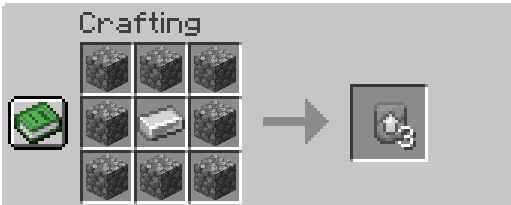
Here's a simple Example of how to upgrade stuff:
Here's some more info in case you're wondering:
What happens if I have Enchantments on my Stuff and want to Upgrade?
Just like the Vanilla Netherrite Upgrading, Enchantments stay on your Tools and Armor, so you don't need to worry about that.
I there a way to disable some recipes or change them up a bit?
As of right now, sadly there isn't. If you know what you're doing, you could go into the Mods JAR file and change or delete the existing recipes. Maybe I will add some configs in the future for you to customize it the way you want to.
Can I use this in my Project (e.g Modpack)?
You are free to do whatever you want with the mod!
- Edition: Minecraft Java
- File type: .jar
- Minecraft versions listed: 1.21.8, 1.21.1, 1.20.1
- How to install: Install the matching mod loader (Forge, Fabric or NeoForge) for your Minecraft version. → Download the .jar. → Put it in the .minecraft/mods folder and launch that loader profile.
- Where to get it: Opens on CurseForge — not every file is mirrored on our own servers.
Install steps are the general flow for this file type — How to install Minecraft Java mods & modpacks walks through it step by step.
- Ships as Smithing Tweaks-1.20.1-1.0.1.jar — drop this file into the mods folder
- Download size: 115 KB
- Download link checked 15 Oct 2026 — working
These come from our own check of the pack file, not from the source page.