Better Eyes
Java mod listed for Minecraft 1.16–1.18. Downloads from the MC Java Mods app on Android.
I don't know my version or loader
Better Eyes
THIS IS A FORGE MOD
Better Eyes changes Eyes of Ender functionality to be more user-friendly.
Are you SICK and TIRED of right-clicking an Eye of Ender only to have it fly off randomly in the distance while you desperately spin around trying to see where it went, only for it to explode in the sky or drop down on top of a tree? Stuck in a forest and can't find a clearing? Or how about when you get just close enough to one that it just goes straight into the ground?
Think of all the WASTED ender pearls you've lost over the years trying to find a stronghold! Forget about all that NONSENSE!
Well, waste no more.. Better Eyes no longer launches Eyes of Ender from the player as an entity, instead, simply a message is generated that gently, but clearly, directs the player in the same direction the eye would have traveled yet they stay comfortably in your inventory. If in the unfortunate event that the Eye of Ender shatters, the player is informed of this information.
Particles will even spawn in an area around the player when the Eye of Ender is right-clicked. It's a very subtle effect, but the more spread out the particles are then the farther you are from the nearest stronghold.
This amazing mod was inspired by how rune talismans work in Runescape and brings the convenience and simplicity of that system to modded Minecraft!
Configuration options available:
- printToActionBar: true - if set to false, the mod will print the message to chat instead
- shatterChance: 0.2 - probability that the eye will shatter when used, 20% chance is the vanilla default
When the player right-clicks an eye, various messages may be displayed in chat:
- Direction: "You rub the Eye of Ender and it pulls north-west."
- Nearby: "You rub the Eye of Ender and it shakes violently in your hand."
- Nothing Found: "You rub the Eye of Ender and it does not move."

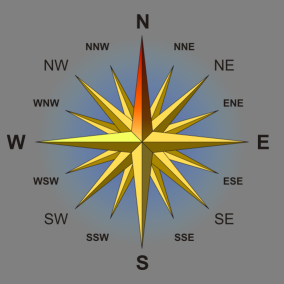
The directions indicated are accurate to the 16th division. Such as:
- North
- East by South-East
- South-West
- Edition: Minecraft Java
- File type: .jar
- Minecraft versions listed: 1.16.5, 1.18.2
- How to install: Install the matching mod loader (Forge, Fabric or NeoForge) for your Minecraft version. → Download the .jar. → Put it in the .minecraft/mods folder and launch that loader profile.
- Where to get it: Opens on CurseForge — not every file is mirrored on our own servers.
Install steps are the general flow for this file type — How to install Minecraft Java mods & modpacks walks through it step by step.
- Ships as bettereyes-1.16.5-1.0.jar — drop this file into the mods folder
- Download size: 10 KB
- Download link checked 15 Oct 2026 — working
These come from our own check of the pack file, not from the source page.